Data subject rights management¶
Privacy regulations give individuals — your customers, users, employees — enforceable rights over their personal data. Under GDPR, CCPA, LGPD, PDPA, and dozens of other frameworks, people can request access to the data you hold, ask for corrections, demand erasure, port their data elsewhere, or object to processing entirely. Your organization must respond within strict legal deadlines.
Dxtra centralises this workflow. You configure which rights services are available, data subjects submit requests through the Transparency Center (or an embedded form on your site), and you manage the full lifecycle — intake, verification, action, and response — from the admin dashboard.
Supported request types¶
Dxtra supports six request types that data subjects can submit through the Rights Management section of the Transparency Center:
Access — The data subject requests the Data Controller to send an email with a link to a resource (e.g. a generated data page) detailing personal data and sensitive personal data processed by the Data Controller. Covers GDPR Article 15 and CCPA §1798.100.
Rectify — The data subject requests the Data Controller to send an email with instructions and/or a link to a resource (e.g. a generated web page) displaying personal data and sensitive personal data with the option to edit data and save. Covers GDPR Article 16.
Erasure — The data subject requests the Data Controller to delete their Data Subject data. The Data Controller will send an email and display notification in the Transparency Center to the Data Subject confirming the action taken by the Data Controller. Covers GDPR Article 17 and CCPA §1798.105.
Data Portability — The data subject requests to receive their personal data in a structured format to transmit or move to another Data Controller. Covers GDPR Article 20 and CCPA §1798.100.
Object — The data subject exercises their Right to Object to their data being processed using Global Privacy Control (GPC), Consumer Signals (Do Not Sell, Do Not Track, Do Not Profile). Covers GDPR Article 21 and CCPA §1798.120.
General Requests — A free-text form where the data subject provides information and instructions. The request is sent to the Data Protection Officer at the email address configured for the organization. Useful for questions, complaints, or rights not covered by the specific request types above.
Configuring rights services¶
In the Dxtra dashboard, go to Rights Management in the left sidebar. The configuration page has two sections:
Active Services¶
Toggle which rights services are available to data subjects. Each toggle controls whether that request type appears in the Transparency Center and in embeddable forms.
Core data subject rights (7 toggles):
| Service | Toggle | Description |
|---|---|---|
| Right of Access | On/Off | Allow data access requests (GDPR Art. 15) |
| Right to Rectification | On/Off | Allow data correction requests (GDPR Art. 16) |
| Right to Erasure | On/Off | Allow data deletion requests (GDPR Art. 17) |
| Right to Restriction | On/Off | Allow requests to restrict processing (GDPR Art. 18) |
| Right to Data Portability | On/Off | Allow data export/portability requests (GDPR Art. 20) |
| Right to Object | On/Off | Allow objection to processing (GDPR Art. 21) |
| Right to Not Be Subject to Automated Decision-Making | On/Off | Allow challenges to algorithmic decisions (GDPR Art. 22) |
General requests:
| Service | Toggle | Description |
|---|---|---|
| General Rights Requests | On/Off | Enable the General Requests free-text form for questions, complaints, or rights not covered by the specific types above |
Privacy controls:
| Control | Toggle | Description |
|---|---|---|
| Detect Global Privacy Control (GPC) | On/Off | Detect the GPC browser signal and honour it as an objection to processing |
Once you configure and approve the rights request settings, they are reflected in your public-facing Rights Request Form on the Transparency Center.
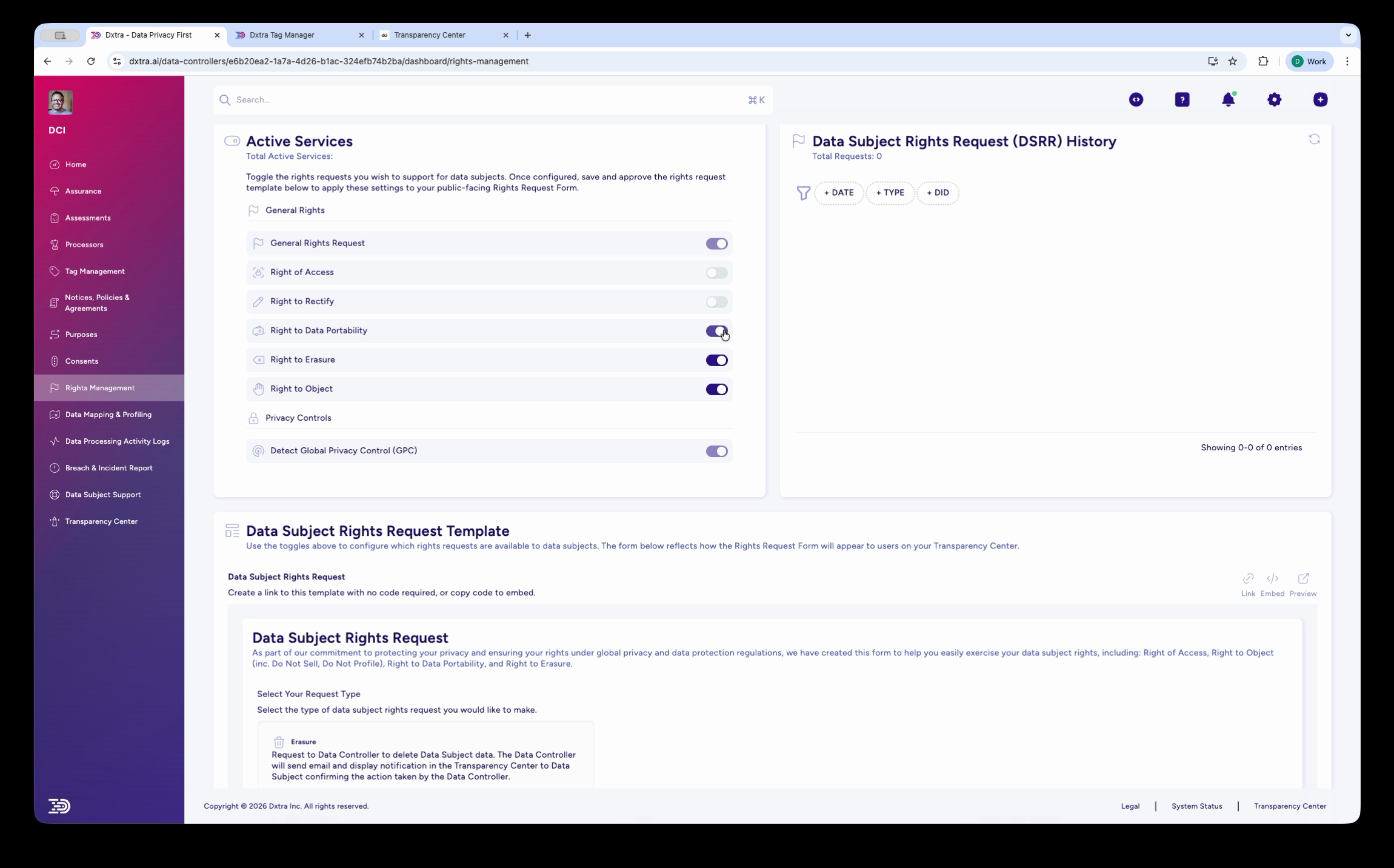
Data Subject Rights Request (DSRR) History¶
The right-hand panel shows a table of all incoming requests, filterable by:
- Days — View requests from the last 7, 30, 90, or 300 days
- Type — Filter by request type (Access, Rectify, Erasure, Portability, Object, General)
Each entry shows the request type, date submitted, data subject identifier, status, and deadline.
Data Subject Rights Request Template¶
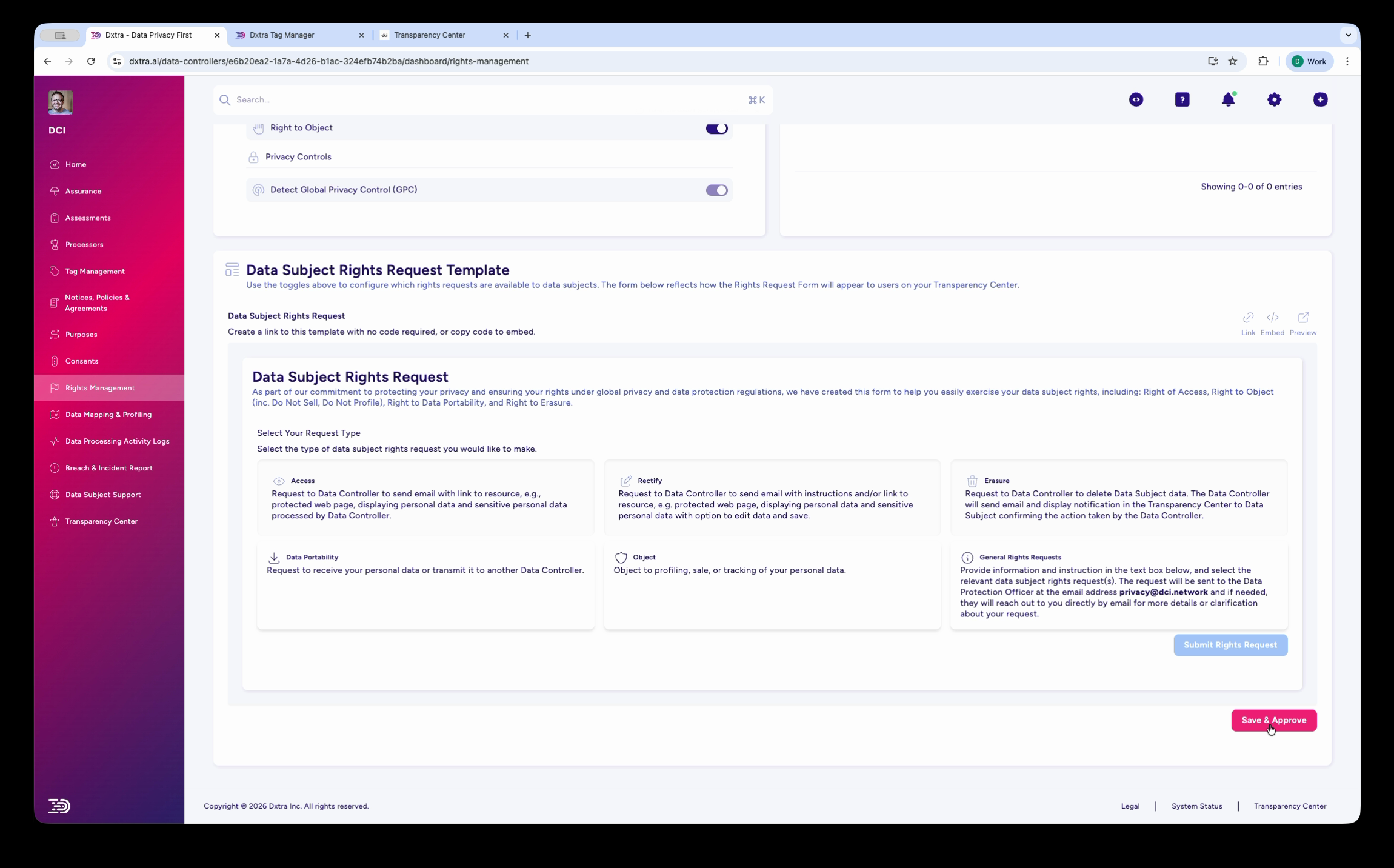
Below the Active Services panel, Dxtra provides an embeddable Data Subject Rights Request form template. You can:
- Create a link to the template with no code required — share it directly or add it to your website
- Copy the embed code to drop the form into any HTML page as a web component
The template displays the six request type cards that data subjects choose from when submitting a request. Below the cards, a Submit & Approve button sends the request to your admin dashboard.
Communication Center¶
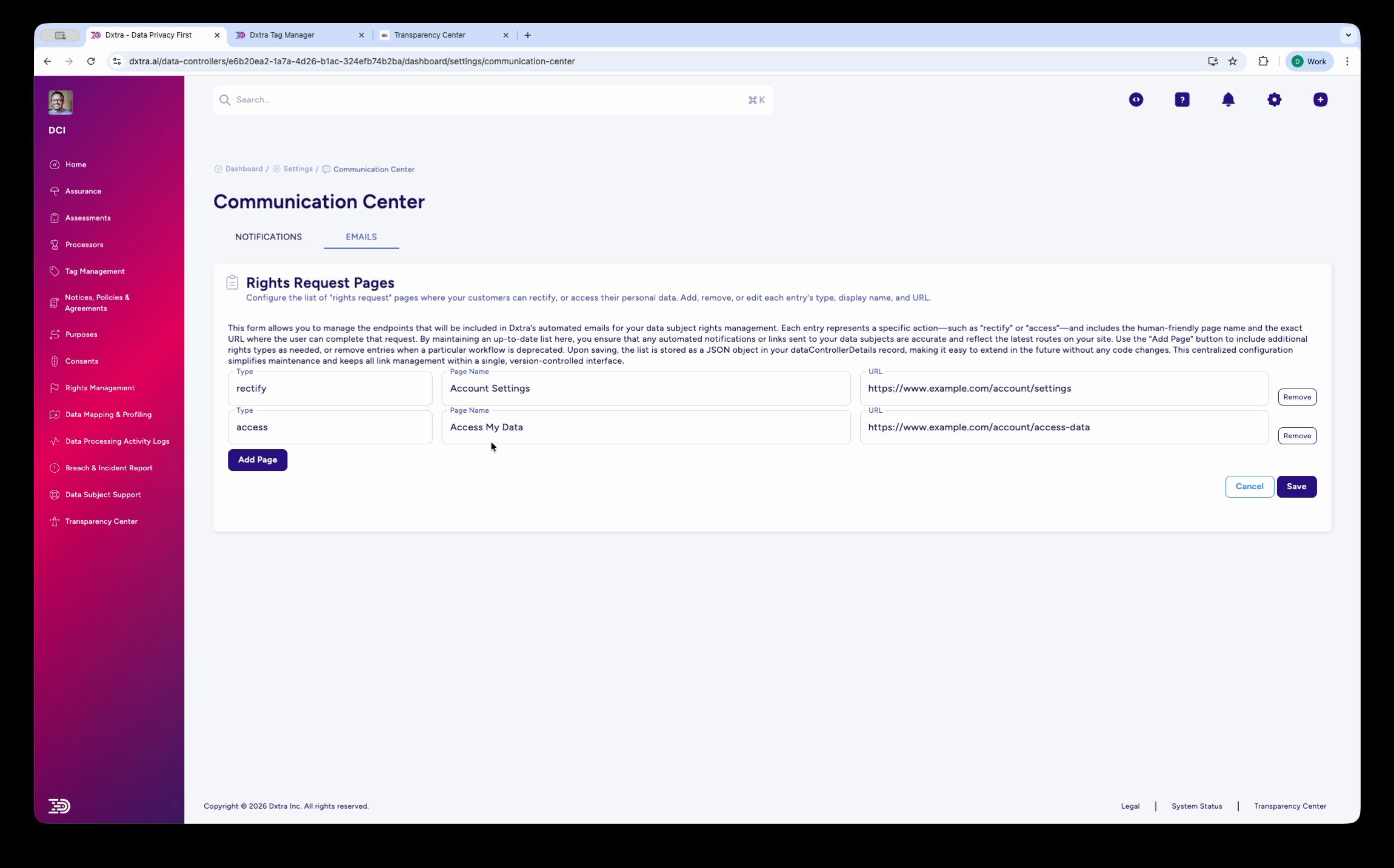
Go to Settings > Communication Center in the dashboard to configure how rights request notifications are delivered. The Communication Center has two tabs:
Notifications — Configure notification messages that are sent to data subjects when they interact with the Transparency Center (e.g. welcome message, request acknowledgements).
Email — Configure the Rights Request Pages that link back to your application. Each page has a name (e.g. "My Account") and a URL (e.g. https://www.example.com/account/settings). When Dxtra sends emails to data subjects about their rights requests, these links point the data subject to the relevant pages on your website where they can take action (e.g. view their account, access their data).
You can add custom pages with the Add Page button and map page names to their URLs.
What data subjects see¶
In the Transparency Center, the Rights Management section shows data subjects two things:
Data Subject Rights Management Requests — A table listing all requests the data subject has previously submitted, with total request count, pagination, and type/status filters. If the data subject has not submitted any requests, this section shows "Page 1 of 0" with no entries.
Data Subject Rights Request form — Below the request history, a self-service form presents the six request type cards (Access, Rectify, Erasure, Data Portability, Object, General Requests). Each card includes a plain-language description of what the request does and what the data subject can expect. The data subject selects a request type and clicks Submit Digital Request to send it.
Tip
The Rights Management section is also available as a standalone embeddable web component (<dx-rights-management>) that you can drop into any page on your website. See embedding web components for setup instructions.
How requests flow through the system¶
- Data subject submits a request through the Transparency Center or an embedded form
- Dxtra logs the request in the DSRR History with a timestamp and assigns the applicable regulatory deadline
- You receive a notification in the dashboard (and optionally via email)
- You review and action the request — verify identity, collect the relevant data, perform the requested action
- Dxtra sends a confirmation to the data subject (via the Transparency Center notification and/or email)
- The request is recorded in the processing activity log for audit purposes
Regulatory deadlines¶
Dxtra automatically tracks response deadlines based on the data subject's jurisdiction:
| Regulation | Deadline | Extension |
|---|---|---|
| GDPR (EU/EEA) | One calendar month | Up to two additional months for complex requests |
| UK GDPR | One calendar month | Up to two additional months for complex requests |
| CCPA/CPRA (California) | 45 calendar days | One 45-day extension permitted |
| LGPD (Brazil) | 15 calendar days | Up to 15 additional days |
| PIPEDA (Canada) | 30 calendar days | Case-by-case |
| PDPA (Singapore) | 30 calendar days | Case-by-case |
| POPIA (South Africa) | 30 calendar days | Case-by-case |
| DPDPA (India) | As prescribed | Not yet specified |
See deadline tracking for details on how Dxtra calculates and monitors deadlines.
Getting started¶
- Configure active services — Toggle on the rights your data subjects can exercise
- Handle a data subject request — Step-by-step guide to processing a DSRR
- Track deadlines — Monitor compliance deadlines across jurisdictions
- Set up your Transparency Center — Publish the rights request form for data subjects
Related¶
- Transparency Center — Where data subjects submit rights requests
- Consent management — Managing consent preferences and withdrawal
- Processing activity logs — Audit trail for rights request actions
- Processors — Which processors handle data subject data
Next: Handle a data subject request step by step.