Handle a data subject access request
This guide walks you through the process of receiving, reviewing, and responding to a Data Subject Rights Request (DSRR) in Dxtra — from the moment a data subject submits their request to the point where you deliver the response and close the case.
Prerequisites
- Rights Management services configured and active (see DSR overview)
- Transparency Center published with the Rights Management section enabled
- At least one data processor onboarded so the system knows where data subject data resides
How a request arrives
Data subjects submit requests in one of three ways:
Through the Transparency Center — The data subject navigates to the Rights Management section, selects a request type (Right of Access, Right to Rectification, Right to Erasure, Data Portability, Object, or General Rights Requests), fills in the required details, and clicks Submit Rights Request.
Through an embedded form — If you've embedded the <dx-rights-management> web component on your website, data subjects submit requests directly from your application without visiting the Transparency Center.
Via General Rights Requests — For requests that don't fit the predefined types, data subjects use the General Rights Requests free-text form. They provide information and instructions in a text box, select the relevant data subject rights request(s), and submit. The request is sent to the Data Protection Officer at the email address configured for your organization.
When a request is submitted, Dxtra automatically:
- Logs the request in the DSRR History table in your admin dashboard
- Assigns the applicable regulatory deadline based on the data subject's jurisdiction
- Displays the request in the Rights Management section of the admin dashboard
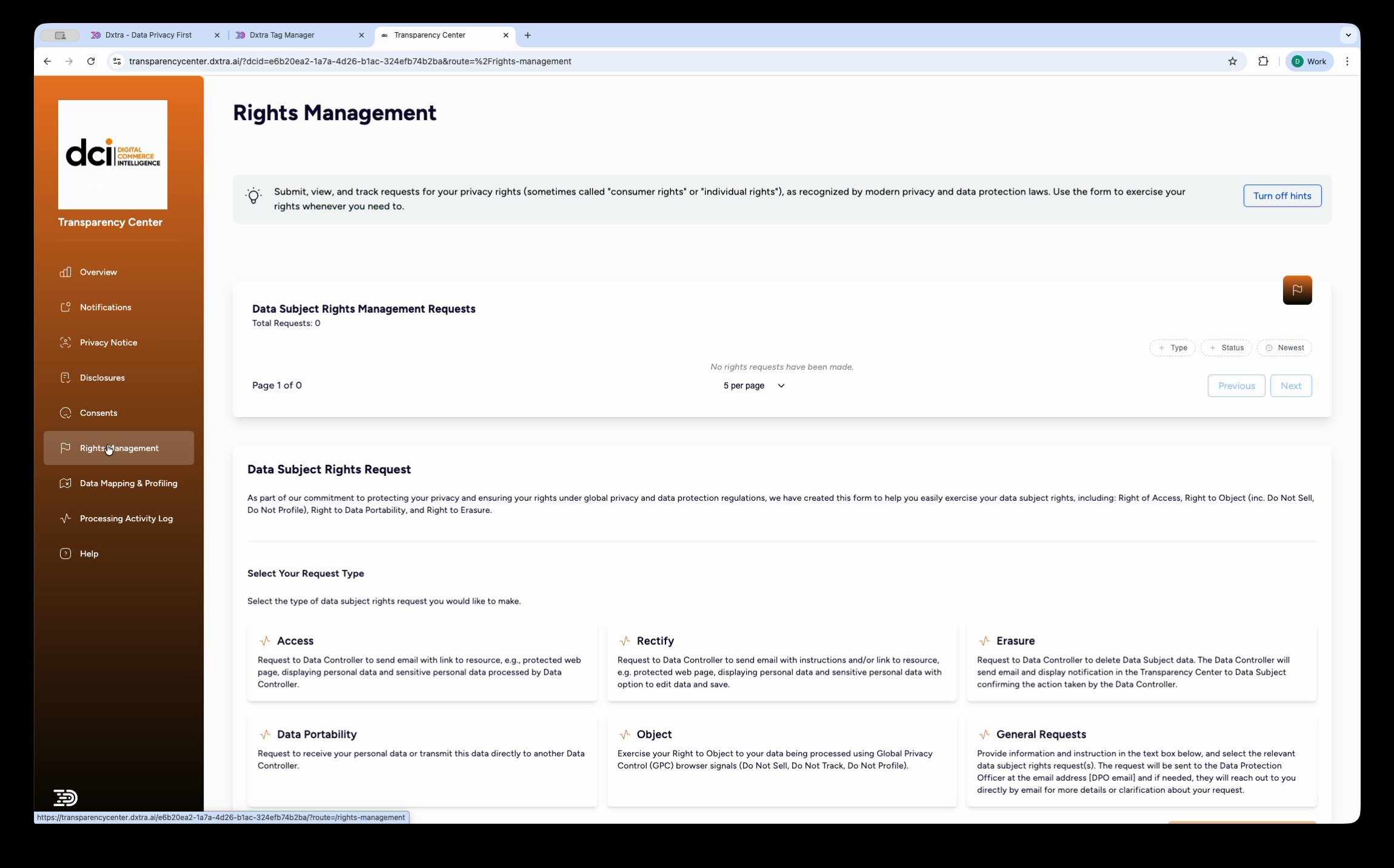
Step 1: Review the incoming request
Go to Rights Management in the left sidebar of the Dxtra dashboard. The Data Subject Rights Request (DSRR) History panel shows all incoming requests.
Filter the table using the controls at the top:
- Days — Show requests from the last 7, 30, 90, or 300 days
- Type — Filter by Access, Rectify, Erasure, Restriction, Portability, Object, or General
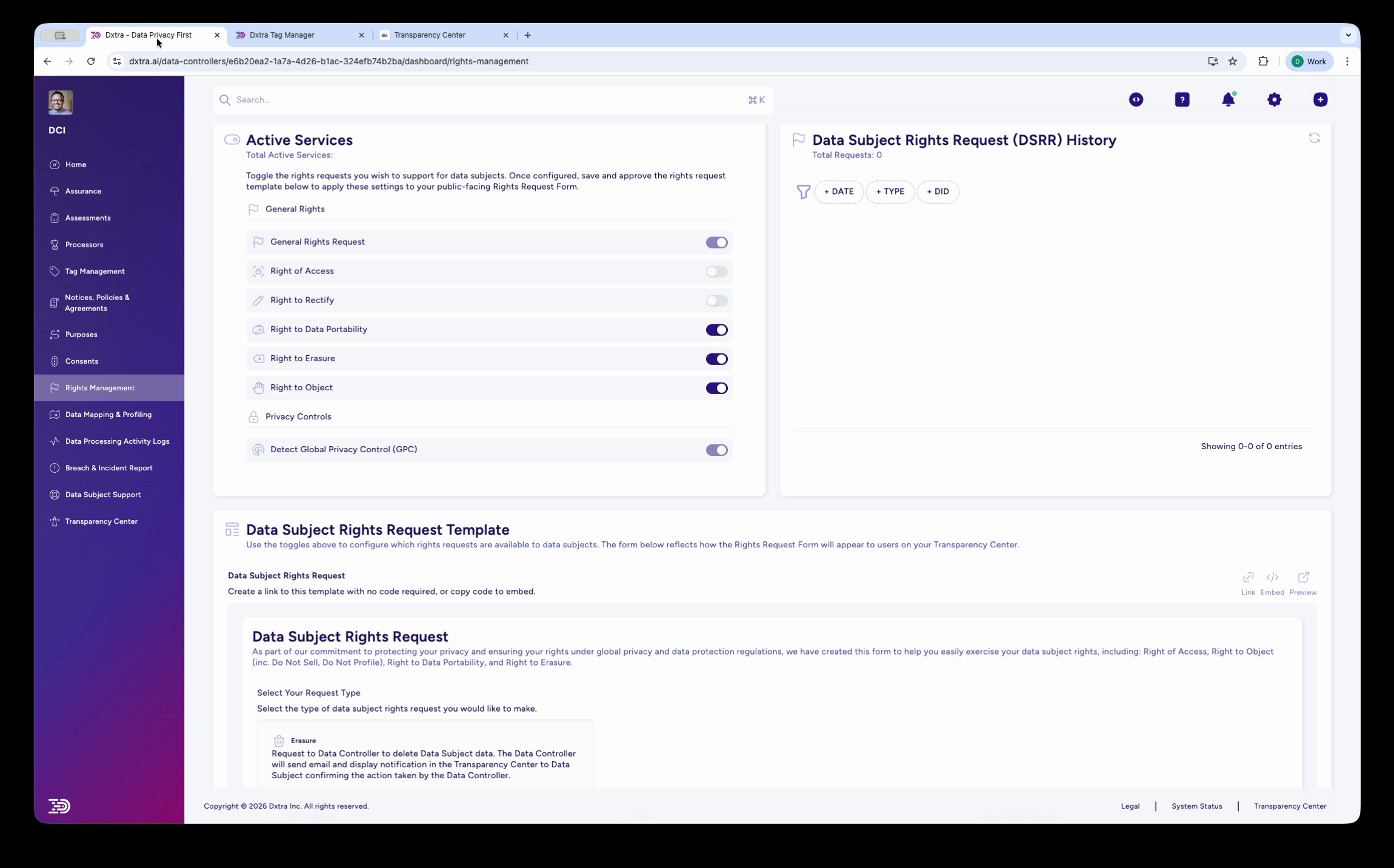
Click on a request to view its details:
- Request type — Which right the data subject is exercising
- Data Subject DID — The pseudonymized identifier for the data subject
- Date submitted — When the request was received (this starts the deadline clock)
- Applicable regulation — GDPR, CCPA, or other framework based on the data subject's jurisdiction
- Deadline — The calculated response deadline
- Status — Pending, Verified, In Progress, or Complete
Step 2: Verify the data subject's identity
Before acting on a request, verify that the requester is who they claim to be. The level of verification depends on the request type and the sensitivity of the data involved.
For data subjects who authenticated via a magic link in the Transparency Center, Dxtra has already verified their email address. This is usually sufficient for most request types.
For requests submitted via embedded forms or email, you may need additional verification:
- Confirm the email address matches a known data subject record
- Request additional identifying information if the data subject cannot be matched
- Document the verification method and outcome
Warning
Do not disclose personal data to an unverified requester. If you cannot verify identity, respond to the data subject explaining what verification is needed and give them a reasonable time (typically 7–14 days) to provide it. The deadline clock pauses until identity is confirmed.
Step 3: Locate the data subject's data
For Access and Data Portability requests, you need to identify all personal data held across your connected systems.
Dxtra's data mapping and processor integrations help you locate data across connected systems. The Data Mapping & Profiling section of the Transparency Center shows which personal data identifiers Dxtra has detected for the data subject (e.g. Email Address, Billing Address, Geographic Location, Cookie Identifiers, Full Name) and which processors handle each identifier.
For each connected integration (Shopify, Stripe, Google Analytics, Mailchimp, etc.), Dxtra knows what categories of personal data the processor handles. Use this mapping to ensure your response covers all relevant systems.
Tip
For systems not connected to Dxtra, manually check for data subject records and include those findings in your response. Document every system you searched, even if no data was found — this demonstrates thoroughness to regulators.
Step 4: Take the requested action
The action you take depends on the request type:
Access requests
Compile a summary of all personal data you hold about the data subject. The response should include:
- What personal data you process (categories and specific data points)
- Why you process it (the legal basis and purposes — available from your processing purposes configuration)
- Who you share it with (your processor list)
- How long you retain it (from your retention policy)
- The data subject's rights (right to rectify, erase, object, etc.)
Erasure requests
Delete the data subject's personal data from all systems where you are the controller. Dxtra sends a confirmation email and displays a notification in the Transparency Center confirming the action taken.
Exceptions where you may decline erasure:
- The data is required to comply with a legal obligation
- The data is needed for the establishment, exercise, or defense of legal claims
- The data serves a public interest purpose
- The data is necessary for ongoing contractual obligations
Document the reason if you decline or partially fulfill an erasure request.
Rectification requests
Dxtra sends the data subject an email with instructions and/or a link to a resource where they can view their personal data and make corrections. Review any corrections made and update your records accordingly.
Data Portability requests
Export the data subject's personal data in a structured, commonly used, machine-readable format. Dxtra supports generating data exports that the data subject can download or transmit to another controller.
Objection requests
Review the objection. For processing based on legitimate interest, you must either stop processing or demonstrate compelling legitimate grounds that override the data subject's interests. For direct marketing, you must always stop processing — no balancing test applies.
If the data subject has enabled Global Privacy Control (GPC) in their browser and you have GPC detection enabled, Dxtra automatically detects and honours this signal.
General Rights Requests
Read the data subject's free-text message and respond appropriately. The data subject provides information and instructions and selects the relevant data subject rights request(s). This may involve answering questions, providing clarification about your privacy practices, or directing the data subject to the appropriate specific request type.
Step 5: Respond to the data subject
Once you have taken the requested action, send the response to the data subject. Dxtra provides notifications through the Transparency Center and can send confirmation emails.
Your response should include:
- Confirmation of the action taken
- Any relevant data or documents (for access/portability requests)
- An explanation if you could not fully comply with the request, including the legal basis for any refusal
- Information about the data subject's right to lodge a complaint with a supervisory authority
Mark the request as Complete in the DSRR History once the response has been sent.
Step 6: Document for audit
Dxtra automatically logs the request lifecycle in the processing activity log:
- When the request was received
- The request type and data subject identifier
- When identity was verified
- What action was taken
- When the response was sent
- Whether the deadline was met
This audit trail is available to auditors and regulators through the read-only access interface and serves as evidence of compliance.
Handling requests via the GraphQL API
Developers can manage DSRRs programmatically using the Dxtra GraphQL API. Key operations include:
- Query incoming requests and their status
- Update request status (Pending → In Progress → Complete)
- Retrieve data subject data across connected processors
- Record actions taken and responses sent
See the API reference for available queries and mutations related to rights management.
Common scenarios
Data subject requests erasure but you have a legal obligation to retain
Respond explaining that you have a legal obligation to retain certain data (e.g. tax records, financial transaction records). Delete all data that is not subject to a legal retention requirement. Document the specific legal obligation that justifies continued retention.
Data subject submits a request but identity cannot be verified
Respond within the regulatory deadline explaining that you need additional verification. Provide clear instructions on what information or documentation the data subject should provide. The deadline clock pauses until verification is complete, but you must communicate promptly.
Multiple requests from the same data subject
Each request is tracked independently in the DSRR History. If a data subject submits frequent or repetitive requests, GDPR allows you to charge a reasonable fee or refuse to act if requests are "manifestly unfounded or excessive." Document your reasoning carefully before declining.
Cross-border requests
A data subject may be covered by multiple regulations simultaneously (e.g. a California resident whose data is also processed in the EU). Apply the most protective standard — typically the regulation with the shortest deadline and broadest rights.
Related
- Data subject rights overview — Configure which rights are available
- Deadline tracking — Monitor response deadlines by regulation
- Transparency Center — Where data subjects submit requests
- Processing activity logs — Audit trail for request actions
Not legal advice
This documentation provides guidance on using Dxtra's rights management features. AI-generated content does not constitute legal advice. Consult a qualified legal professional for advice specific to your jurisdiction and business context.