Account & Billing
Manage your Dxtra account, workspace settings, and billing information.
Your Account
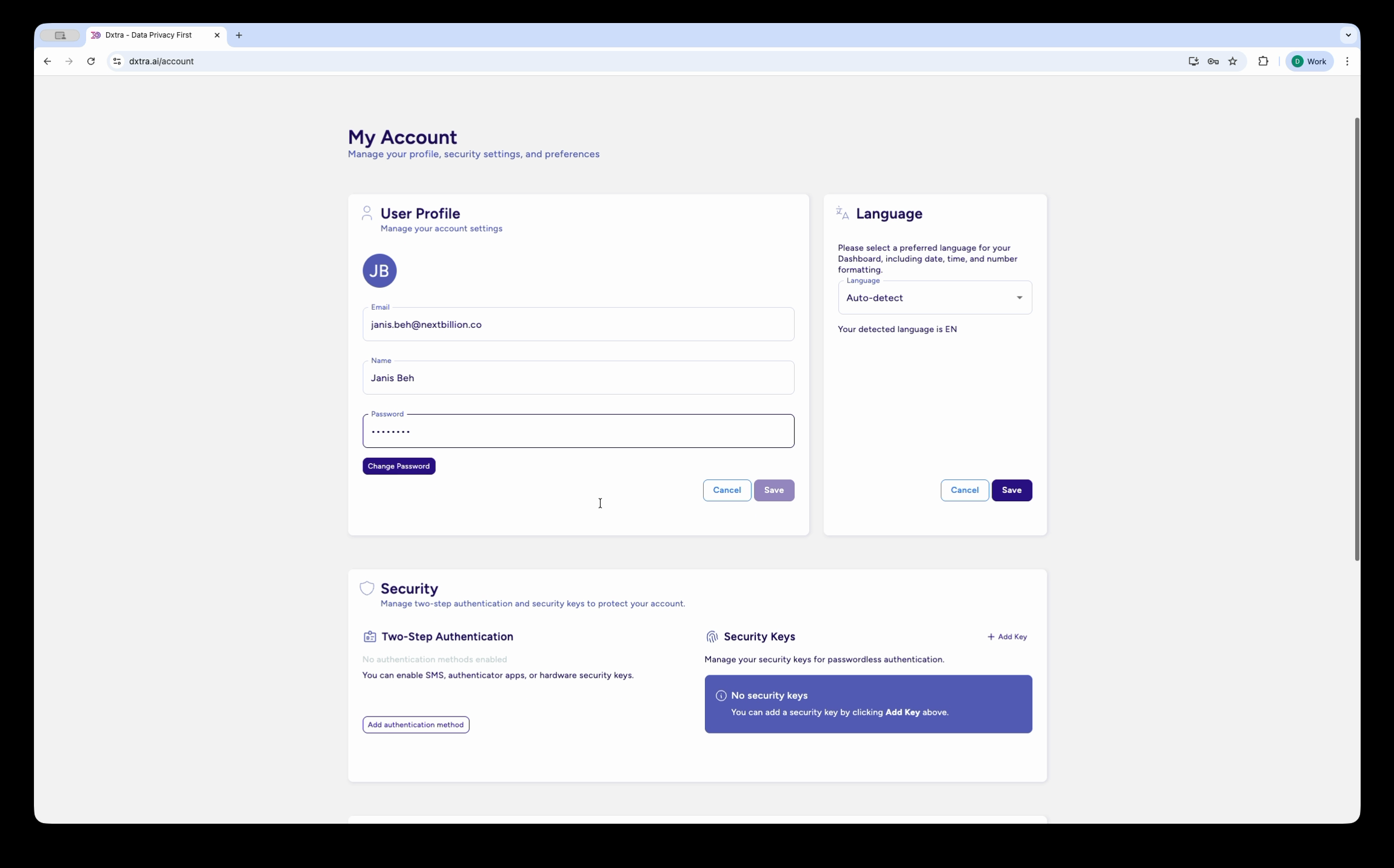
Profile
Edit your user profile:
- Name — Your full name
- Email — Account email (used for login and notifications)
- Avatar — Profile picture
- Language — Preferred interface language
- Timezone — For correct deadline and reporting times
Password & Security
Manage your account security:
- Change password
- View active sessions
- Revoke sessions
- Enable/manage multi-factor authentication
- Recovery codes (save securely)
Notification Preferences
Choose how you want to be notified:
- Email notifications
- DSRR deadline reminders
- New requests
- System updates
- Frequency (daily, weekly, etc.)
- In-app notifications (bell icon)
- Slack integration
- SMS alerts (available on some plans)
API Keys
Manage personal API keys for programmatic access:
- Create new key
- View existing keys (partially masked)
- Revoke keys
- Rotate keys regularly for security
Learn about API authentication →
Workspace Settings
Workspace Information
Edit workspace details:
- Name — Your workspace name
- Logo — Company logo for branding
- Website — Your company website
- Support Email — For customer inquiries
- Privacy Officer — Contact person for privacy requests
Regional Settings
- Timezone — For all timestamps and deadlines
- Currency — For billing display
- Language — Default interface language
- Date Format — How dates are displayed
Default Configurations
- Default Regulation — GDPR, CCPA, or other
- Default Consent Categories — Pre-check when creating activities
- Default DSRR Deadline — Based on regulation
- Retention Period — How long to keep request data
Workspace Management
Create Workspace
Have multiple privacy programs? Create additional workspaces:
- Click + New Workspace
- Enter workspace name
- Choose region (affects data residency)
- Select initial setup path
- Workspace is ready to use
Switch between workspaces using dropdown menu in top-left.
Switch Workspaces
If you're in multiple workspaces:
- Click workspace name in top-left
- Choose workspace from list
- You're now in that workspace
Workspace Switcher
See all your workspaces and quickly switch between them.
Billing & Subscription
Quick access to:
- Current plan
- Billing address
- Payment methods
- Invoices
- Usage limits
Security & Privacy
Data Residency
Choose where your data is stored:
- US — Data centers in United States
- EU — GDPR-compliant EU data centers
- Asia-Pacific — Data centers in Singapore/Australia
Selected at workspace creation; cannot change after.
Encryption
All data encrypted:
- At Rest — AES-256
- In Transit — TLS 1.2+
- Customer-controlled encryption — Available on Enterprise plan
Compliance Certifications
Dxtra certifications roadmap:
- SOC 2 Type II (on the roadmap)
- ISO 27001 (on the roadmap)
- GDPR compliance
- CCPA compliance
Data Export & Deletion
Export Your Data
Export all workspace data:
- DSRR requests and history
- Documents and processing activities
- Audit logs
- Team member information
- Configuration
Delete Workspace
Permanently delete workspace and all data:
- Go to Workspace Settings
- Click Delete Workspace
- Type workspace name to confirm
- Data is permanently deleted
- Cannot be recovered
Integration Settings
Connected Platforms
View all integrated systems:
- Shopify, WooCommerce
- Salesforce, HubSpot
- Mailchimp, Klaviyo, Customer.io
- Stripe, QuickBooks, etc.
For each:
- Connection status
- Last sync time
- Permissions granted
- Disconnect/revoke access
API Access
Manage API keys and webhooks:
- Create/revoke API keys
- View API usage
- Configure webhooks
- Test webhook delivery
Help & Support
Documentation
- In-app documentation link
- External docs: https://docs.dxtra.ai
- Video tutorials
- Frequently asked questions
Support
- In-app chat (available 9am-5pm PT)
- Email: support@dxtra.ai
- Status page: https://dxtra.instatus.com
Feedback
Have suggestions? We'd love to hear:
- Feature requests
- Improvement ideas
- Bug reports
Not legal advice
AI-generated content does not constitute legal advice. Consult a qualified legal professional for advice specific to your jurisdiction and business context.