Shopify integration
Beta — Integration details
This integration's setup steps are based on standard Shopify API patterns. Specific API scopes, credential handling, and data access flows will be verified against the live Dxtra application. If you encounter differences, please report an issue.
Connect your Shopify store to Dxtra to automatically track customer data, respond to data subject requests, and manage consent preferences across your store.
Overview
When you process orders through Shopify, you collect and store customer data including names, email addresses, billing and shipping addresses, phone numbers, and order history. Dxtra integrates with Shopify to automatically discover this data, enable customers to access their information, and execute deletion requests—all while maintaining full compliance with GDPR, CCPA, and other privacy regulations.
What you can do
- Access Requests — Customers can request export of their name, email, address, phone, order history, and preferences
- Deletion Requests — Fulfill customer erasure requests by deleting accounts and associated customer data
- Consent Management — Sync email marketing consent preferences between Shopify and your other platforms
- Data Discovery — Automatically identify all customer personal data stored in Shopify
- Preference Propagation — Update marketing consent across your integrated platforms when a customer opts out
Prerequisites
- Active Shopify store (any plan)
- Dxtra workspace with admin access
- Shopify admin access
Setup instructions
Step 1: Select Shopify from processors
- Log in to your Dxtra dashboard
- Go to Processors page
- Click Select Processor dropdown
- Find and select Shopify
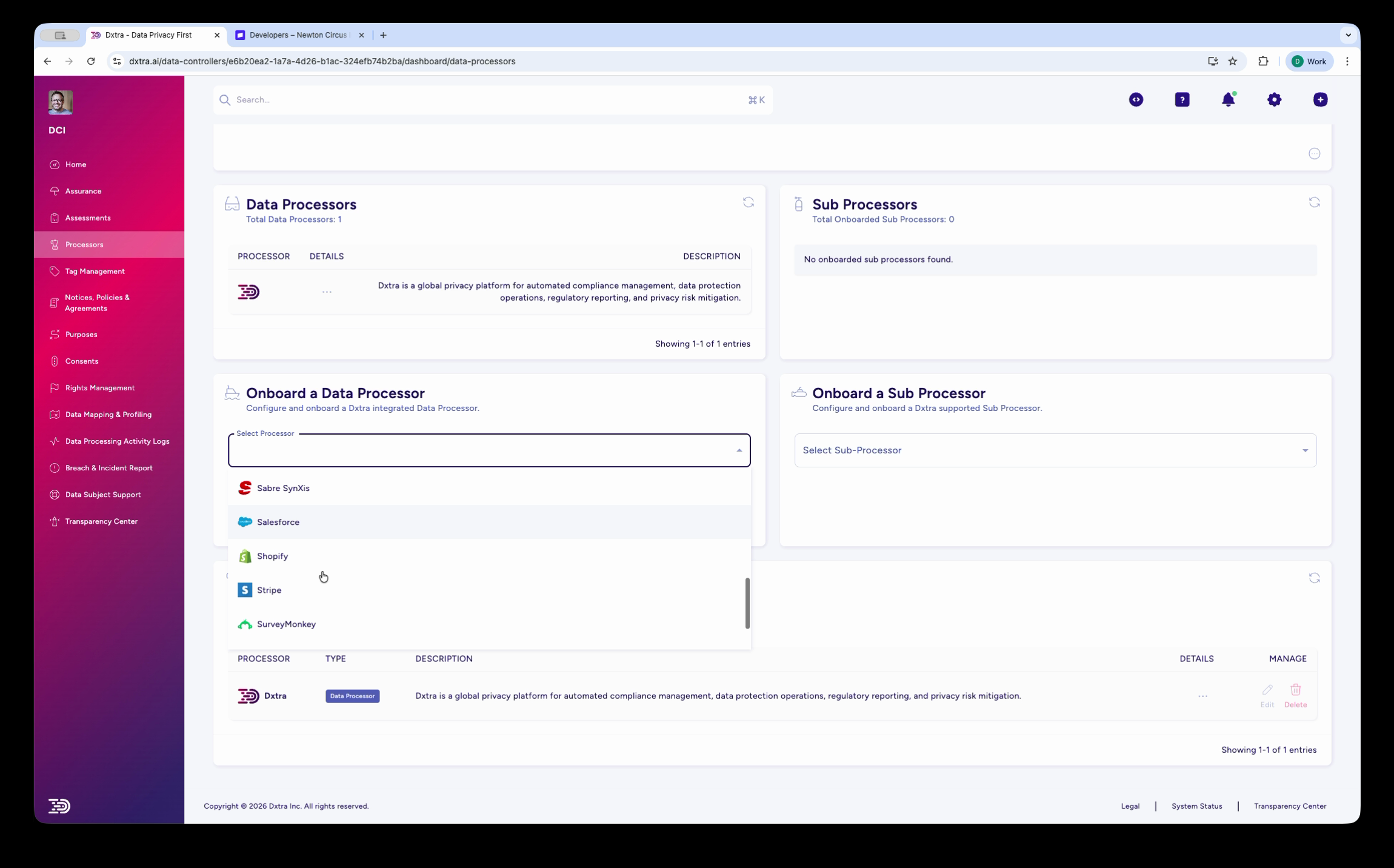
Step 2: Enter credentials and authorize
A multi-step onboarding wizard appears:
- Data Processor Details — Review Shopify's information
- Enter API Key — Dxtra prompts you to generate and paste a Shopify API token:
- Go to your Shopify Admin → Settings → Apps and Integrations
- Click "Develop apps" and create a new app named "Dxtra"
- Under "Admin API scopes," enable:
read_customers,write_customers,read_orders,read_customer_events - Copy the Admin API access token
- Paste into the Dxtra wizard
- Data Controller DID — Dxtra displays your organization's unique identifier for this integration
- Confirm and Onboard — Review permissions and click "Confirm" to activate
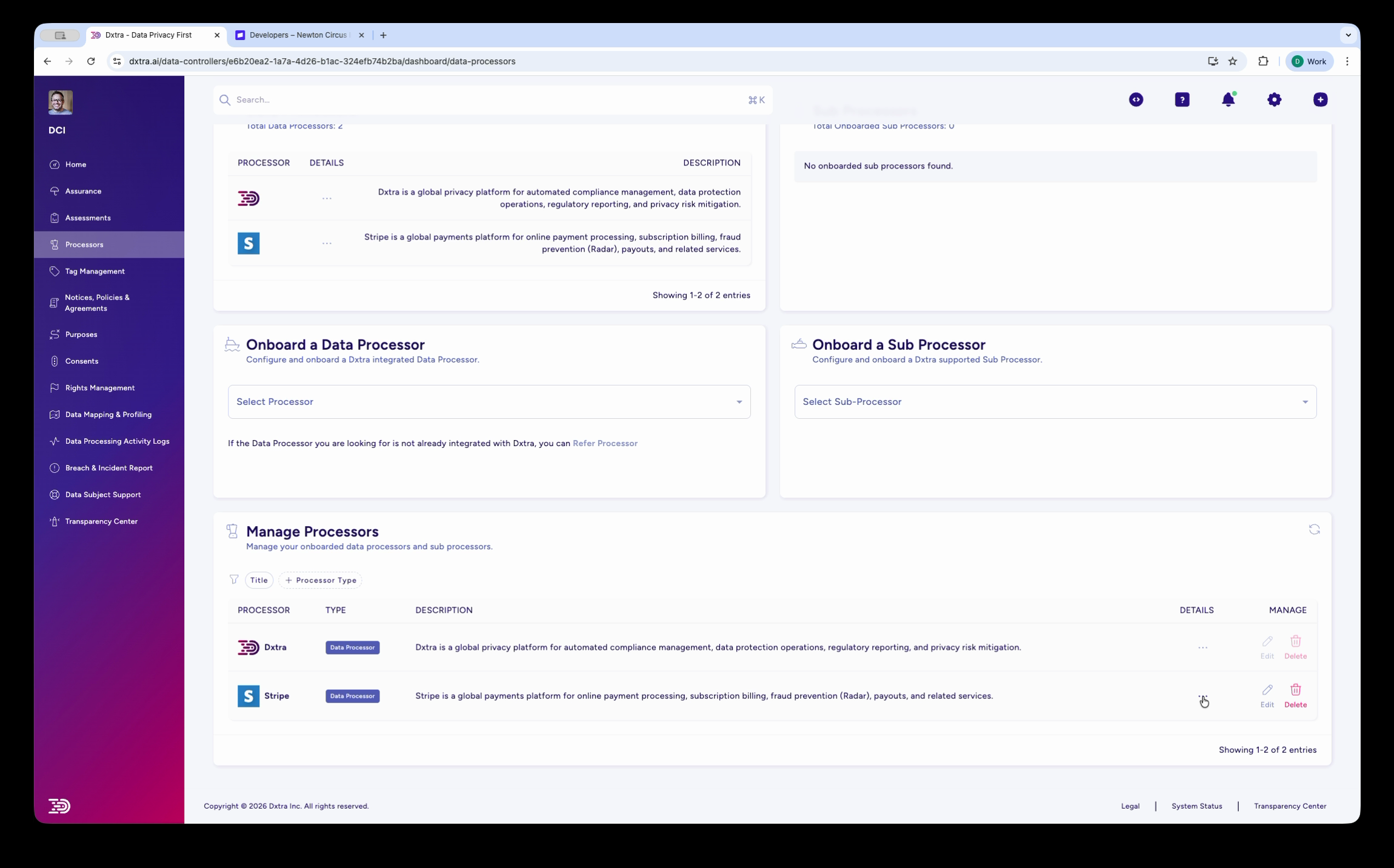
Step 3: Verify in Manage Processors table
Once onboarded, your Shopify processor appears in the Manage Processors table with an "Interconnected" badge.
Data covered
| Data Category | Details |
|---|---|
| Customer information | Name, email, phone, billing address, shipping address |
| Order history | Order number, date, items purchased, totals, status |
| Payment data | Payment method (tokenized only), transaction timestamps |
| Marketing preferences | Email subscription status, consent flags |
| Customer notes | Store staff notes, tags, custom attributes |
What Dxtra does not access
Dxtra never receives full credit card numbers, CVV codes, or raw card data. Shopify keeps this data PCI-DSS compliant and separate.
How data subject rights work
Access requests
When a customer requests their data:
- Create a new DSRR in Dxtra with the customer's email
- Dxtra automatically queries Shopify for:
- All customer records
- Complete order history with item details
- Marketing preferences and consent status
- Generate an export file (CSV or JSON)
- Send to the customer within 30 days (or your jurisdiction's deadline)
Deletion requests
When a customer requests erasure:
- Verify their identity via email confirmation
- Create a deletion DSRR in Dxtra
- Choose scope:
- Delete customer account and contact data
- Keep order records for tax/legal compliance (pseudonymized)
- Delete all marketing preferences
- Dxtra executes deletion from Shopify
- Send confirmation to the customer
Tax and legal records
Shopify requires retention of order and payment records for compliance. Dxtra deletes personally identifying information but retains order numbers and totals where legally required.
Monitoring and sync status
After setup, monitor your Shopify integration from the Manage Processors page:
- Interconnected — Connection is active and syncing
- Inactive — Connection has been lost (token expired or permissions revoked)
- Pending — Initial sync in progress
Dxtra syncs Shopify data in near real-time. When a new customer places an order or updates their profile, Dxtra detects the change within minutes.
What triggers a sync
| Event | What Dxtra does |
|---|---|
| New customer created | Adds customer to data subject registry |
| Customer profile updated | Updates stored personal data |
| New order placed | Logs order data in processing activity records |
| Customer deleted in Shopify | Marks data subject record as deleted |
Consent and preference propagation
When a customer updates their marketing preferences through your Transparency Center, Dxtra can propagate that change back to Shopify:
- Email opt-out — Dxtra updates the customer's
accepts_marketingflag in Shopify - Full marketing opt-out — Dxtra removes marketing tags and unsubscribes the customer
- Consent withdrawal — Dxtra logs the withdrawal and updates all connected platforms
This works in both directions — if a customer unsubscribes directly in Shopify, Dxtra detects the change and updates your consent records.
Connect your email platform too
If you use Klaviyo, Mailchimp, or another email platform with Shopify, connect both to Dxtra so consent changes propagate across your entire marketing stack. See email marketing integrations.
Multi-store setup
If you operate multiple Shopify stores, connect each store as a separate processor in Dxtra:
- Repeat the setup process for each store
- Each store gets its own processor entry in Manage Processors
- DSRRs automatically search across all connected stores
- Consent preferences propagate to all connected stores
Troubleshooting
Connection shows "Inactive"
- Verify the API token is still valid in your Shopify Admin
- Check that all required scopes are enabled (
read_customers,write_customers, etc.) - Regenerate the API token in Shopify and update it in the Dxtra Processors page
Shopify data not syncing
- Check your Shopify Admin → Apps and Integrations → Dxtra app is installed
- Verify the Dxtra app has not been uninstalled or permissions revoked
- Test with a new customer access request to confirm connectivity
- Wait 2-3 minutes for sync to complete (Shopify enforces API rate limiting)
Customer data not found
- Confirm the customer email address matches exactly in Shopify
- Verify the customer exists in Shopify (check customer list or order history)
- Ensure Shopify has not already deleted the customer record
- Check that email addresses don't have extra spaces or case sensitivity issues
Deletion failed
- Confirm the customer is not a Shopify staff account
- Verify there are no pending orders in fulfillment (cancel or complete first)
- Check for app conflicts with other Shopify apps
- Contact support@dxtra.ai with the customer email and error details
Orders retained after deletion
This is expected. Shopify requires retention of order and payment records for tax compliance. Dxtra pseudonymizes the personal data (replaces the customer name and email with anonymized identifiers) but retains the order record. Your privacy notice should explain this.
Best practices
- Test before go-live — Create test orders and run sample DSRRs to verify data retrieval works end-to-end
- Document your process — Train team members on how to create and fulfill DSRRs through Dxtra
- Monitor sync status — Check Manage Processors regularly for any "Inactive" alerts
- Update your privacy notice — List Shopify as a data processor and describe what customer data is collected
- Connect related platforms — Link your email marketing and payment platforms for complete consent propagation
Related integrations
- WooCommerce — Alternative e-commerce platform integration
- Stripe — Connect Stripe for payment data compliance
- Klaviyo — Sync consent preferences for Shopify email marketing
- Mailchimp — Sync consent preferences for email campaigns
Next step: Connect your email marketing platform or payment processor to manage consent across all customer touchpoints.