Processor management
For a screen-by-screen reference of the Processors dashboard interface, see App Reference: Processors.
Data processors are third parties that process personal data on your behalf — payment providers, email platforms, analytics services, cloud storage, CRM tools. Under GDPR and similar regulations, you are responsible for ensuring each processor provides sufficient guarantees about security and compliance. Dxtra gives you a centralised registry to track every processor, their contractual agreements, certifications, and compliance status.
The Processors page
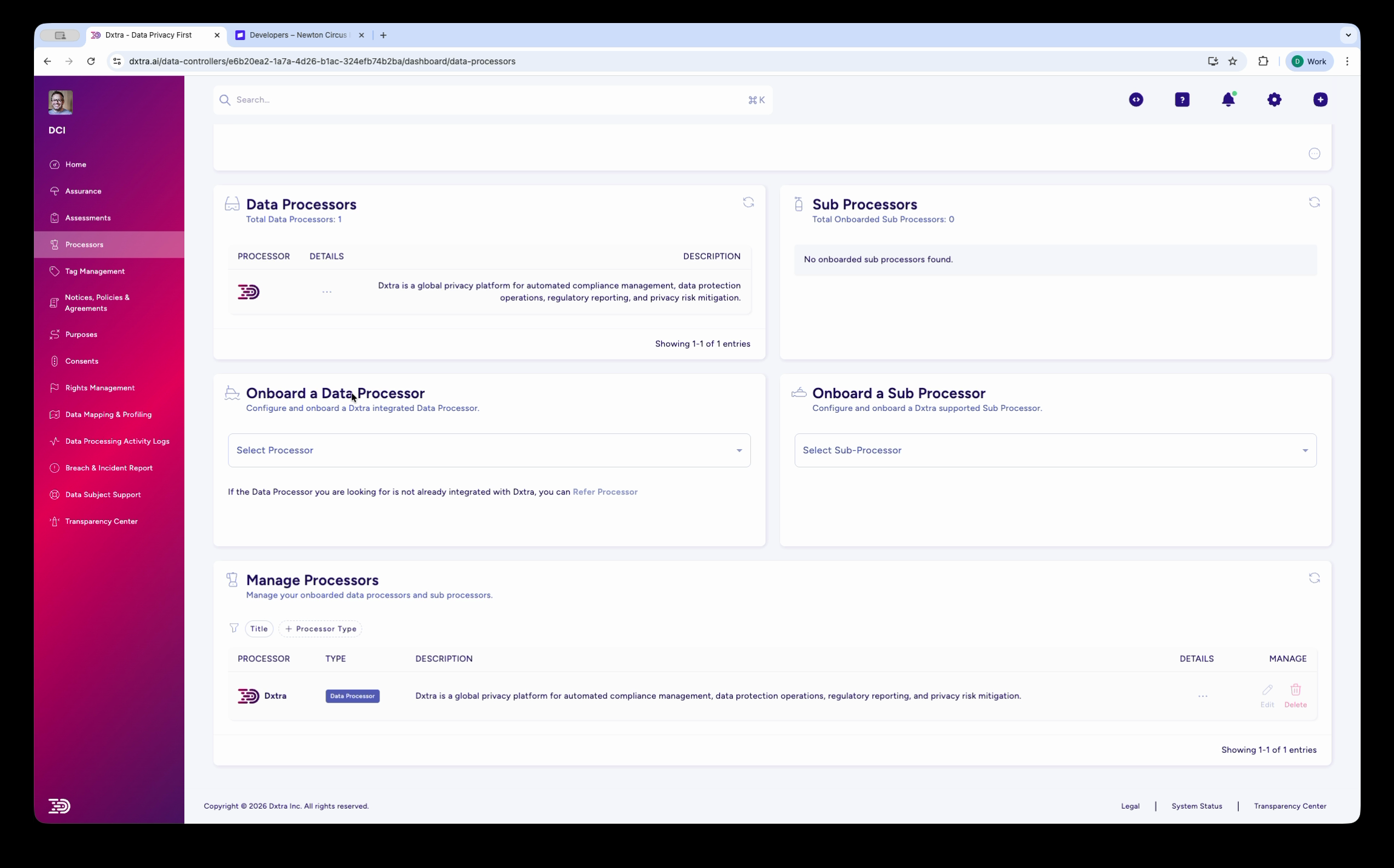
Navigate to Processors in the left sidebar. The page is divided into four sections:
Data Processors
The top-left table lists all onboarded data processors. Each row shows the processor's icon, name, and description. The header displays the total count (e.g. "Data Processors: 2"). Click a processor row to expand its details.
Sub Processors
The top-right table lists sub processors — third parties that your processors use to further process data. If no sub processors have been onboarded, this section shows "No onboarded sub processors found." The header displays the total count.
Onboard a Data Processor / Onboard a Sub Processor
Below the lists, two onboarding forms let you add new processors:
- Onboard a Data Processor — "Configure and Onboard a Dxtra Integrated Data Processor." Use the Select Processor dropdown to choose from pre-built integrations (Salesforce, Shopify, Stripe, SurveyMonkey, and others). If the processor you need is not in the dropdown, click Refer Processor to request it.
- Onboard a Sub Processor — "Configure and manage a Dxtra Approved Sub Processor." Use the Select Sub Processor dropdown to add sub processors.
Manage Processors
The bottom section shows a table of all onboarded processors and sub processors with columns for Processor name, Type, Description, Details, and Manage. Filter by Title or Processor Type using the tabs above the table.
Each processor in the Manage table shows a status badge — Interconnected means the processor is fully connected and active.
Processor details
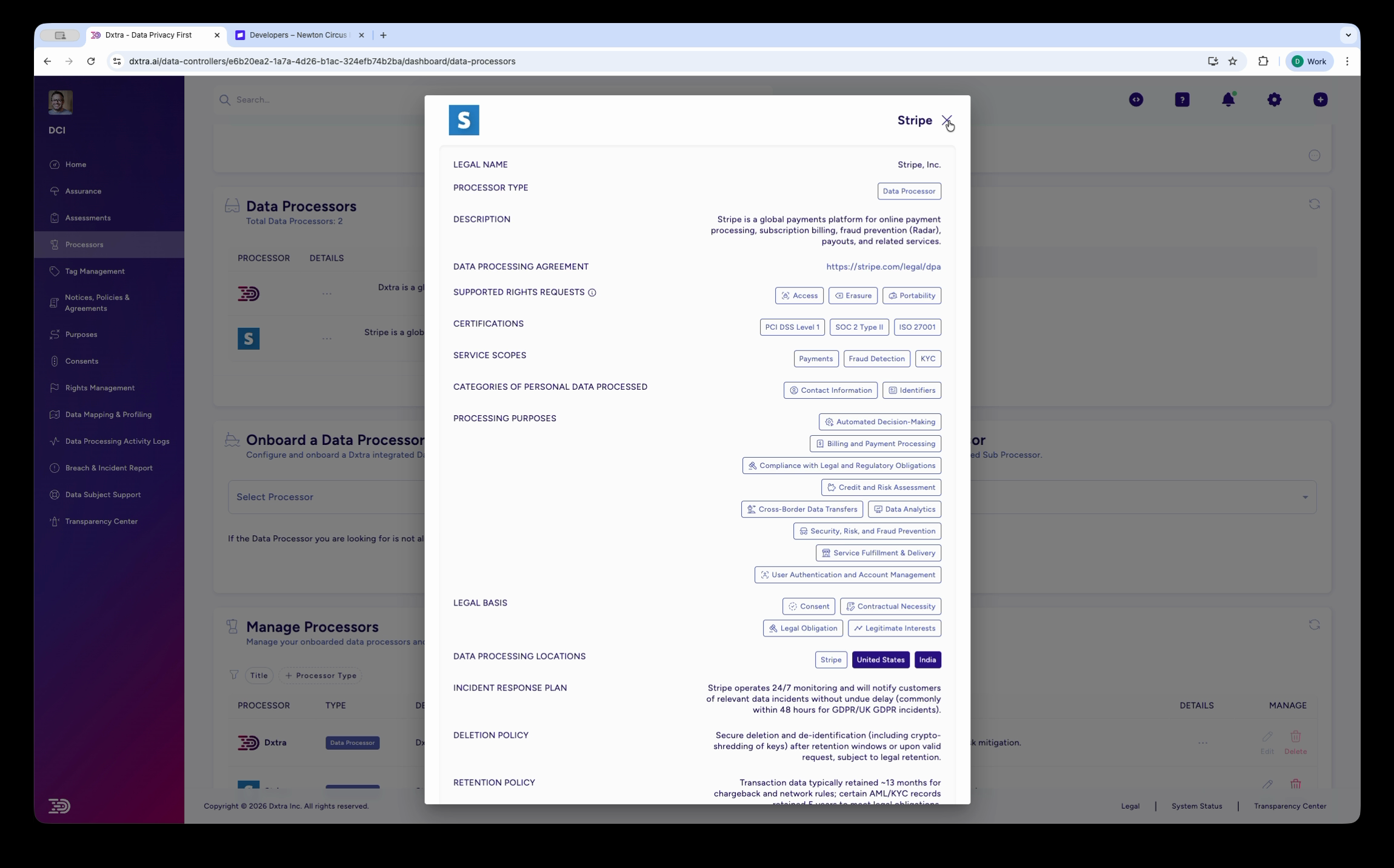
Click Details on any processor in the Manage Processors table to open the processor details panel. This panel shows the complete processor profile:
| Field | Description |
|---|---|
| Legal Name | The processor's official legal entity name |
| Processor Type | Data Processor or Sub Processor |
| Description | What the processor does and what services it provides |
| Data Processing Agreement | Link to the processor's DPA (e.g. Stripe's DPA at stripe.com/legal/dpa) |
| Automated Audits Requests | Whether automated audit requests are enabled |
| Certifications | Security certifications held (e.g. ISO 27001, SOC 2, PCI DSS) |
| Service Scope | The scope of services the processor provides |
| Categories of Personal Data Processed | Which data categories the processor handles |
| Processing Purposes | Checkboxes for each processing purpose the processor fulfils |
| Legal Basis | The legal basis for sharing data with this processor |
| Data Processing Locations | Countries/regions where data is processed (e.g. EU, UK, USA) |
| Incident Response Plan | The processor's incident response procedures |
| Deletion Policy | How the processor handles data deletion requests |
| Retention Policy | The processor's data retention practices |
Pre-built integrations
Dxtra includes pre-built integrations for common processors. When you select one from the Select Processor dropdown, Dxtra pre-populates the processor profile with known details (description, DPA link, certifications, data categories) and guides you through a multi-step onboarding wizard.
Current pre-built processors include: Salesforce, Shopify, Stripe, SurveyMonkey, and others. The list grows as new integrations are added. See integrations for the full catalogue.
For processors not in the dropdown, you can request them via Refer Processor or add them as custom processors.
Why processor management matters
Maintaining a processor registry is not optional under most privacy regulations:
- GDPR Article 28 requires a written contract (DPA) with every processor before sharing personal data
- GDPR Article 30 requires records of processing activities including processor details
- CCPA/CPRA requires contracts with service providers that limit data use
- LGPD, PIPEDA, POPIA and other regulations have similar processor oversight requirements
Dxtra's processor registry gives you a single place to demonstrate compliance with these obligations — during audits, assessments, or regulatory inquiries.
Related
- Add a data processor — Step-by-step onboarding guide
- Monitor processors — Ongoing oversight, details review, and compliance tracking
- Vendor risk assessments — Assess processor security posture
- Integrations — Full integration catalogue
- Processing activity logs — Audit trail showing processor activity
Not legal advice
AI-generated content does not constitute legal advice. Consult a qualified legal professional for advice specific to your jurisdiction and business context.