Purpose & consent management¶
Every piece of personal data you process needs a lawful basis. For some processing that means explicit consent from the data subject; for others it means a documented legitimate interest, contractual necessity, or legal obligation. Dxtra helps you define your processing purposes, assign the correct legal basis to each, and collect granular consent where required — all while generating the audit trail regulators expect.
Rather than treating consent as a single "accept all" checkbox, Dxtra supports granular consent categories and individual purpose-level controls. Data subjects can opt in or out of specific purposes (like Advertising Personalisation or User Profiling) through the cookie consent banner, the Transparency Center, or embedded consent components.
How consent works in Dxtra¶
Consent management in Dxtra connects three things:
Processing purposes define what you do with personal data and why. Each purpose is grouped under a consent category, assigned a legal basis, and linked to the data processors and personal data identifiers involved. Purposes are configured in the Purposes section of the dashboard.
Consent categories are the top-level groupings that data subjects interact with. Dxtra uses four standard categories plus custom categories:
| Category | Description | Consent required? |
|---|---|---|
| Strictly Necessary | Processing required for the website or application to function — authentication, security, essential features | No (always on, no toggle) |
| Performance / Analytics | Analytics and measurement tools that help you understand user behavior and improve services | Yes (or legitimate interest with objection rights) |
| Functional | Features that enhance user experience but are not essential — preferences, personalization, language settings | Yes |
| Targeting / Marketing | Advertising, marketing, cross-site tracking, retargeting | Yes (explicit consent in most jurisdictions) |
| Custom | Additional categories specific to your business (e.g. Social Media) | Depends on purpose |
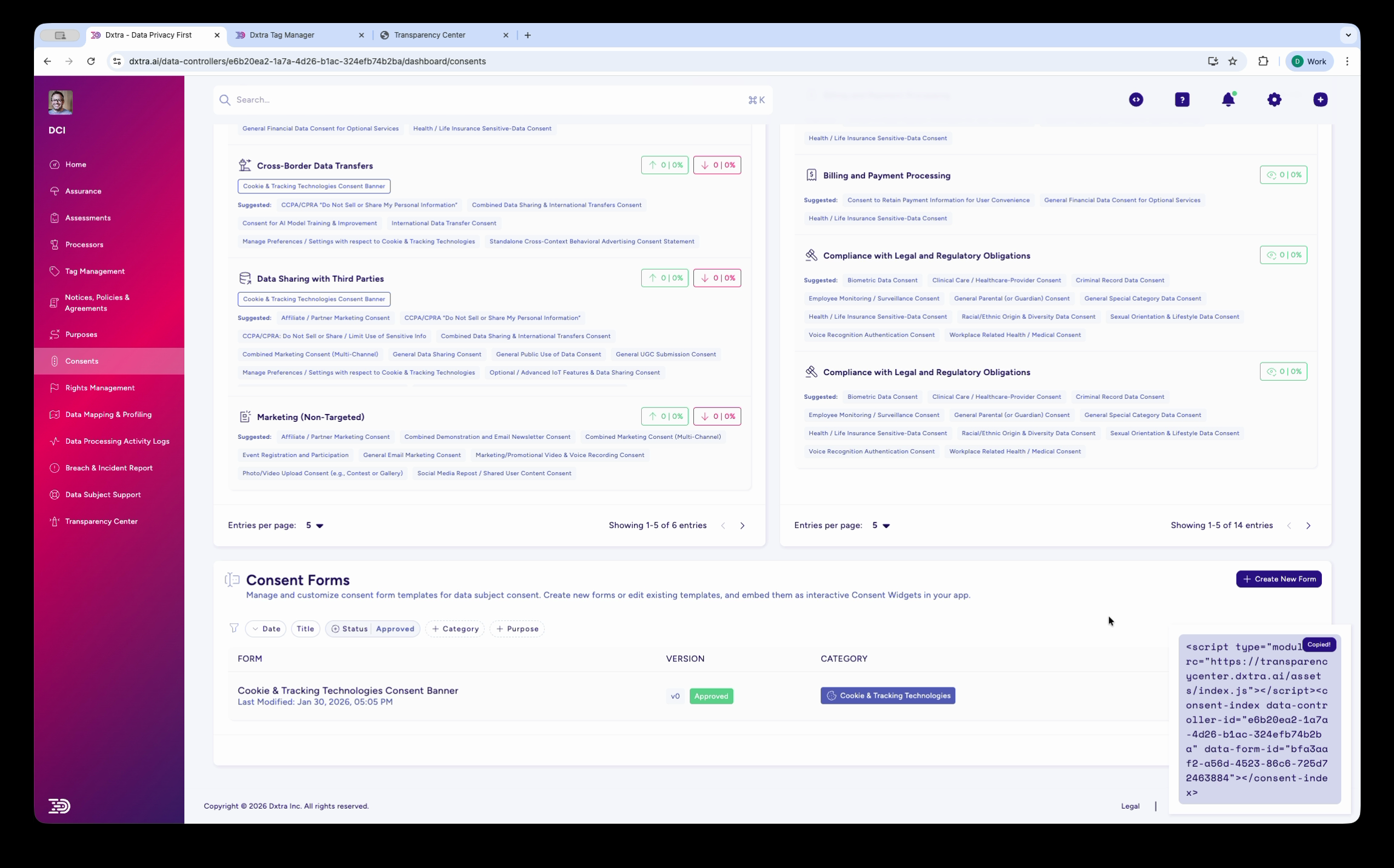
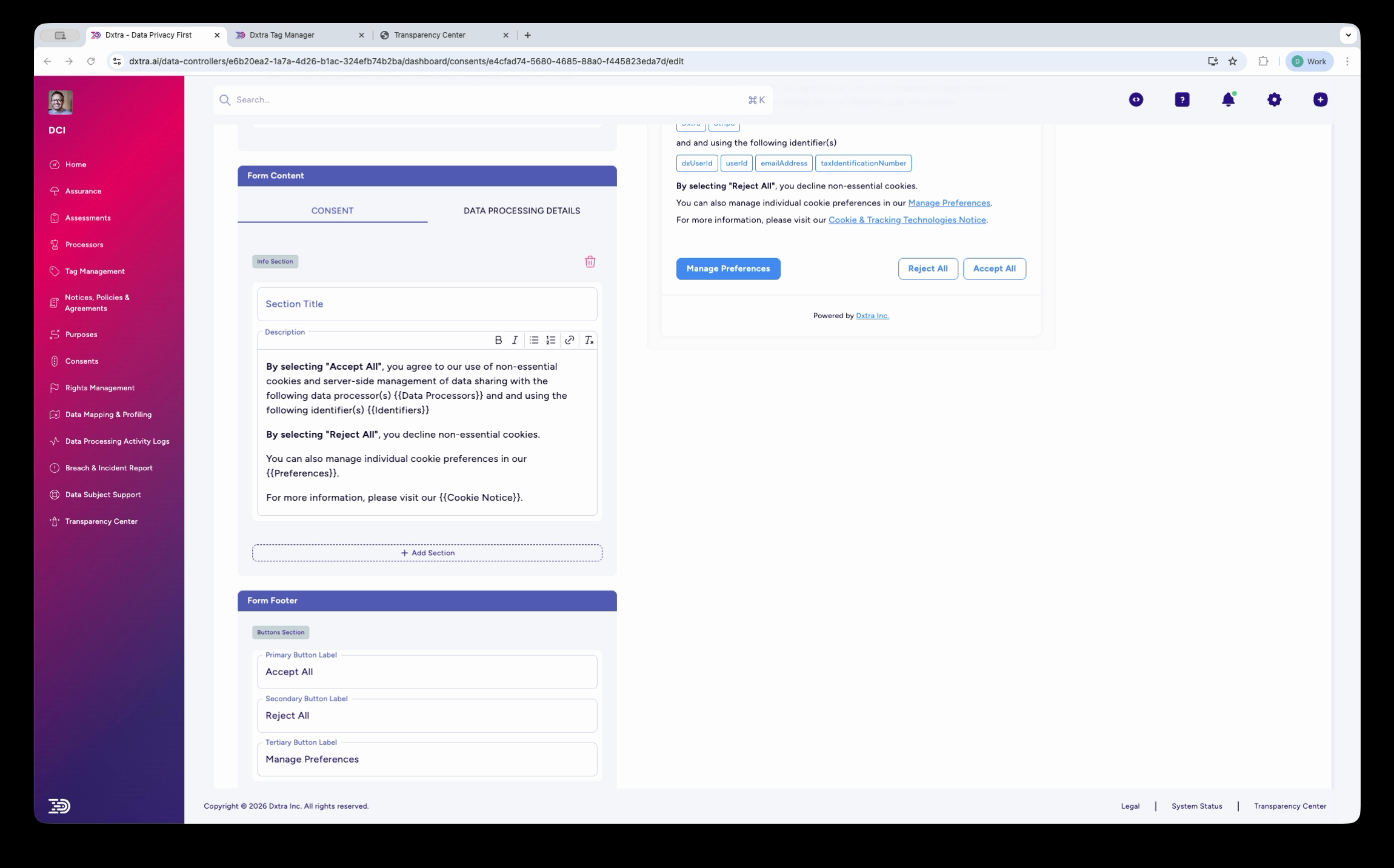
Consent forms are the user-facing interfaces where data subjects make their choices. Dxtra provides a WYSIWYG consent form editor for building cookie banners, event registration consent forms, and other consent experiences. Forms show the consent text, data processor badges, personal data identifier badges, and action buttons (Accept All, Reject All, Manage Preferences).
What the dashboard shows¶
Purposes section¶
The Purposes page in the dashboard displays your processing purposes grouped by category (e.g. "Digital Advertising and Marketing Platforms"). Each purpose shows:
- The purpose name (e.g. Advertising Personalisation, Analytics Storage, Cross-Border Data Transfers)
- Associated tags (e.g. Google Consent Mode v2)
- The data processor responsible (e.g. Google Ads)
- Processing purpose details including applicable regulations, legal basis, and consent requirements
Consents section¶
The Consents section shows a table of all consent items with OPT-IN and OPT-OUT status columns. Items include Advertising Personalisation, Automated Decision Making, Cross-Border Data Transfers, User Profiling, Advertising User Data, Targeted Marketing, and Behavioural Data Processing.
Browser privacy signals¶
A dashboard panel shows how many of your site visitors are broadcasting privacy preferences through their browsers: No Signals, Do Not Track, Global Privacy Control (GPC), and combined GPC & DNT. This helps you understand the privacy posture of your audience.
Global Privacy Control (GPC) is a browser-level signal that communicates a data subject's intent to opt out of the sale or sharing of their personal data. When Dxtra detects a GPC signal:
- The signal is honoured as a valid objection under CCPA §1798.120 and recognized under GDPR Article 21
- The data subject's opt-out preference is automatically applied to targeting and marketing processing purposes
- The GPC detection status is displayed to the data subject in the Transparency Center (see Browser privacy signals)
- The signal is logged in the consent audit trail with a timestamp
You can toggle GPC detection on or off in the Rights Management configuration under "Detect Global Privacy Control (GPC)".
Tip
Monitor the Browser privacy signals panel regularly. A high percentage of GPC-enabled visitors may indicate that your audience is privacy-conscious and that you should prioritize transparent, consent-first data practices.
Consent categories in detail¶
Strictly Necessary¶
Processing that is essential for the website or application to function. This includes user authentication, security measures, shopping cart functionality, and load balancing. Under GDPR and the ePrivacy Directive, strictly necessary processing does not require consent. The toggle is always on and cannot be turned off by data subjects.
Performance / Analytics¶
Processing that measures how visitors use your site — page views, session duration, traffic sources, error rates. Tools like Google Analytics fall into this category. Under GDPR, analytics generally requires consent unless you can demonstrate a legitimate interest. Under CCPA, it requires notice and opt-out rights. Dxtra's Tag Manager enforces this category — analytics tags only fire after the data subject consents.
Functional¶
Processing that enhances the user experience without being essential — language preferences, remembered form values, personalized content recommendations. Functional cookies require consent under the ePrivacy Directive but are often lower-risk. Data subjects can toggle this category independently.
Targeting / Marketing¶
Processing for advertising personalization, retargeting, cross-site tracking, and marketing campaigns. This category almost always requires explicit, informed consent. It typically involves data sharing with third-party advertising platforms (Google Ads, Meta/Facebook). Under GDPR, CCPA, and most other privacy laws, targeting requires opt-in consent before any data is collected.
Custom categories¶
You can define additional categories for business-specific processing. For example, ACME Inc. in the demonstration uses a "Social Media" category for social media cookies and tracking. Custom categories follow the same consent logic — you assign each one a consent requirement (opt-in or opt-out) and link it to the relevant purposes.
Consent forms¶
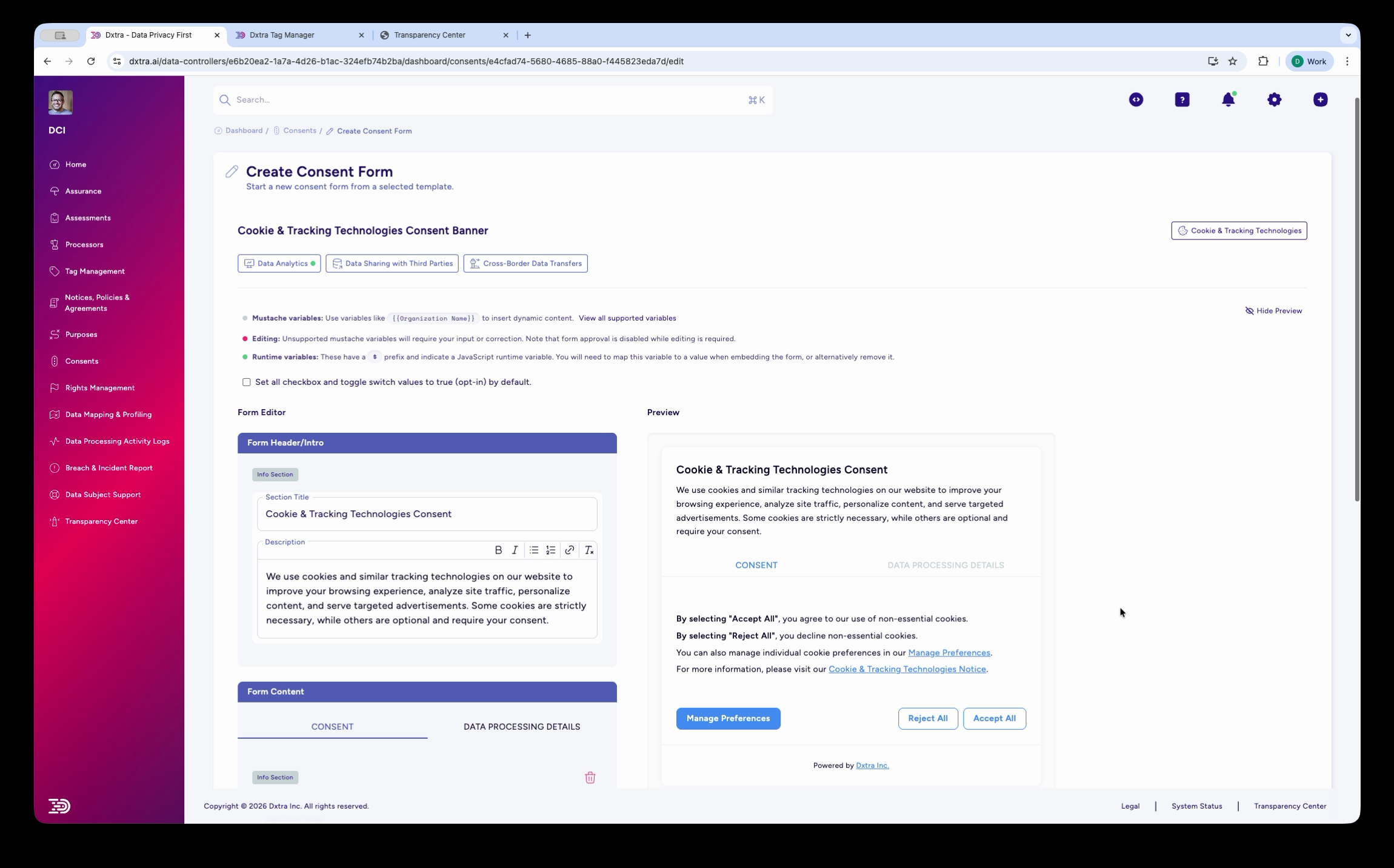
Dxtra provides a split-screen consent form editor for designing consent banners and forms:
Left panel (Form Editor) — Contains the form header/title, rich-text content editor, and a Decision Title section. You write the consent explanation in plain language, describing what data is collected, which processors handle it, and what the data subject is agreeing to. Tabs switch between a Consent view and a Data Processing Details view.
Right panel (Preview) — Shows the consent form exactly as visitors will see it, including the full consent text, processor badges (e.g. Dxtra, Google Analytics, Mailchimp, Shopify), identifier badges (e.g. email, IP address, cookie identifiers), and three action buttons: Manage Preferences, Reject All, and Accept All.
Creating a new consent form¶
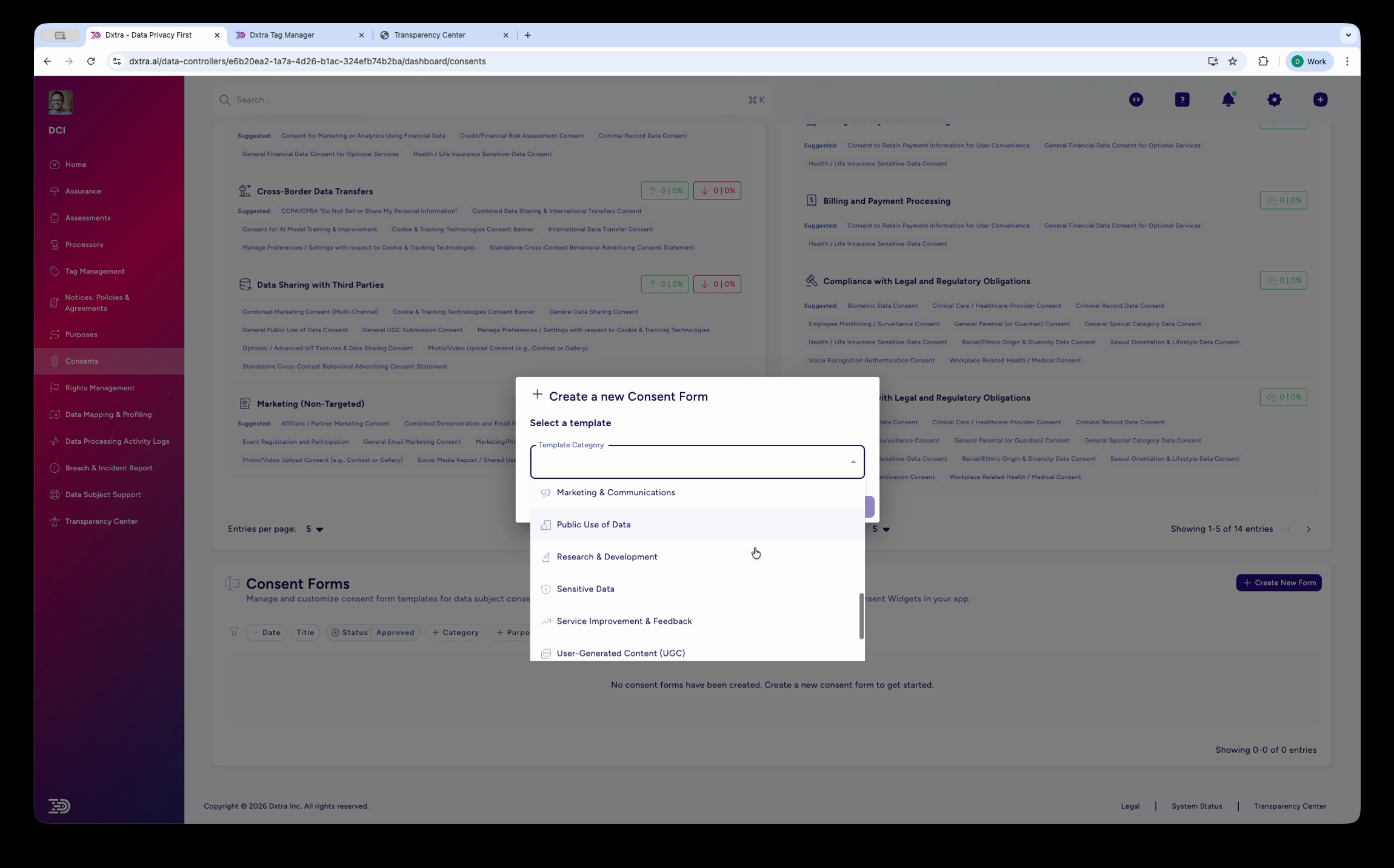
To create a consent form, click Create New Form in the Consent Forms section. Dxtra presents a template selector with pre-built options for common use cases: Marketing & Communications, Public Use of Data, Research & Development, Sensitive Data, Service Improvement & Feedback, and User Generated Content (UGC).
Cookie consent banner¶
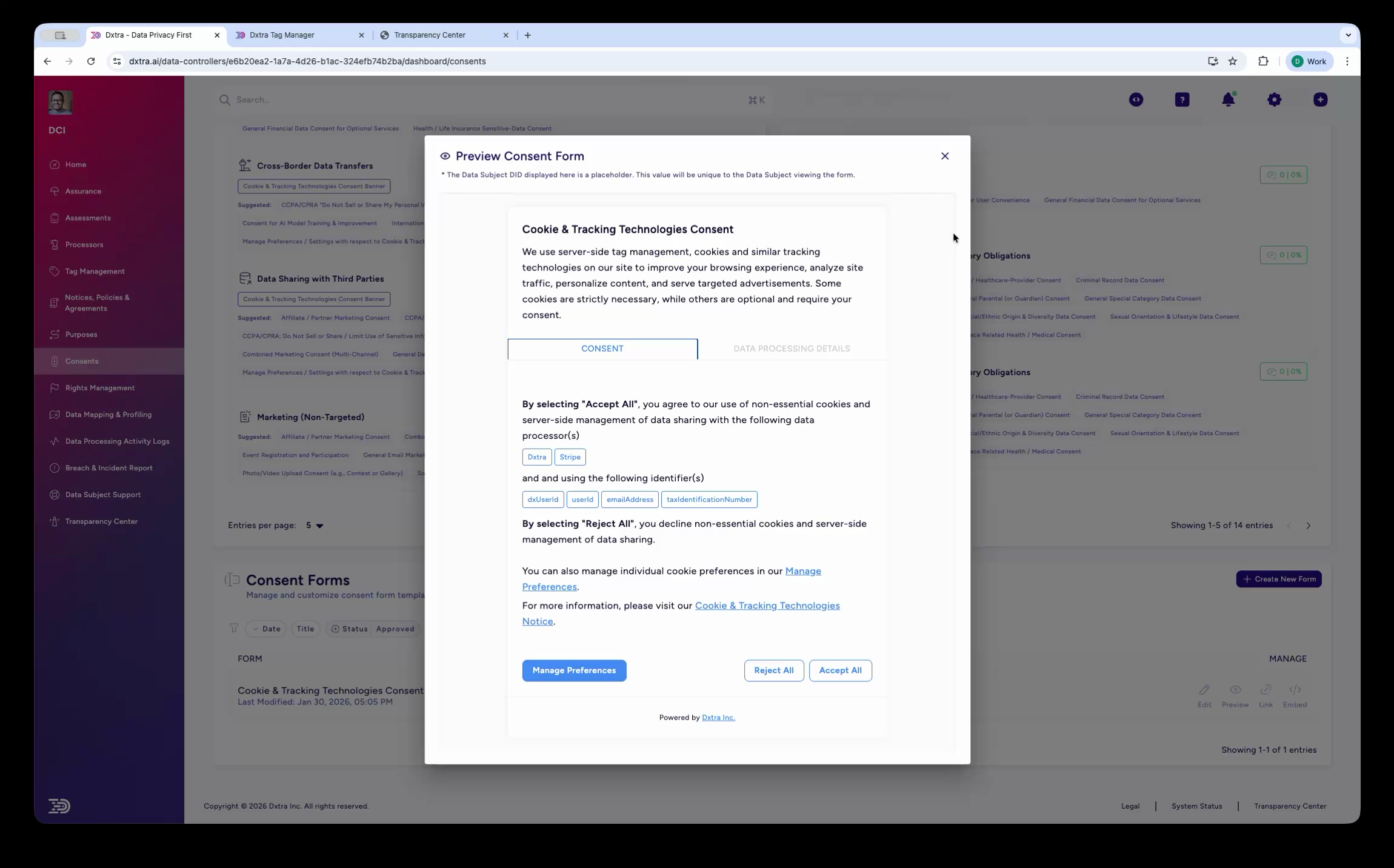
The cookie consent banner is a modal overlay that appears when a visitor first arrives at your site. It has two tabs:
Consent tab — Explains what cookies and tracking technologies your site uses, lists the data processors and identifiers involved, and provides Accept All / Reject All / Manage Preferences buttons.
Data Processing Details tab — Provides granular transparency about how data is processed for specific purposes (advertising personalization, targeted advertising, data sharing, etc.). Critically, this tab also displays the data subject's Data Subject DID — a pseudonymized identifier they can use to access the Transparency Center or submit rights requests.
Manage Preferences modal¶
When a data subject clicks Manage Preferences, a modal shows granular controls for each consent category: Strictly Necessary (always on), Analytics, Functional, Targeting, and Social Media. Each category has a toggle switch. Categories can be expanded to show descriptions explaining what that category of cookies does and which processors use them.
The form footer section of the editor lets you configure the button labels and layout for the consent banner — including the Primary Button (Accept All), Secondary Button (Reject All), and Manage Preferences link.
Event registration consent¶
Beyond cookie banners, Dxtra supports consent forms for specific business processes. For example, an event registration consent form collects consent for processing personal data related to event ticketing, explaining which identifiers are needed and which processors are involved (e.g. Dxtra, Eventbrite, Google Analytics, Mailchimp, Shopify).
What data subjects see in the Transparency Center¶
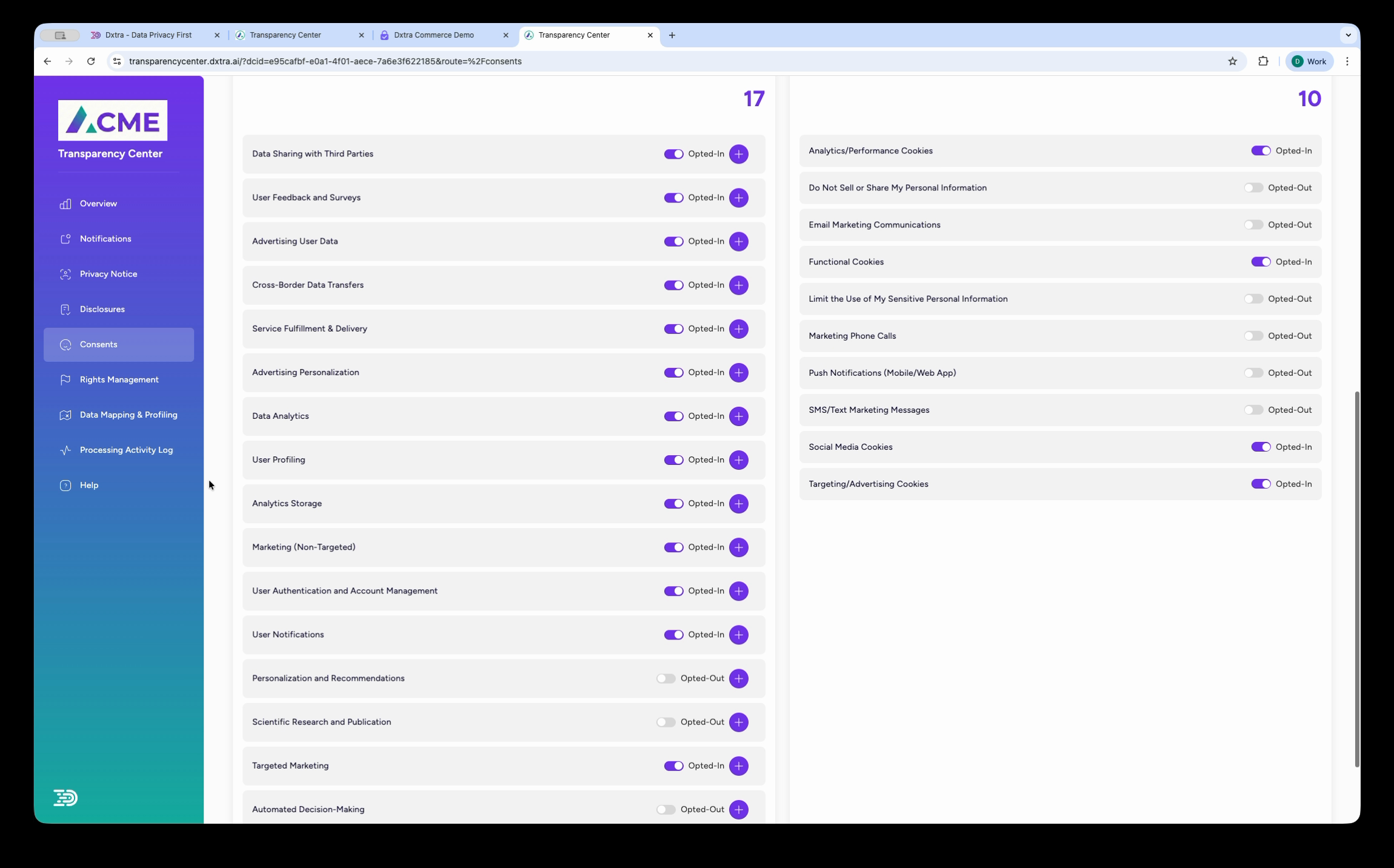
The Consents section of the Transparency Center gives data subjects full visibility and control:
Data We Collect With Your Consent — Split into "Data Not Linked to You" (e.g. Do User ID, Browsing Data) and "Data Linked to You" (e.g. Geographic Location, Billing Address, Email Address, Home Address, Full Name).
Your Data Subject Consents — A list of all consent purposes (e.g. Data Sharing with Third Parties, Advertising User Data, Targeted Marketing, Cross-Border Data Transfers, User Profiling) each with an "Opted In" toggle that the data subject can change at any time.
Your Data Subject Preferences — A list of preference categories (e.g. Analytics Cookies, Do Not Sell/Share, Email Marketing, Functional Cookies, Targeting Cookies, SMS Marketing, Push Notifications) each with an "Opt Out" toggle.
This gives data subjects complete, granular control over every consent and preference from a single page — exceeding the requirements of most privacy regulations.
Getting started¶
- Configure processing purposes — Define what you do with personal data, assign consent categories, and link to processors
- Manage legal basis — Document the legal basis for each purpose (consent, legitimate interest, contract, etc.)
- Build a consent form — Create cookie banners, registration forms, and other consent experiences with the visual form builder
- Set up the Tag Manager — Deploy consent-aware analytics that respect category toggles
- Set up your Transparency Center — Publish consent controls for data subjects
Related¶
- Tag Manager: consent enforcement — How tags respect consent categories
- Transparency Center — Where data subjects manage their consent preferences
- Data subject rights management — Handling objection and withdrawal requests
- Processing activity logs — Audit trail for consent events
Next: Configure processing purposes to define your processing activities.