Vendor Risk Assessment
A Vendor Risk Assessment (also called a Third-Party Risk Assessment) evaluates the security, compliance, and operational risks of your data processors and vendors. As your organization relies on increasingly complex vendor ecosystems—payment processors, email platforms, analytics tools, cloud storage, and more—documented vendor assessments provide evidence that you've performed due diligence on who has access to personal data.
What a Vendor Risk Assessment Covers
When you add a data processor to Dxtra, the AI engine automatically generates an assessment that covers:
- Security posture — Certifications (SOC 2, ISO 27001), access controls, encryption, and data protection measures
- Data processing practices — What data the vendor accesses, how they process it, retention policies, and data deletion procedures
- Subprocessor chains — Whether the vendor uses sub-processors, who they are, and what data flows to them
- Compliance certifications — Which standards and frameworks the vendor complies with
- Contractual safeguards — Data Processing Agreement (DPA) terms, liability limits, and data subject rights support
- Incident response — Whether the vendor has breach notification procedures and incident response capabilities
The assessment provides a structured risk analysis that documents your due diligence decisions. It becomes part of your audit trail and regulatory evidence.
Human review required
Dxtra's AI generates vendor assessments from processor information, but every assessment requires your review and approval. You must confirm the assessment accurately reflects the vendor's security posture and risk level.
How Dxtra Generates Vendor Assessments
When you add a processor to Dxtra, the AI engine pulls information from multiple sources:
- Processor profile data — What you've configured about the processor (location, data access, retention, certifications)
- Questionnaire inputs — Details you've provided about how you use the processor and what data you share
- Industry standards — Public information about the vendor's security practices, certifications, and incident history
- Regulatory context — Relevant compliance frameworks and standards that apply to your processor
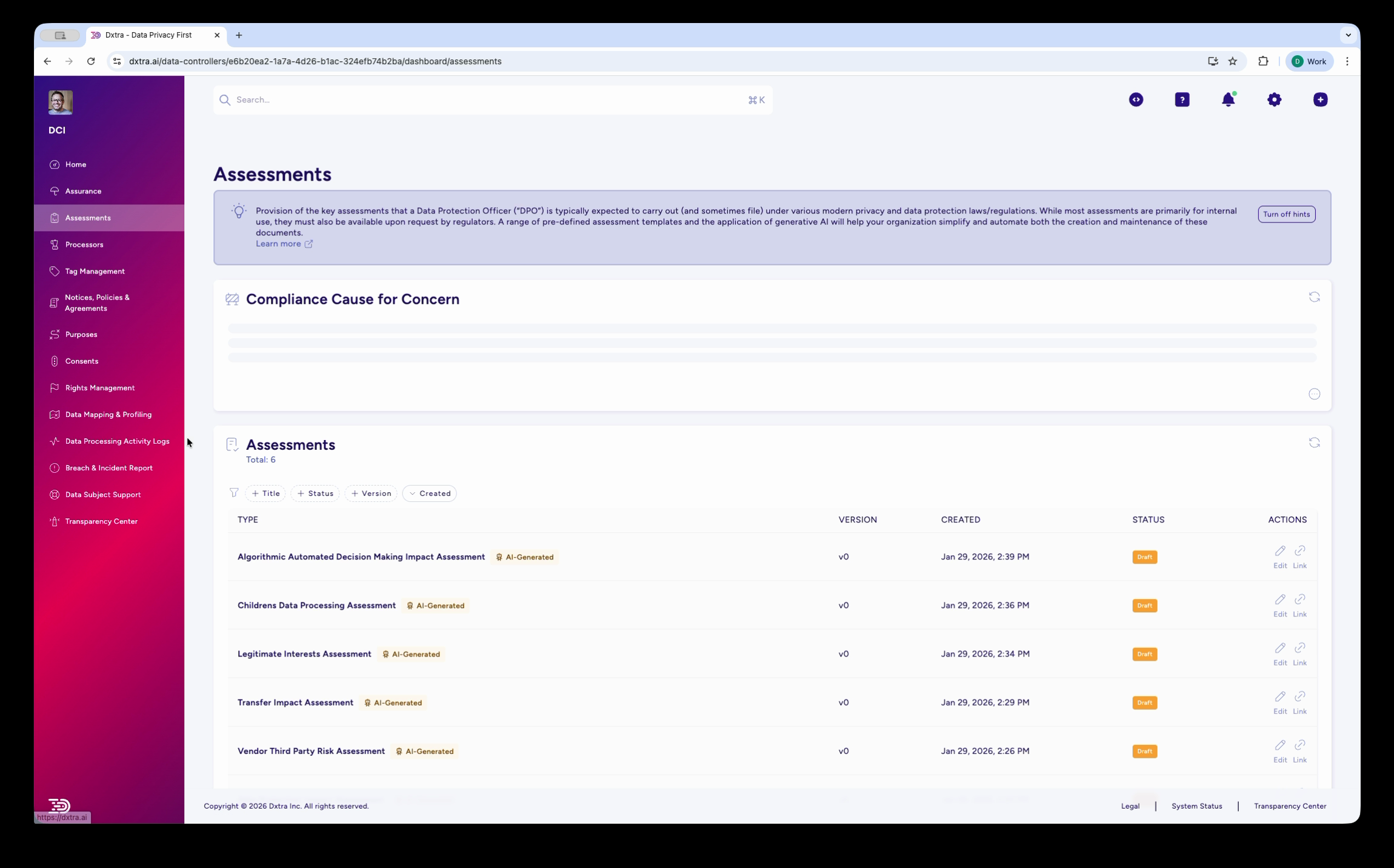
The AI generates a draft assessment that covers risk analysis, mitigation strategies, and approval status. The assessment appears in your Assessments list with an "AI Generated" badge and a status indicator (LIVE or Draft).
Reviewing and Editing the Assessment
Open the assessment to review and edit its contents. The editor has:
- Left pane — Rich text WYSIWYG editor where you can modify assessment content
- Right pane — Live preview showing how the assessment will appear when exported or approved
- Tabs — WYSIWYG editor tab and Processors tab (which links the assessment to specific processors)
- Toolbar — Formatting options, headings, lists, tables, and more
Make edits in the WYSIWYG editor
Click in the left pane to edit assessment sections. You can:
- Revise risk analysis and add additional context
- Update mitigation measures based on vendor communications
- Clarify contractual safeguards or certifications
- Add action items for outstanding vendor questionnaires or audits
Link processors to the assessment
Click the Processors tab to see which processors this assessment covers. You can add or remove processors to scope which vendors the assessment applies to.
Each processor shows:
- Processor name and category
- Data access scope (what data the processor receives)
- Location of processing
- Any active Data Processing Agreement (DPA)
The Processors Tab
The Processors tab shows which data processors are evaluated in this assessment. This links the vendor risk assessment to your actual processor inventory and ensures your assessment stays current as your processor list changes.
For each processor in the assessment:
- Confirm the data access scope is accurate
- Verify the processor's location and sub-processor information
- Check that a signed DPA exists in your records
- Update if the processor's role or data access has changed
If a processor no longer processes your data, remove it from the assessment. If you add a new processor, you can create a new assessment or add it to an existing one.
Approval Workflow
When you're satisfied with the assessment, choose an action at the bottom of the editor:
- Save to Draft — Save your edits without finalizing. The assessment remains in Draft status and is not active.
- Save and Approve — Save your edits and move the assessment to LIVE status. It's now part of your compliance record and evidence of due diligence.
- Reject — Return the assessment to the processor/stakeholder for revision (if this is a team-based workflow).
The assessment includes version tracking and effective dates. When you approve an assessment, it's time-stamped and becomes the active vendor risk documentation for that processor.
Reassessments and versioning
When vendor circumstances change materially, create a new version of the assessment. Dxtra tracks all versions and marks the most recent one as active. Older versions remain in your audit history.
When to Reassess Vendor Risk
Reassess your vendor risk assessments when:
- Vendor changes — The vendor announces new services, acquisitions, or significant organizational changes
- New sub-processors — The vendor onboards a sub-processor that will access your data
- Contract renewals — You renew your contract with the vendor; confirm terms remain acceptable
- Security incidents — Your vendor experiences a breach or security incident; assess the impact
- Certification changes — The vendor gains or loses compliance certifications (SOC 2 renewal, ISO 27001 expiration, etc.)
- Regulatory changes — New regulations affect data protection requirements for this processor
- Minimum annual review — Re-assess at least once per year as a matter of governance
Connecting to Processors
The Vendor Risk Assessment is part of your broader processor governance. For details on managing your processor inventory, see Processor Management.
Your processor list drives several compliance artifacts:
- Assessments — This vendor risk assessment and any transfer impact assessments for processors in high-risk jurisdictions
- DPAs — Data Processing Agreements with each processor
- Privacy notices — Disclosures about which processors have access to personal data
- Transparency Center — A list of processors visible to data subjects
Exporting and Sharing the Assessment
Once approved, you can export the assessment as a PDF and share it via a secure link:
- Open the assessment
- Click the Export as PDF button
- A PDF is generated with all assessment sections, risk analysis, and approval metadata
- Share the PDF link internally (compliance records, audit trails) or with vendors (reassurance about your due diligence)
Frequently Asked Questions
When should I assess a vendor? Before adding a vendor that will process personal data. Dxtra generates the assessment automatically when you create the processor, but you should review and approve it before relying on that vendor.
What if the vendor won't provide information? Work with procurement to include assessment requirements in vendor contracts. Many vendors have pre-built questionnaires or security questionnaires available on their website.
Can I reuse vendor assessments? Use previous assessments as templates, but re-assess when vendor circumstances change materially. Older assessments remain in your audit history as version records.
How do I handle multiple vendors in the same category? Create separate assessments for each vendor so you can track individual vendor risk and have distinct approval trails. You can mark assessments as "similar risk profile" if two vendors have comparable security postures.
What if I identify high-risk issues? Document your findings in the assessment, identify mitigation measures (contractual terms, technical controls, monitoring), and track action items. If risk remains unacceptable, escalate to procurement or business leadership to decide whether to continue using the vendor.
Related Guidance
- Assessments Overview
- Data Protection Impact Assessment
- Transfer Impact Assessment
- Processor Management
Ready to start? Log into Dxtra and select New Assessment → Vendor Third Party Risk Assessment.