Assessments
Compliance assessments document the risks, safeguards, and oversight of your data processing activities. Dxtra generates assessments automatically from your organization's questionnaire answers, then you review, refine, and approve them before they go live.
Why assessments matter
Regulators expect you to demonstrate that you've:
- Identified what personal data you process and why
- Assessed the risks to individuals
- Implemented appropriate safeguards
- Reviewed decisions before deployment (especially for automated decision-making)
Assessments create that documented evidence. They also help you spot gaps in your data protection practices before they become compliance problems.
Assessment types
Dxtra generates five types of assessments, all AI-powered:
Data Protection Impact Assessment (DPIA) Required for high-risk processing under GDPR Article 35. Documents the processing, data types, risks, and risk mitigation measures.
Transfer Impact Assessment (TIA) Assesses risks when transferring personal data to other countries. Documents transfer mechanisms and additional safeguards required.
Legitimate Interests Assessment (LIA) Justifies why your legitimate interest lawfully overrides individuals' rights when processing their data without consent.
Algorithmic Impact Assessment Evaluates systems that make decisions about individuals without human review. Required by GDPR Article 22 and many other frameworks.
Vendor Risk Assessment Evaluates third-party service providers and processors. Covers data security practices, contracts, and compliance commitments.
How Dxtra generates assessments
Your Dxtra questionnaire answers feed into the AI engine, which generates a complete, structured assessment document with:
- Pre-filled data from your organization profile
- Sections and tables tailored to the assessment type
- Risk ratings and gap analysis
- Recommendations for additional safeguards
Every AI-generated document passes a 5-point quality gate and requires human review before publishing. The AI saves you hours of template-filling; you maintain full control over final content.
The Assessments list
Navigate to Governance → Assessments to see all your assessments.
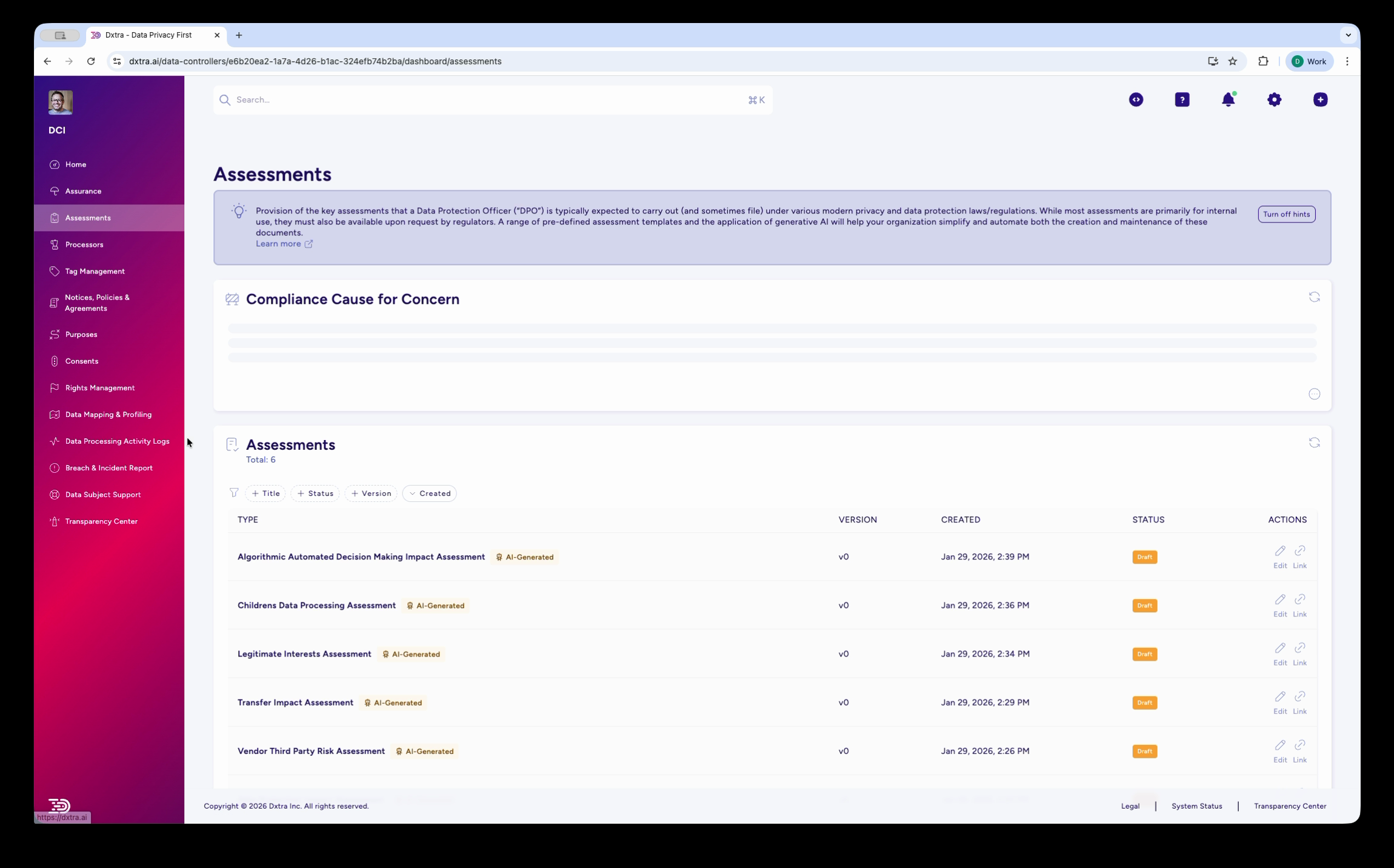
The table shows:
| Column | What it tells you |
|---|---|
| Title | Assessment name (auto-generated; you can rename) |
| Version | Version number increments with each regeneration |
| Created | Date the assessment was first generated |
| Status | LIVE (green, published) or Draft (orange, pending approval) |
| Actions | Edit, view, delete, or share the assessment |
A "Compliance Cause for Concern" banner alerts you if assessments show missing safeguards or unreviewed content.
Assessment workflow
1. Generate
Answer your governance questionnaire. Dxtra's AI engine generates an assessment based on your answers. The assessment starts in Draft status.
2. Review & edit
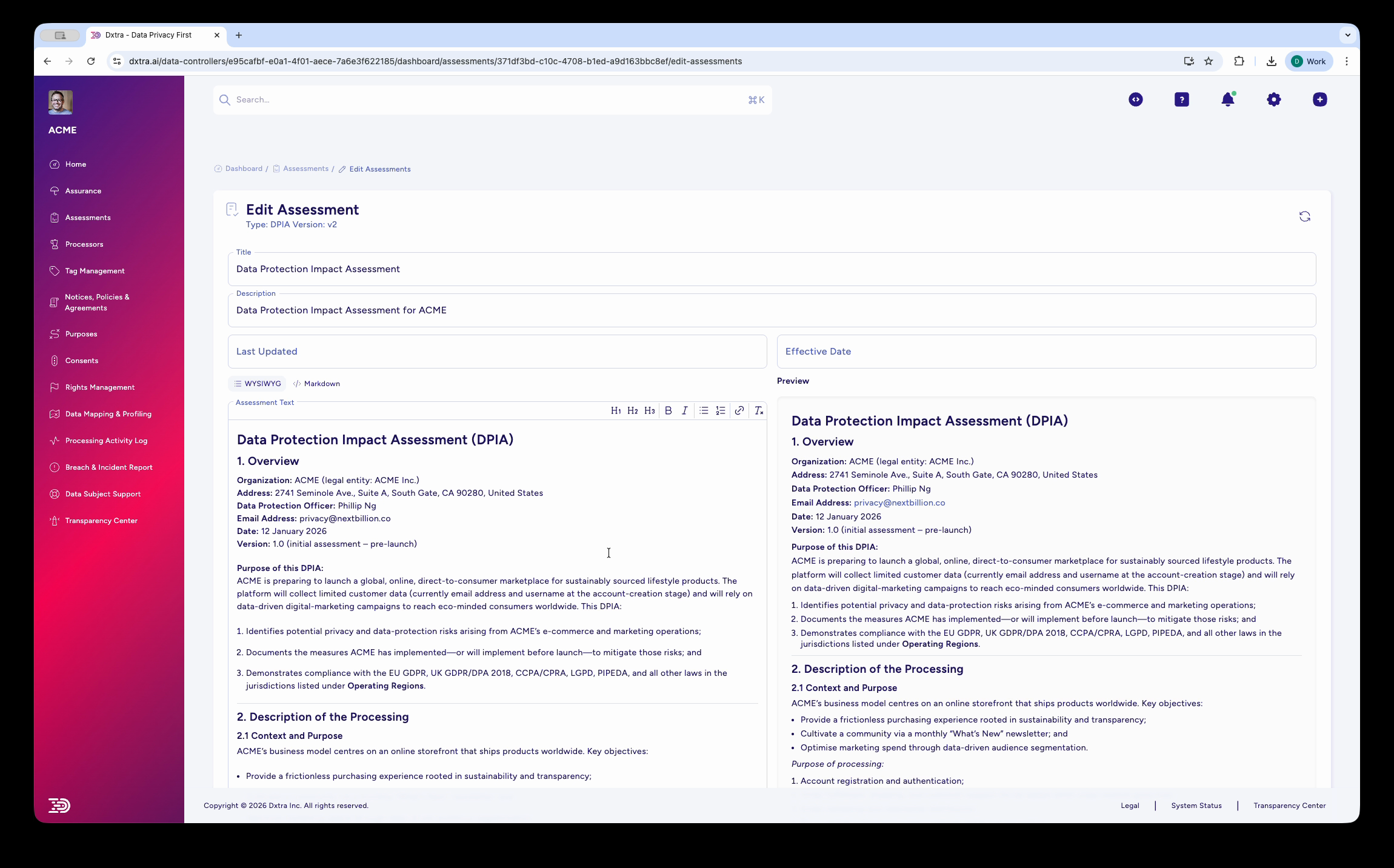
Open the assessment to review the AI-generated content. The split-view editor shows your WYSIWYG edits on the left and a live preview on the right. You can refine sections, add context, or update data that's changed since the questionnaire.
3. Approve
When you're satisfied with the content, click Save and Approve. The assessment moves to LIVE status and becomes your official documented evidence.
4. Export & share
Export the assessment as a PDF (formatted with your branding, if configured). Share the PDF link with auditors, regulators, or other stakeholders.
5. Ongoing review
Assessments should be reviewed annually or when your processing changes. When you regenerate an assessment, you get a new version while the previous version remains in your history.
Compliance Cause for Concern
This banner appears at the top of the Assessments list if:
- An assessment has draft sections that haven't been reviewed
- Missing safeguards are flagged in risk assessments
- An assessment hasn't been reviewed in over 12 months
- Action items on the assessment are incomplete
Address the items listed to keep your compliance program current.
AI Regeneration
Regenerate means Dxtra re-runs the AI engine to generate a fresh assessment based on updated questionnaire answers. This is useful when:
- Your data processing changes
- You've added new safeguards
- You want to refresh risk assessments with new information
Each plan has a monthly regeneration quota:
| Plan | Regenerations/month |
|---|---|
| Start | 1 |
| Growth | 2 |
| Scale | 3 |
| Enterprise | 10+ (custom) |
When you regenerate, the old version stays in your history, and a new version is created in Draft status for your review.
Next steps
- Run a DPIA — Step-by-step guide to reviewing and approving a Data Protection Impact Assessment.
- Governance overview — See how assessments fit into your compliance program.