Review your initial compliance setup
After completing the data controller profile wizard and activating your subscription, Dxtra's AI engine generates your Version 0 — a complete initial compliance framework tailored to your organization, operating regions, and industry. This takes approximately 30–60 minutes.
You'll receive an email notification and an in-app confirmation when Version 0 is ready.
Your account is active
When you log in after Version 0 is generated, the Home dashboard displays an activation confirmation with a summary of your subscription and next steps.
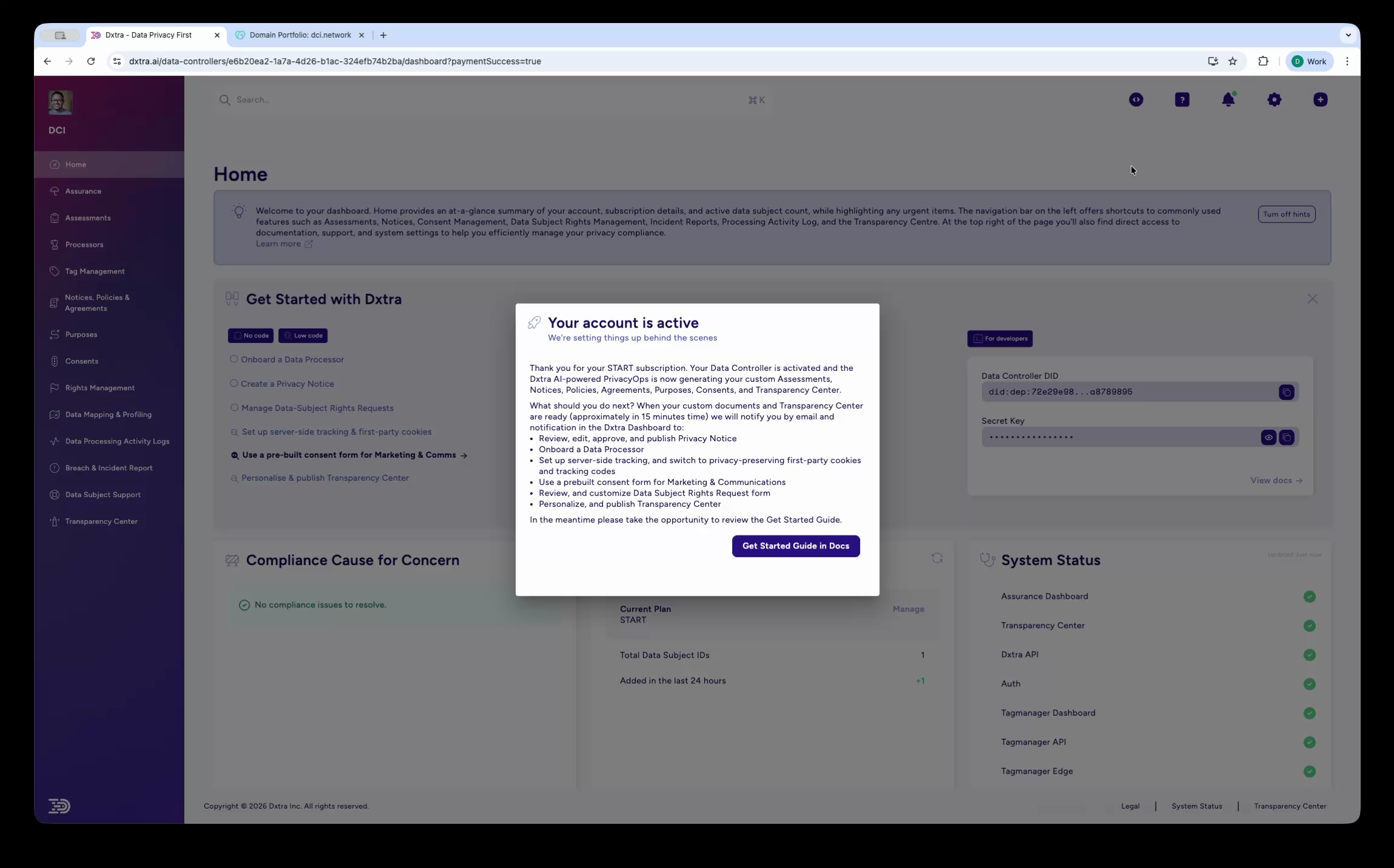
The Home dashboard showing a "Your account is active" modal overlay. The modal confirms your START subscription is processed, your Data Controller is screened, and your initial compliance framework is generated. A list of recommended next steps appears, along with a "Get Started Guide in Docs" button. Behind the modal, the Home dashboard shows the Get Started checklist, Plan Overview (START plan), and System Status indicators.
What Version 0 includes
Your AI-generated Version 0 covers the following, all tailored to your operating regions and industry:
Assessments — Data Protection Impact Assessments (DPIAs), Legitimate Interests Assessments (LIAs), Transfer Impact Assessments (TIAs), Vendor Third-Party Risk Assessments, Algorithmic/Automated Decision Making Impact Assessments, and Children's Data Processing Assessments where applicable to your context.
Notices and policies — Privacy notices in full, overview, and quick-look formats. Cookie policies, Terms and Conditions, Data Processing Addendums (DPAs), and related documents generated in your selected languages.
Consent configuration — Pre-configured consent types (Strictly Necessary, Performance/Analytics, Functional, Targeting/Marketing) linked to your processing purposes.
Purposes and legal basis — Automated categorization of data processing activities based on your industry, with appropriate legal basis determinations.
Data subject rights forms — Access, deletion, portability, rectification, and objection request forms ready for deployment.
Transparency Center — A public-facing privacy portal customized for your organization, ready to publish on your subdomain or embed as a web component.
Review before publishing
Review all AI-generated content carefully. While Dxtra creates a strong baseline, customize notices and policies to reflect your specific data practices. Have your legal counsel review before publishing.
Review your rights management setup
Navigate to Rights Management in the sidebar to review the data subject rights Dxtra has configured for your organization.
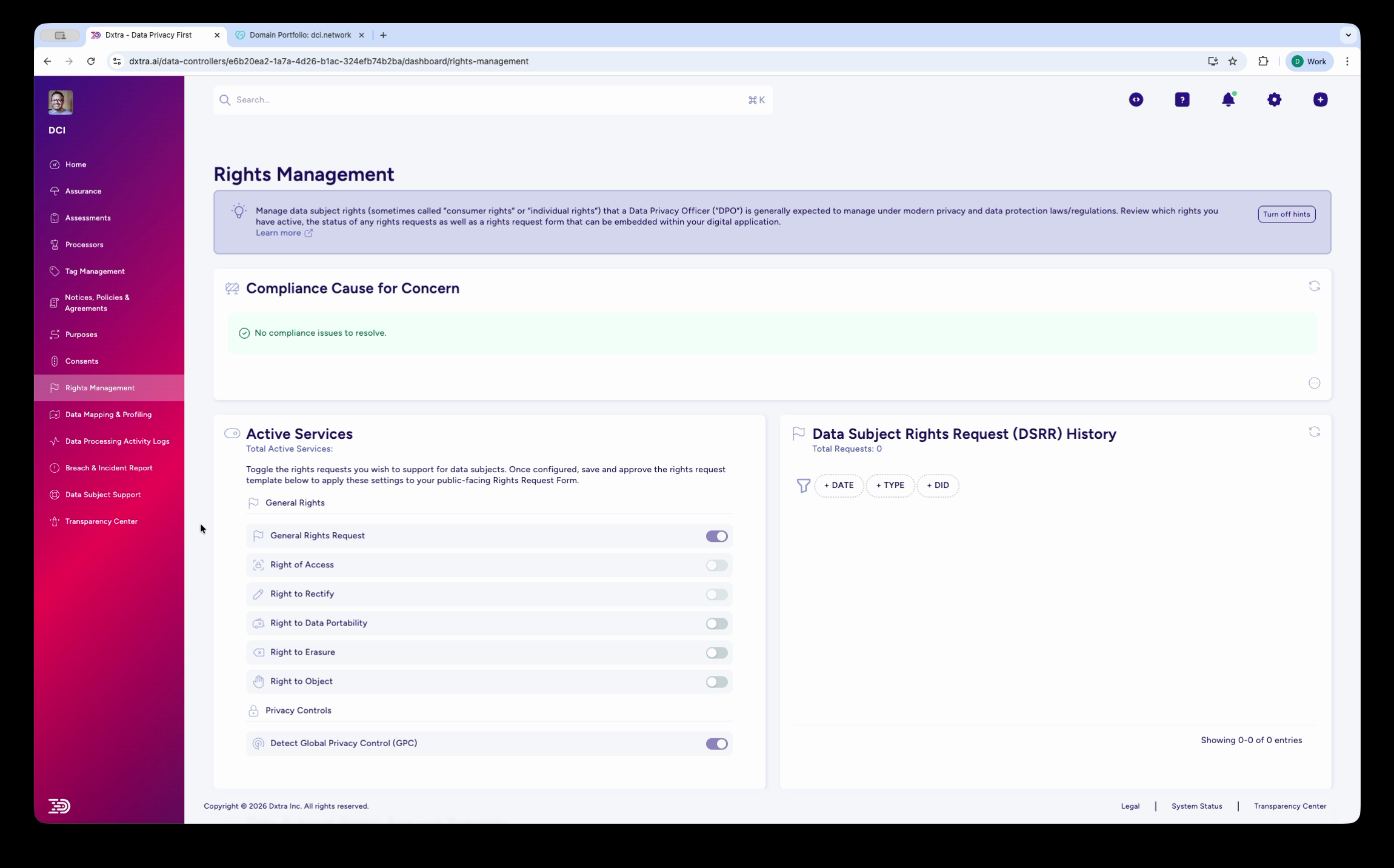
The Rights Management page showing a Compliance Cause for Concern section at the top, followed by two main sections: Active Services on the left with toggles for General Rights, General Rights Request, Right of Access, Right to Rectify, Right to Data Portability, Right to Erasure, Right to Object, Privacy Consent, and Detect Global Privacy Control (GPC). On the right, the Data Subject Rights Request (DSRR) History section with date, type, and status columns.
The Active Services section shows which rights your organization supports, with toggles to enable or disable each. Once configured, these settings feed into your public Data Subject Rights Request form on the Transparency Center.
Review each toggle and confirm it matches your organization's obligations:
- General Rights Request — Allows data subjects to submit general privacy inquiries
- Right of Access — Data subjects can request a copy of their personal data (GDPR Article 15, CCPA Section 1798.100)
- Right to Rectify — Data subjects can correct inaccurate data (GDPR Article 16)
- Right to Data Portability — Data subjects can receive their data in a portable format (GDPR Article 20)
- Right to Erasure — Data subjects can request deletion of their data (GDPR Article 17, CCPA Section 1798.105)
- Right to Object — Data subjects can object to processing (GDPR Article 21)
- Privacy Consent — Manage consent preferences
- Detect Global Privacy Control (GPC) — Automatically honor browser-level opt-out signals
Review your Transparency Center
Navigate to Transparency Center in the sidebar to preview the public-facing privacy portal Dxtra has generated.
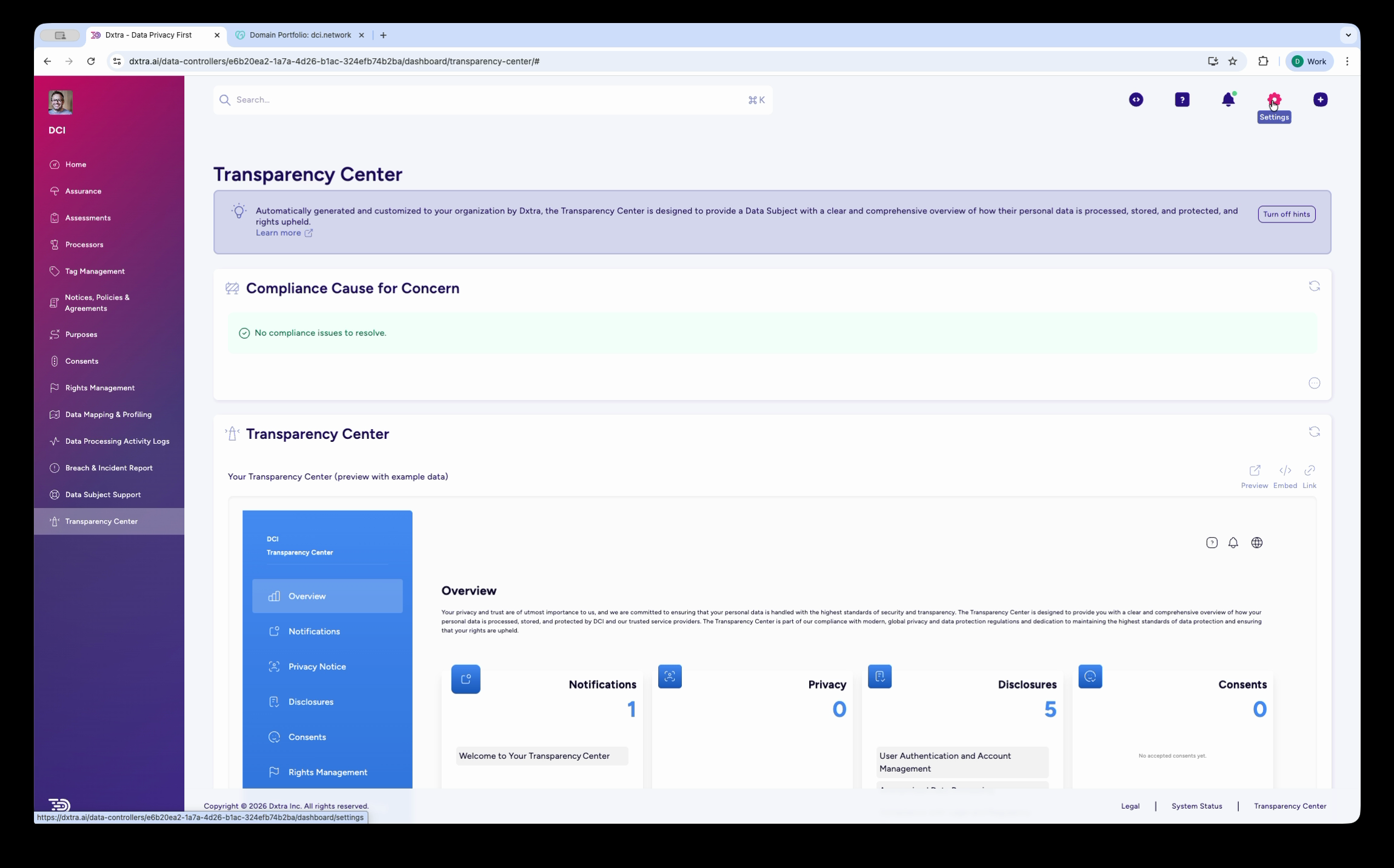
The Transparency Center admin page showing a Compliance Cause for Concern section at the top, then the Transparency Center preview below. The preview includes a left sidebar navigation with sections for Overview, Notifications, Privacy Notices, Disclosures, Consents, and Rights Management. The main content area shows the Overview tab with counts for Notifications, Privacy, Disclosures, and Consents.
The Transparency Center preview shows what data subjects see when they visit your privacy portal. Review each section:
- Overview — A summary landing page with counts of your notifications, privacy notices, disclosures, and consent categories
- Notifications — Any privacy-related notifications for data subjects
- Privacy Notices — Your AI-generated privacy notices in full, overview, and quick-look formats
- Disclosures — Data processing disclosures and transparency statements
- Consents — Consent management interface where data subjects control their preferences
- Rights Management — The form where data subjects submit access, deletion, and other rights requests
Follow the Get Started checklist
The Home dashboard includes a Get Started with Dxtra checklist. Work through each item to complete your setup:
- Onboard a Data Processor — Register your vendors and service providers in the Processors section
- Create a Privacy Notice — Review and approve your auto-generated privacy notice in Notices, policies & agreements
- Manage Data Subject Rights Requests — Configure your rights request form and publish it via the Rights Management section
- Set up server-side hosting — Register your domain for first-party cookie tracking in Organization settings
- Use a consent form — Select and publish a consent form for your website via Consents
- Personalize and publish Transparency Center — Customize branding and publish your privacy portal via Transparency Center
Iterate beyond Version 0
Your Version 0 is a baseline. As your business evolves, use Dxtra's AI regeneration feature to update your compliance framework:
- New processing activity — Add a new purpose and regenerate affected privacy notices
- New data processor — Register the processor and update disclosures
- Policy change — Update policies and create a new version for audit trail
- Regulatory changes — Regeneration accounts for new regulations as they come into force
Each plan includes a monthly AI regeneration quota (1 for Start, 2 for Growth, 3 for Scale, 10 for Enterprise). Each regeneration creates a new version, maintaining a clear audit trail of how your compliance program evolved.
Not legal advice
AI-generated content does not constitute legal advice. Consult a qualified legal professional for advice specific to your jurisdiction and business context.
Next steps
- Configure organization settings — Branding, domain, and detailed organization configuration
- Invite team members and configure security — Add your team and enable 2FA
- Workspace onboarding overview — Full onboarding walkthrough
- Home dashboard reference — Understand the dashboard layout and features