Breach & Incident Report¶
The Breach & Incident Report page is your centralized registry for documenting, tracking, and reporting data breaches and security incidents. From here you create breach reports, assess their impact and risk, manage regulatory notifications, and maintain a complete audit trail.
Sidebar location: Breach & Incident Report URL path: /data-controllers/{id}/dashboard/breach-incident-report
[!TIP] For workflow guides on filing a breach report and building a response plan, see Report a breach and Breach response plan.
What you can do¶
- View all breach and incident reports in a filterable registry
- Create new breach reports using the 5-tab guided form
- Track risk levels, affected individuals, and regulatory notification deadlines
- Upload supporting documentation and evidence
- Publish completed reports with electronic signature
- View published reports in a read-only 6-tab modal
Breach report list¶
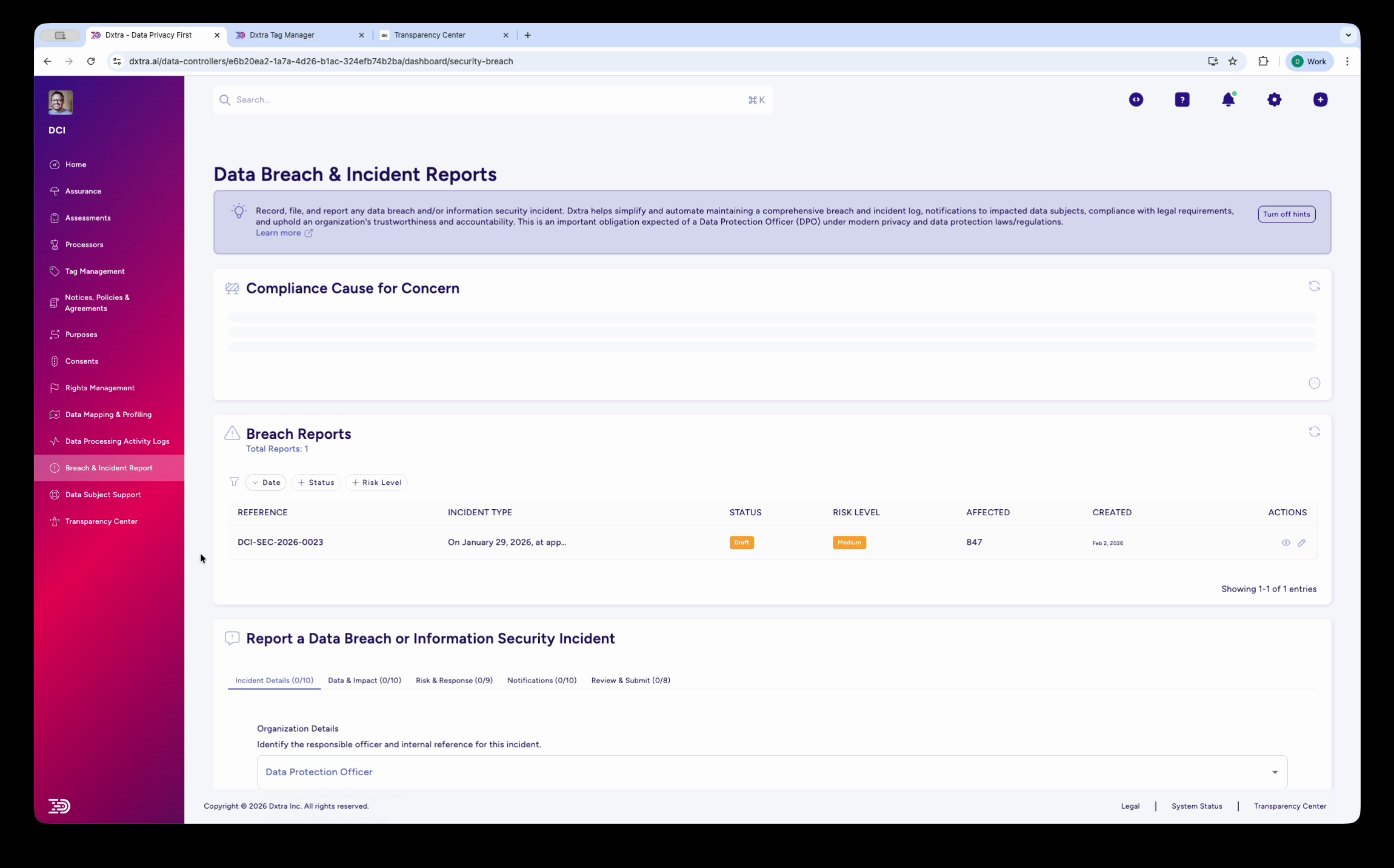
The Data Breach & Incident Reports page showing the breach log with columns for Reference, Incident Type, Status, Risk Level, Affected count, Created date, and Actions. A sample breach entry is displayed with status and risk level badges. Below, the "Report a Data Breach or Information Security Incident" section shows a multi-step form with five tabs: Incident Details, Data & Impact, Risk & Response, Notifications, and Review & Submit. The form starts with "Organization Details" including the Data Protection Officer assignment.
Navigate to Breach & Incident Report in the sidebar. The page shows your breach registry at the top and a multi-step reporting form below.
The breach registry displays the following columns:
| Column | Description |
|---|---|
| Reference | Unique breach reference number in the format {ControllerPrefix}-SEC-{Year}-{Sequence} (e.g. DCI-SEC-2026-0023) |
| Incident Type | Short description of the breach category |
| Status | Current state — Draft or Published |
| Risk Level | Assessed severity — Low, Medium, High, or Critical (shown as a color-coded badge) |
| Affected | Number of individuals affected |
| Created | Date the report was first created |
| Actions | Edit or view the full report |
Creating a breach report¶
To report a new breach, complete each of the five tabs: Incident Details, Data & Impact, Risk & Response, Notifications, and Review & Submit. Each tab shows a completion counter that updates in real time as you fill in fields.
Tab 1: Incident Details¶
The first tab captures the basic incident information: Organization Details (including Data Protection Officer assignment), incident type and description, discovery date and time, systems affected, and initial classification.
Tab 2: Data & Impact¶
This tab documents the personal data involved and the scope of individuals affected.
Personal Data Affected:
| Field | Type | Description |
|---|---|---|
| Categories of Personal Data | Multi-select | Select the categories of personal data involved (e.g. Basic Identity, Contact Details, Financial Data) |
| Specific Identifiers Affected | Multi-select checkboxes | Select specific data elements exposed (e.g. names, email addresses, account numbers) |
| Data Protection Measures | Multi-select checkboxes | Select security measures that were in place at the time (e.g. encryption, access controls, pseudonymization) |
| Were Encryption Keys Compromised? | Radio | Yes / No / Unknown |
Affected Individuals:
| Field | Type | Description |
|---|---|---|
| Categories of Data Subjects | Dropdown | Select the category of affected individuals (e.g. Customers, Employees, Suppliers) |
| Number of Affected Individuals | Radio | Exact Count or Range Estimate |
| Number of Individuals Affected | Number | Enter the count or estimate of affected individuals |
| Number of Records Affected | Number | Total data records involved |
| Geographic Scope | Multi-select | Jurisdictions of affected individuals — displayed as color-coded jurisdiction chips |
[!NOTE] Geographic Scope selections automatically correlate with the applicable notification thresholds shown on the Notifications tab.
Tab 3: Risk & Response¶
Capture the risk assessment (Overall Risk Level, Potential Consequences, Detailed Risk Assessment), response actions (Measures Taken, Immediate Containment Actions, Ongoing Mitigation Measures, Long-term Improvements), and evidence preservation details.
Tab 4: Notifications¶
Document regulatory notifications (whether notification is required, applicable thresholds per jurisdiction, authorities notified), individual notifications (recommended actions for affected individuals, detailed recommendations), and third-party/processor involvement.
Tab 5: Review & Submit¶
The final tab captures lessons learned, remediation planning, supporting evidence, and the formal submission declaration.
Lessons Learned:
| Field | Type | Description |
|---|---|---|
| Root Cause Analysis | Textarea | Document the primary vulnerability, contributing factors, and root cause determination |
| Identified Vulnerabilities | Textarea | List specific vulnerabilities discovered during investigation |
Remediation Action Plan:
| Field | Type | Description |
|---|---|---|
| Action Items | List | Each item has: Action (text), Owner (text), Due Date (date), Status (dropdown) |
| Add Action Item | Form | Action, Owner, Deadline, + button to add |
Supporting Documentation:
| Field | Type | Description |
|---|---|---|
| Document Category | Dropdown | Select category for the uploaded file (e.g. Evidence & Screenshots) |
| File Upload | Drop zone | Upload supporting files |
| Uploaded Files | Table | Columns: CATEGORY, FILE NAME, SIZE, UPLOADED, ACTIONS |
Declaration & Submission:
| Field | Type | Description |
|---|---|---|
| Submitter Name | Text (required) | Name of the person submitting the report |
| Position/Title | Text (required) | Role or title of the submitter |
| Submission Date | Datetime | Auto-populated, editable |
| Electronic Signature | Text (required) | Typed signature for formal declaration |
| Report Status | Display | Shows current status. Publishing locks the form. |
[!WARNING] Once a report is published, the form is locked. Contact your administrator to make changes to a published report.
Viewing a published breach report¶
Click the View (eye icon) on any published breach report to open the Breach Report Details modal. This read-only view organizes the report into 6 tabs — different from the 5-tab edit view:
Overview tab¶
| Field | Description |
|---|---|
| Reference | Unique breach reference (e.g. DCI-SEC-2026-0023) |
| Status | Published |
| Brief Description | Summary of the incident |
| Created | Date and time the report was first created |
| Updated | Date and time of the most recent edit |
| Published | Date and time the report was published |
| Risk Level | Assessed severity (Low, Medium, High, Critical) |
| Potential Consequences | List of potential impacts (e.g. Identity Theft, Account Takeover, Reputational Damage, Loss of Control) |
Incident tab¶
Displays the incident type, discovery timeline, systems affected, and attack vectors from the Incident Details tab of the edit form.
Impact tab¶
Displays the data categories affected, number of individuals, and geographic jurisdictions from the Data & Impact tab of the edit form.
Risk tab¶
Displays the risk assessment summary, likelihood and severity scoring, and detailed risk narrative from the Risk & Response tab of the edit form.
Response tab¶
Displays containment actions taken, ongoing mitigation measures, long-term improvements, and evidence preservation details from the Risk & Response tab of the edit form.
Notifications tab¶
Displays regulatory notifications sent, individual notification actions, third-party/processor involvement, and timeline compliance status from the Notifications tab of the edit form.
From this view you can click Edit Report to return to the edit form, or Close to dismiss.
Background: regulatory context¶
Breach definition and scope¶
A data breach occurs when personal information is accessed, disclosed, or lost without authorization. This can affect data confidentiality (disclosed to unauthorized parties), integrity (modified, deleted, or corrupted), or availability (made inaccessible to legitimate users).
[!NOTE] Not all security incidents are breaches. An attempted attack that was unsuccessful or an incident affecting non-personal data does not trigger breach notification requirements.
Regulatory notification timelines¶
Notification obligations vary significantly by jurisdiction:
GDPR (EU/EEA): Article 33 requires notification to the supervisory authority within 72 hours of becoming aware of a breach, unless the breach is unlikely to result in a risk to individuals. Article 34 separately requires notification to affected individuals without undue delay where the breach is likely to result in a high risk to their rights and freedoms.
CCPA/CPRA (California): Cal. Civ. Code §1798.82 requires breach notification to affected individuals in the most expedient time possible and without unreasonable delay. Note: the commonly cited 45-day deadline applies to data subject rights requests under CPRA §1798.100(d), not breach notification.
UK DPA 2018: Same framework as GDPR — 72 hours to the supervisory authority (ICO) unless unlikely to result in risk. Notification to individuals without undue delay where there is likely high risk.
PDPA (Singapore): Section 26D requires notification to the PDPC within 3 calendar days after the organization assesses the breach is notifiable. A breach is notifiable if it results in or is likely to result in significant harm to individuals, or affects 500 or more individuals.
APPI (Japan): Notify without undue delay. Depends on likelihood and impact of harm.
Brazil LGPD: Notify without undue delay. Supervisory authority notification if public security is at risk.
[!IMPORTANT] Regulatory timelines are provided for general guidance only. Dxtra tracks applicable deadlines based on your Geographic Scope selections, but always consult qualified legal counsel for jurisdiction-specific compliance requirements. AI-generated content does not constitute legal advice.
Notification content¶
To Regulatory Authorities: name and contact of data controller, description of breach and affected data, likely consequences for individuals, measures taken or proposed to remedy, and contact for further information.
To Affected Individuals: what personal data was compromised, likely consequences, steps they should take to protect themselves, measures taken to prevent recurrence, and DPO/privacy team contact for questions.
Types of incidents¶
Common breach categories include external attacks (ransomware, hacking, phishing), internal errors (accidental disclosure, misconfigured storage, lost devices), and third-party breaches (processor/vendor compromise, sub-processor exposure, supply chain incidents).
Best practices¶
Develop a Response Plan: Document procedures, decision trees, and approval authorities before incidents occur. Practice tabletop exercises regularly.
Establish Clear Escalation: Define who needs to be notified at each stage and document decision authority for notification determinations.
Preserve Evidence: Maintain logs, forensic data, and chain-of-custody documentation in secure, isolated storage.
Implement Preventive Controls: Encryption (in transit and at rest), access controls, monitoring systems, and staff training.
Vendor Risk Management: Assess processor security programs and include breach notification requirements in all Data Processing Agreements.
Related pages¶
- Report a breach — Step-by-step guide to filing a breach report
- Breach response plan — Building your incident response workflow
- Data Mapping & Profiling — Understand data sensitivity for breach risk assessment
- Rights Management — Support individuals exercising erasure rights after breaches
- Transparency Center — Communicate security measures and breach history to build trust
Refer to GDPR Articles 33-34 (Breach Notification), Cal. Civ. Code §1798.82, UK DPA 2018 §67-68, Singapore PDPA §26D, APPI Article 26, and Brazil LGPD Articles 48-49.