Rights Management
The Rights Management page lets you configure which data subject rights your organization supports and manage incoming Data Subject Rights Requests (DSRRs).
URL path: /data-controllers/{id}/dashboard/rights-management
Access: Select Rights Management in the left sidebar.
What you see
The page has two main sections:
- Active Services (left) — Toggleable rights and privacy controls
- DSRR History (right) — A table tracking all submitted requests
Active Services
Configure rights toggles
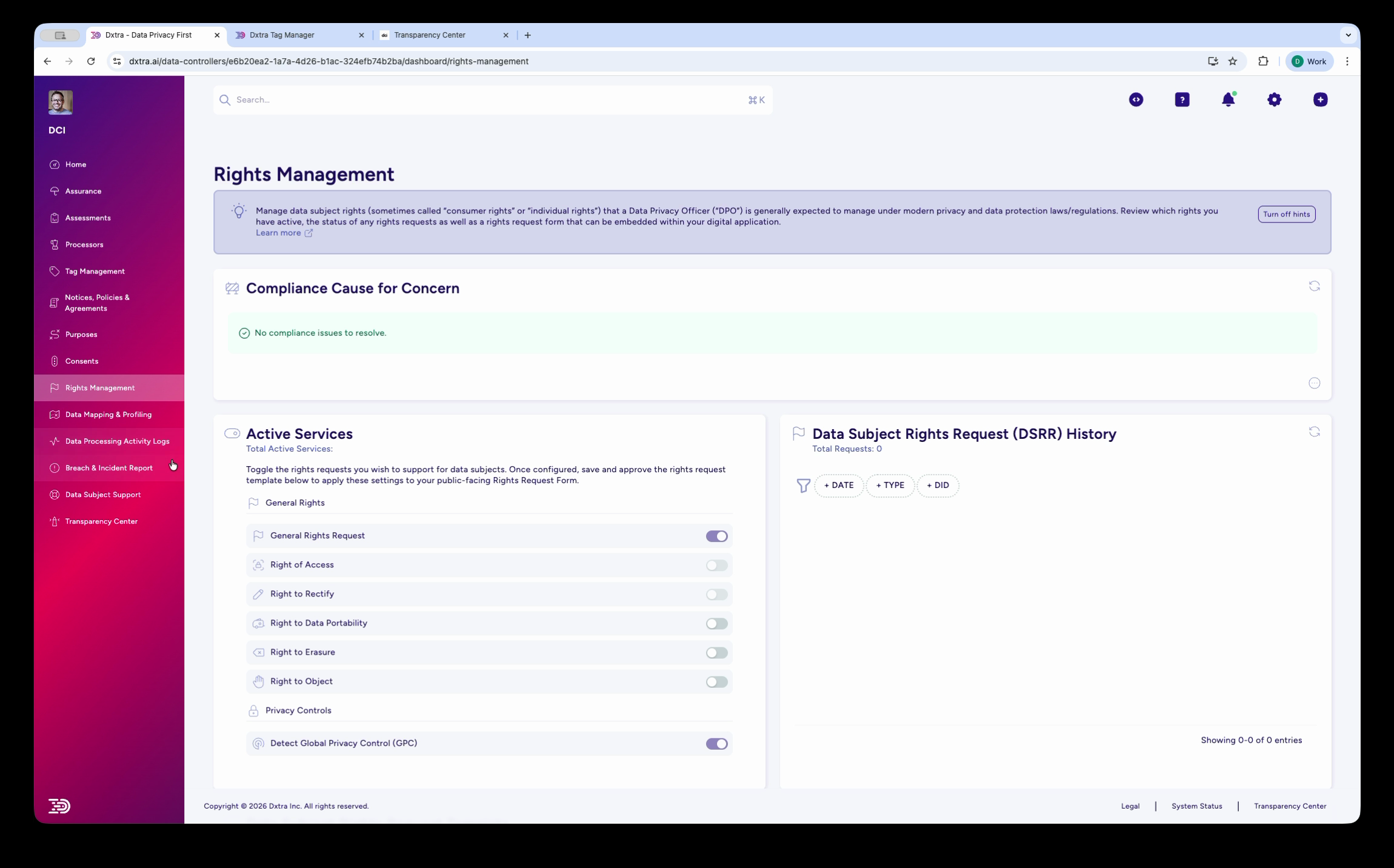
The Rights Management page showing two main sections. On the left, "Active Services" lists toggleable rights: General Rights Request, Right of Access, Right to Rectify, Right to Data Portability, Right to Erasure, Right to Object, Privacy Contract, and Detect Global Privacy Control (GPC). Each right has an on/off toggle and an expand arrow. On the right, "Data Subject Rights Request (DSRR) History" shows a table for tracking submitted requests with date, type, and status columns.
Enable or disable each right using the toggle switch. Plus a separate GPC privacy control.
Seven core data subject rights
- Right of Access — Data subjects can retrieve all personal data you hold about them.
- Right to Rectification — Correct inaccurate or incomplete information.
- Right to Erasure — Request permanent deletion of personal data.
- Right to Restriction — Limit how their data is processed.
- Right to Data Portability — Receive data in a structured, machine-readable format.
- Right to Object — Oppose processing for direct marketing or profiling.
- Right to Not Be Subject to Automated Decision-Making — Challenge decisions made without human review.
Global Privacy Control (GPC)
Dxtra detects Global Privacy Control (GPC) signals from browsers. GPC is managed as a separate privacy control, not as one of the seven core rights. When enabled, Dxtra automatically respects GPC signals by opting users out of data sales and sharing.
DSRR History
The DSRR History table tracks all submitted requests. Columns include:
| Column | Description |
|---|---|
| Reference | Unique request identifier |
| Type | The request type — one of: Access, Rectification, Erasure, Restriction, Portability, or Objection |
| Status | Current state: In Progress, Complete, or Verified |
| Created | Date the request was submitted |
| Actions | View details or respond to the request |
Customize the request form
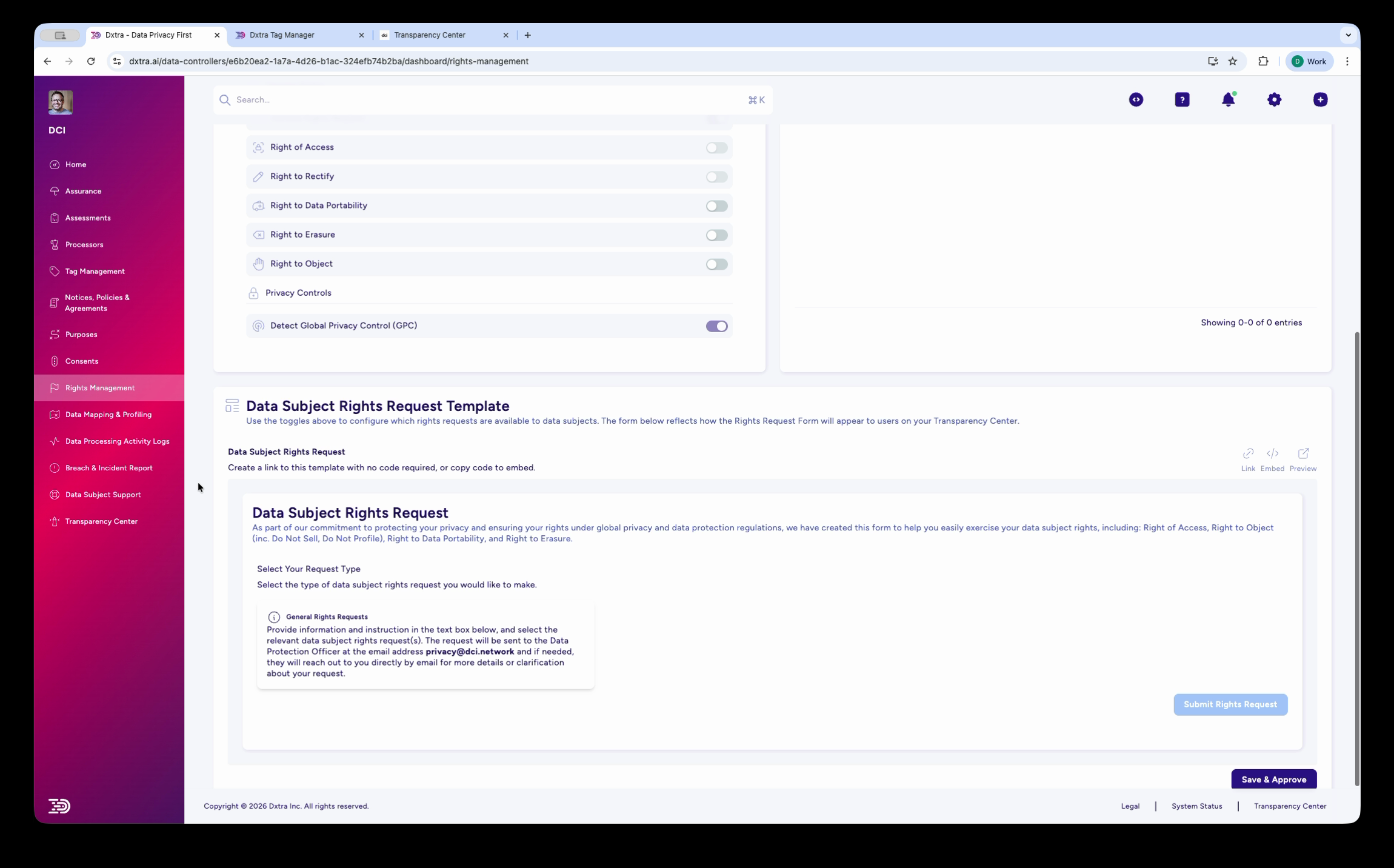
The Rights Management page scrolled down, showing the "Data Subject Rights Request Template" section. This includes a link to the request form that can be shared with data subjects, and a preview of the "Data Subject Rights Request" form. The form asks data subjects to select their request type (General Rights Request shown with description), and includes a "Save & Respond" button.
Below the Active Services, configure the Data Subject Rights Request Template — the form data subjects use to submit requests. The form is accessible via a shareable link that you can embed on your Transparency Center or website.
Compliance timelines by regulation
| Regulation | Deadline | Extension |
|---|---|---|
| GDPR | 1 month from receipt | Extendable by 2 months for complex requests |
| CCPA | 45 days from verified request | — |
| Other jurisdictions | Typically 30–45 days | Varies |
For full deadline tracking details, see DSRR deadlines.
Related
- Handle a data subject rights request — Step-by-step DSRR processing guide
- DSRR deadlines — Deadline tracking and compliance timelines
- Transparency Center — Where data subjects submit requests
- Compliance issues — Track overdue DSRRs