Processing Activity Log
Overview
The Record of Processing Activity (RoPA) is the authoritative documentation of how your organization collects, uses, stores, and shares personal data. It serves as both a compliance requirement and a practical operational guide for privacy governance.
Privacy regulations across jurisdictions require organizations to maintain detailed records of their data processing activities. Beyond compliance, the RoPA provides: - A single source of truth for data practices - Evidence of lawful processing and due diligence - Operational guidance for teams handling personal data - Foundation for impact assessments and compliance reviews - Protection against regulatory fines and enforcement actions
Who uses this feature
- Data Protection Officer (DPO): Owns the RoPA, ensures updates, and provides documentation during regulatory inquiries
- Developer: Integrates processing activities into APIs and Tag Manager to track actual data flows
- Auditor & Regulator: Reviews documented practices and data handling procedures during investigations and compliance audits
Essential RoPA elements
Each processing activity in your RoPA should document:
Controller & Processor Details
- Data Controller: Entity determining processing purposes and means
- Processor Details: Names and contact information of processors
- Sub-Processors: Any processors that further engage third parties
- Data Protection Officer (DPO): Contact information if appointed
- Joint Controllers: Other parties sharing controller responsibility
Processing Purposes
- Primary Purpose: Main business reason for collecting and processing
- Secondary Purposes: Additional permitted uses of the data
- Marketing & Communications: Whether data is used for promotional activities
- Analytics & Profiling: Any algorithmic decision-making or behavioral analysis
- Legal/Regulatory: Obligations driving the processing
Data Categories
Categories of Data Subjects: Who is affected? - Customers or users - Employees or contractors - Patients or students - Website visitors - Third-party contacts
Categories of Personal Data: What information is processed? - Identifiers (name, ID, email) - Contact information (phone, address) - Technical data (IP addresses, cookies, device IDs) - Behavioral data (transactions, interactions, preferences) - Sensitive data (health, financial, biometric information) - Inferred attributes (scores, predictions, classifications)
Legal Basis & Retention
Lawful Basis: Why processing is permitted? - Consent: Individual has given explicit permission - Contract: Processing necessary to deliver promised services - Legal Obligation: Law requires the processing - Vital Interests: Protects critical health or safety needs - Public Task: Processing is necessary for government functions - Legitimate Interests: Organization has valid business reasons
Retention Schedules: How long data is kept? - Specific duration (e.g., "one month from last interaction") - Trigger events (e.g., "until customer account is closed") - Regulatory requirements (e.g., "7 years for tax purposes")
Managing your RoPA in Dxtra
Dashboard Overview
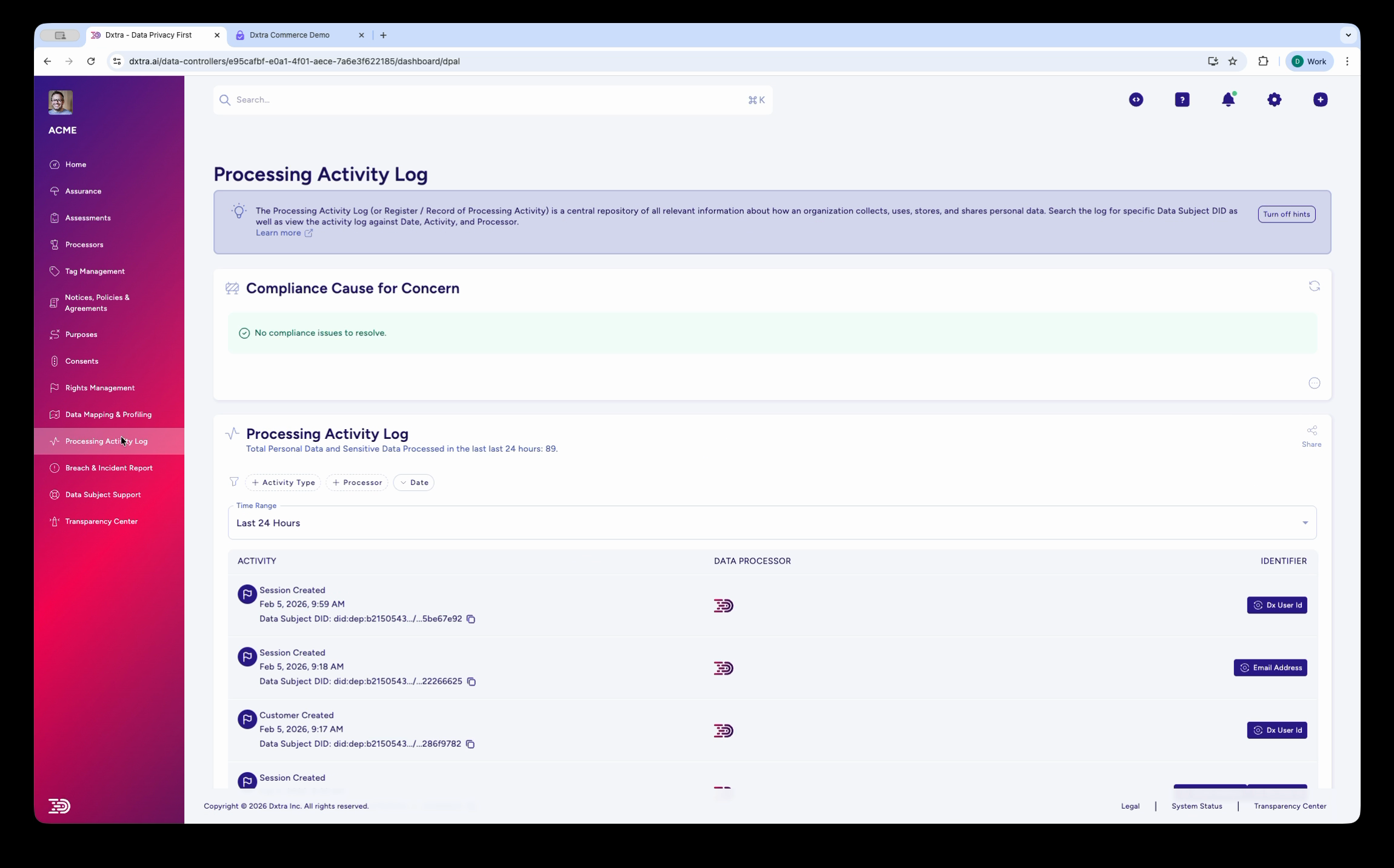
The Processing Activity Log page showing a chronological list of data processing activities. Each entry displays the activity type (e.g., "Session Created," "Customer Created"), timestamp, Data Subject DID reference, and the associated Data Processor icon. A "Compliance Cause for Concern" status banner appears at the top. Filter tabs include Activity Type, Processors, and Date, with a time range selector (default: "Last 24 Hours").
The Processing Activity Log displays a chronological record of all data processing events. Each entry shows:
- Activity type: What processing occurred (session created, customer created, etc.)
- Timestamp: When the activity was recorded
- Data Subject DID: The decentralized identifier for the affected individual
- Data Processor: Which processor performed the activity
- Certification status: Whether the activity is certified compliant
Searching & filtering
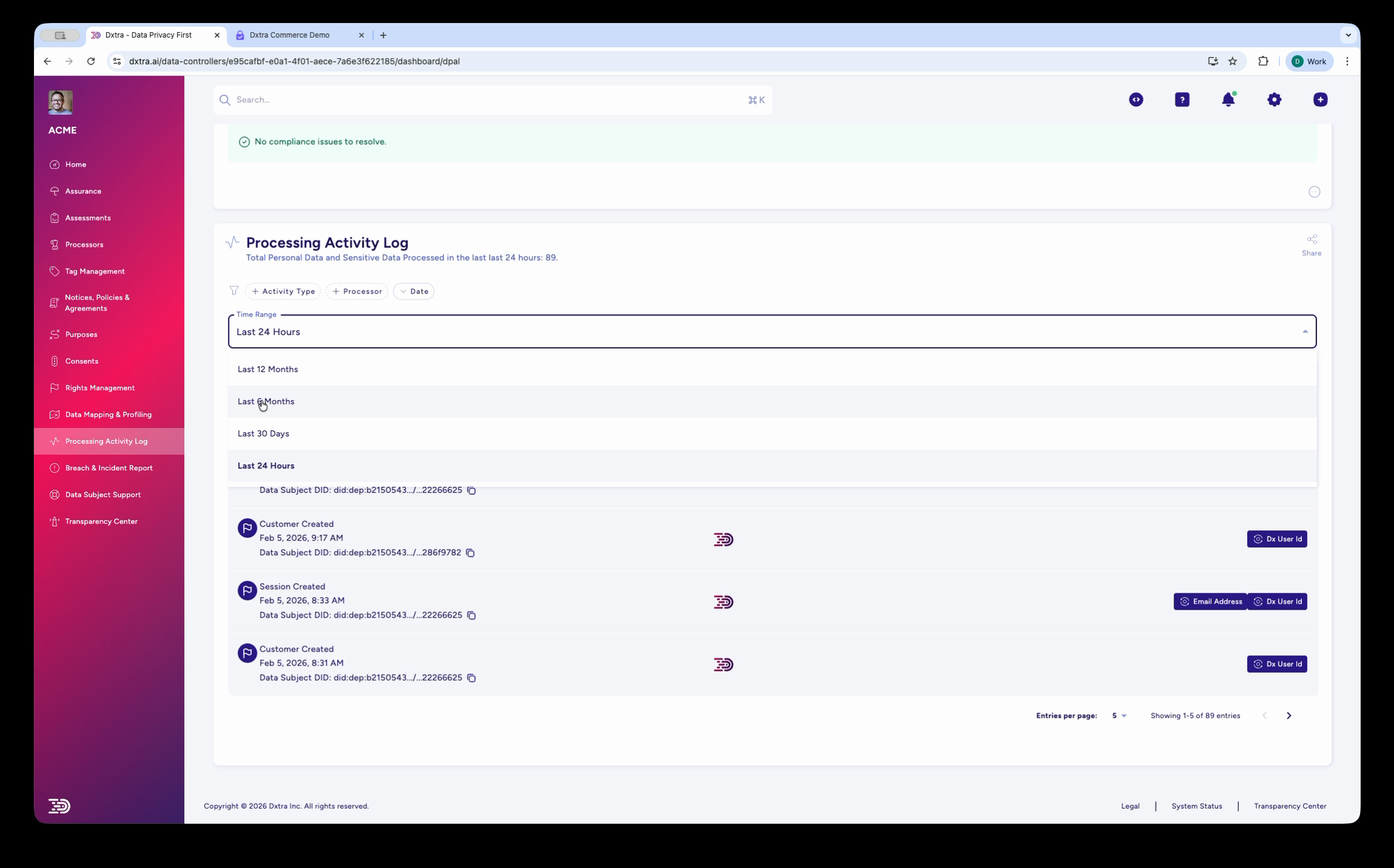
The Processing Activity Log with the time range filter dropdown expanded, showing options: Last 24 Hours, Last 12 Months, Last 6 Months, Last 30 Days. The activity list shows entries with pagination controls at the bottom.
Use the search and filtering interface to: - Search by processing activity name or description - Filter by legal basis (consent, contract, legal obligation, etc.) - Filter by data category (customer, employee, visitor, etc.) - Filter by retention period - View audit trail of changes
Maintenance process
Quarterly Reviews
- Assess whether documented practices match actual operations
- Interview data custodians and team leads
- Verify retention schedules are being followed
- Review new data sources or recipients
Annual Updates
- Comprehensive refresh of the entire RoPA
- Audit all changes made during the year
- Assess whether legal bases remain valid
- Update retention schedules based on business changes
- Verify security measures are current
Change Management
Update RoPA when processing changes: - New data sources or types collected - Additional purposes or recipients for existing data - Changes to retention periods - Modified security or access controls - Jurisdictional or regulatory changes
Approval & Signature
- Privacy officer review and approval
- Data controller sign-off
- Executive acknowledgment for significant processing
- Dated approval records in RoPA
Best practices
Be Specific Use precise language rather than generic descriptions. "Customer service support" is better than "general business purposes."
Align with Practice Document what actually happens, not what should ideally happen. Regulators expect consistency between written policies and real operations.
Regular Audits Conduct spot checks of actual processing against documented practices. Discrepancies indicate either documentation or procedural problems requiring correction.
Training Requirements Use RoPA as a basis for privacy training. Ensure teams understand which lawful basis applies to their processing activities.
Impact Assessments Reference RoPA findings when conducting Data Protection Impact Assessments. Start with high-risk activities identified through the inventory.
Vendor Management Require processors and vendors to provide documentation supporting their role in your RoPA. Verify contractual terms align with documented processing.
Incident Correlation Use RoPA to assess impact when breaches occur. Which data categories were compromised? Which data subjects are affected? RoPA answers these critical questions.
Related documentation
- Notices, policies & agreements — Base your privacy notice on RoPA findings
- Rights Management — Use RoPA to understand which systems contain responsive data
- Security & Breach reporting — Reference RoPA when assessing breach impact
Refer to GDPR Article 30 (Records of Processing Activities) and equivalent requirements under CCPA Section 1798.100, PIPEDA Schedule 1, and your local privacy laws.