Data Subject Support¶
The Data Subject Support section enables you to provide self-service help to data subjects through an AI-powered Help Center. This reduces support burden on your privacy team while improving user experience and regulatory compliance.
Overview¶
Modern privacy frameworks expect organizations to make privacy information and rights accessible to individuals. A well-designed Help Center serves dual purposes: helping data subjects understand their rights and providing operational support for your privacy team through self-service alternatives.
Help Center components¶
AI-Powered Q&A¶
Data subjects can ask any privacy-related question and receive AI-generated answers. The system learns from your FAQs and organizational settings to generate consistent, personalized replies.
Rate limits: Each verified data subject gets 3 questions per day. This prevents abuse while ensuring genuine data subjects can get help whenever they need it.
How it works: 1. Data subject types a question (e.g., "What happens to my data if I delete my account?") 2. The AI reads your configured policies, FAQs, and organizational settings 3. A personalized answer is generated and displayed immediately 4. The data subject can ask follow-up questions (within their daily limit) 5. If the AI cannot answer adequately, the system can escalate to your DPO contact information
This approach reduces the burden on your privacy team by answering routine questions automatically while maintaining human oversight for complex issues.
FAQs¶
Your Help Center includes a searchable FAQ section with expandable accordion-style answers. Common privacy questions appear here:
- "What is this Transparency Center?"
- "How do I request access to my data?"
- "How do I request deletion of my data?"
- "How can I contact your organization?"
You can customize and add FAQs to match your specific practices and policies. When you update FAQs, the AI uses them as reference material to generate better answers.
Search Bar¶
A prominent search bar lets data subjects find answers by keyword. They can search for terms like "delete," "export," or "privacy," with results surfacing matching FAQs and AI-suggested topics.
Contact Your DPO¶
The Help Center displays your Data Protection Officer's contact information, pulled directly from your organization settings:
- DPO Name
- Email Address
- Physical Address
This makes it easy for data subjects to reach out directly if they need more help than the Help Center provides.
Configuration¶
Step 1: Review your Help Center report¶
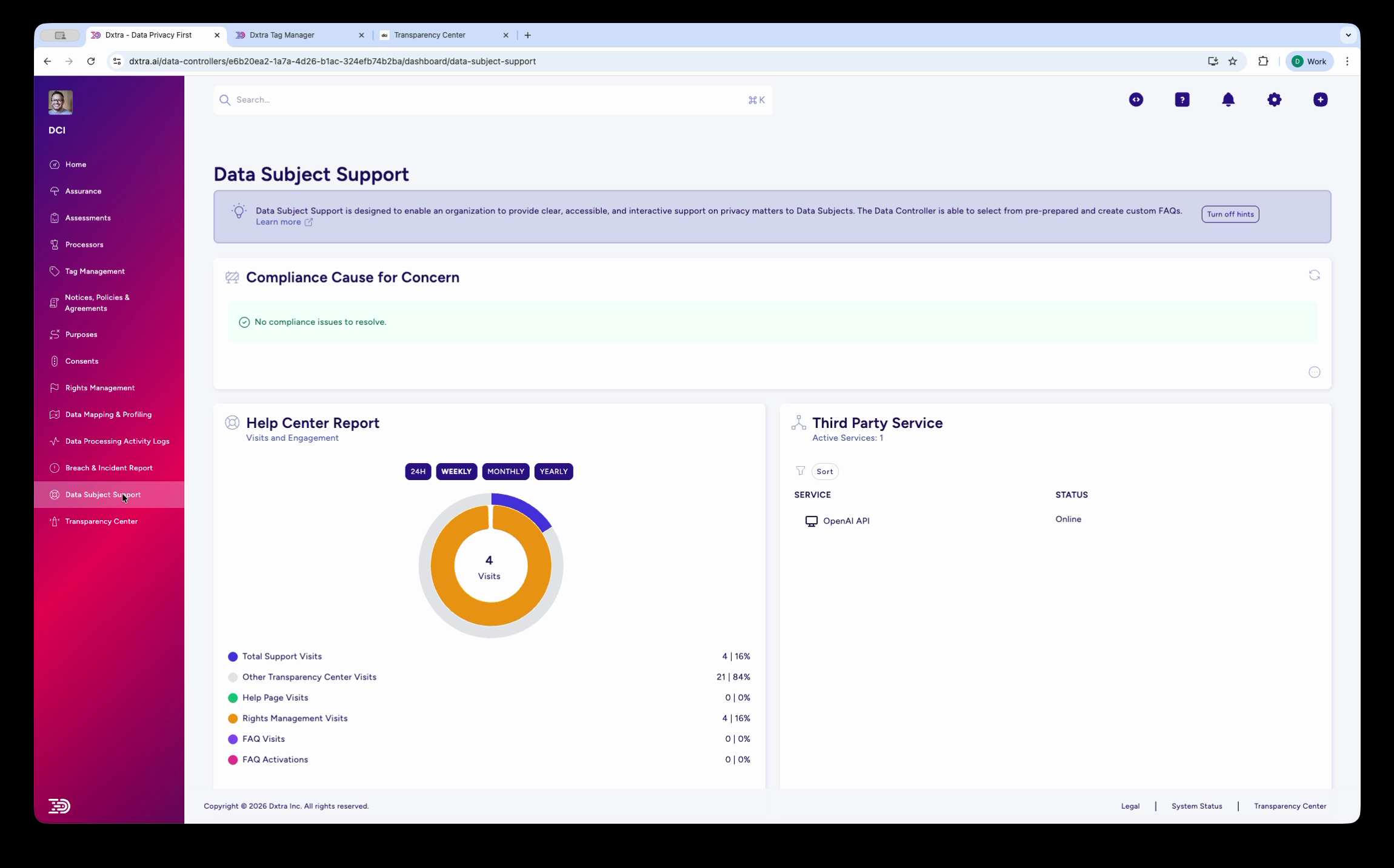
The Data Subject Support page showing two main sections. On the left, the "Help Center Report" displays a donut chart of visitor engagement metrics broken down by category: Total Support Visits, Other Transparency Center Visits, View Page Visits, Rights Management Visits, FAQ Visits, and FAQ Activations — with counts in the donut chart and both counts and percentages in the breakdown table. Filter tabs (24H, Weekly, Monthly, Yearly) let you adjust the time range. On the right, the "Third Party Service" section shows connected external services with their status (e.g., OpenAI API: Online).
Navigate to Data Subject Support in the sidebar. The page has two main panels.
Help Center Report (left panel)¶
The Help Center Report displays a donut chart showing visitor engagement metrics broken down by category. The donut chart displays counts for each category, while the breakdown table shows both counts and percentages.
| Metric | What it measures |
|---|---|
| Total Support Visits | All visits to the Help Center |
| Other Transparency Center Visits | Visits to other TC sections (not Help Center) |
| View Page Visits | Page views within the Help Center |
| Rights Management Visits | Visits to rights request pages |
| FAQ Visits | Views of FAQ entries |
| FAQ Activations | Times a data subject expanded/clicked an FAQ answer |
Use the time range filter tabs — 24H, Weekly, Monthly, Yearly — to adjust the reporting period.
Third Party Service monitoring (right panel)¶
The Third Party Service panel shows the real-time status of external AI services that power the Help Center Q&A feature:
- Anthropic API — Status: Online/Offline
- OpenAI API — Status: Online/Offline
- Linear API — Status: Online/Offline
If a service shows as Offline, the AI-powered Q&A feature may be degraded. Data subjects can still browse FAQs and contact your DPO.
Step 2: Manage your FAQs¶
Dxtra provides 22 pre-built Dxtra Support FAQs covering common privacy questions. You can also create your own custom FAQs.
Pre-built FAQs¶
The 22 pre-built FAQs cover topics like: "What is this Transparency Center?", "How do I request access to my data?", "How do I request deletion of my data?", and "How can I contact your organization?" These are ready to use out of the box.
Custom FAQs¶
Add your own FAQs tailored to your business practices. Custom FAQs appear alongside the pre-built ones and can be deleted at any time.
AI-generated FAQs¶
Dxtra can generate FAQ answers using AI. Each plan includes a limited number of AI FAQ generation credits — for example, the START plan includes 20 credits. The credit counter is displayed when you create a new AI-generated FAQ (e.g. "19/20 remaining"). To add an AI-generated FAQ:
- Click Add New FAQ
- Enter the question
- Click Generate — the AI reads your configured policies, organizational settings, and existing FAQs to produce an answer
- Review the generated answer and edit if needed
- Click Submit to publish
Step 3: Publish your Help Center¶
Publish your completed Help Center to make it accessible to data subjects. The Help Center appears as part of your Transparency Center, giving data subjects a self-service way to find answers before contacting your DPO.
Best practices¶
Write for clarity¶
- Use short sentences, bullet points, and examples to break up content
- Avoid technical terms; if you must use them, explain them in plain language
- Be specific about your actual practices—mention real retention periods, actual vendors you work with, and your exact policies
- Keep FAQs current; review quarterly and update when business practices change
Prioritize your audience¶
Remember that data subjects may be non-lawyers with varying levels of privacy knowledge. Write for a general audience, not experts in data protection law. When you explain a complex concept, start with the simple version and then provide details for those who want to understand more deeply.
Customize FAQs for your business¶
Standard FAQs (applicable across most organizations): - How do you collect my data? - How long do you keep my data? - Do you sell or share my data? - How do I exercise my privacy rights?
Company-Specific FAQs (tailored to your business): - Product-specific data handling - Industry practices - Integration with third-party services
Maintain your Help Center¶
Weekly: Monitor AI chatbot for unanswered questions; add new FAQs as needed.
Monthly: Review support tickets and identify new FAQ candidates. Add FAQs for the top questions your team receives directly.
Quarterly: Audit all FAQ content for accuracy against current privacy policies. Test all links to ensure resources are still current. Verify that your FAQs align with any recent changes to your data practices or policies.
Annually: Conduct comprehensive help center refresh. Assess design and functionality for usability and accessibility. Gather user feedback on clarity and helpfulness. Update any outdated information based on changes to your business model or regulatory landscape.
Measure success¶
Track these metrics to understand how well your Help Center is working: - FAQ views and search queries: Identify which topics are most important to data subjects - AI chatbot accuracy: Monitor which questions the system cannot answer well - Support ticket reduction: Compare support email volume before and after Help Center launch - User satisfaction: Collect feedback on whether FAQs were helpful and clear
Multi-regional compliance¶
Tailor content to specific jurisdictions: - GDPR (EU): Detailed rights explanations, DPO contact - CCPA/CPRA (California): Consumer rights, opt-out explanations - PIPEDA (Canada): Access request procedures - PDPA (Singapore): Consent requirements - APPI (Japan): Security measures, complaint contact
Related pages¶
- Rights Management — Help data subjects understand and exercise their rights
- Transparency Center — Provide comprehensive privacy information via dedicated portal
- Data Mapping & Profiling — Use mapping insights to explain data handling practices
Ensure your Help Center supports the transparency requirements of GDPR Articles 13-14, CCPA §1798.100, PIPEDA §4-5, and equivalent regulations in your jurisdiction.