Data Mapping & Profiling
Data mapping and profiling provides the foundational understanding of how your organization collects, processes, and uses personal information. This practice is essential for building privacy by design, conducting impact assessments, and demonstrating regulatory compliance.
Overview
Effective data governance begins with comprehensive data mapping—understanding what data you hold, where it originates, how it flows through your systems, and how it's ultimately used. Profiling analysis extends this to examine algorithmic decision-making, data quality, and individual impact.
Core mapping categories
Data Classification
Personal Data: Any information identifying or relating to a natural person. - Direct identifiers (name, email, ID number) - Quasi-identifiers (age, location, occupation) - Behavioral data (purchase history, browsing, interactions) - Inferred attributes (preferences, predictions, scores)
Sensitive Data: Special categories warranting enhanced protection. - Racial or ethnic origin - Political opinions and affiliations - Religious or philosophical beliefs - Trade union membership - Genetic and biometric data - Health information - Sex life and sexual orientation - Criminal convictions and offenses
Data Sources & Flows
Map the complete journey of information: - Sources: Where data originates (user input, third parties, inferred) - Entry Points: Systems and processes that receive data - Processing Steps: Transformations, enrichment, or analysis - Storage Locations: Systems and geographies holding data - Recipients: Internal teams and external partners accessing data - Exit Points: How data leaves your control (deletion, export, sharing)
Lawful Basis & Retention
Every processing activity requires: - Lawful Basis: Consent, contract, legal obligation, vital interests, public task, or legitimate interests - Purpose: Specific, explicit reason for processing - Necessity: Whether data is actually required for stated purpose - Retention Period: How long data is kept before deletion
[!NOTE] Multiple lawful bases may support different uses of the same dataset. Document each independently.
Algorithmic profiling assessment
When your organization uses automated decision-making or profiling:
Key Documentation Elements
Processing Purposes: What specific business outcomes drive the profiling? - Credit decisions or risk assessment - Targeting or personalization - Performance evaluation or fraud detection
Data Categories: Which personal data types feed the algorithm? - Behavioral data (historical transactions, interactions) - Demographic information - Derived or inferred attributes
Impact on Individuals: What outcomes does the profiling determine? - Eligibility for services or benefits - Pricing or offer terms - Restrictions or exclusions
Human Intervention & Rights
Ensure individuals can challenge automated decisions through human review availability, explanation mechanisms, and formal appeal procedures.
Implementation steps
Step 1: Review file scan results
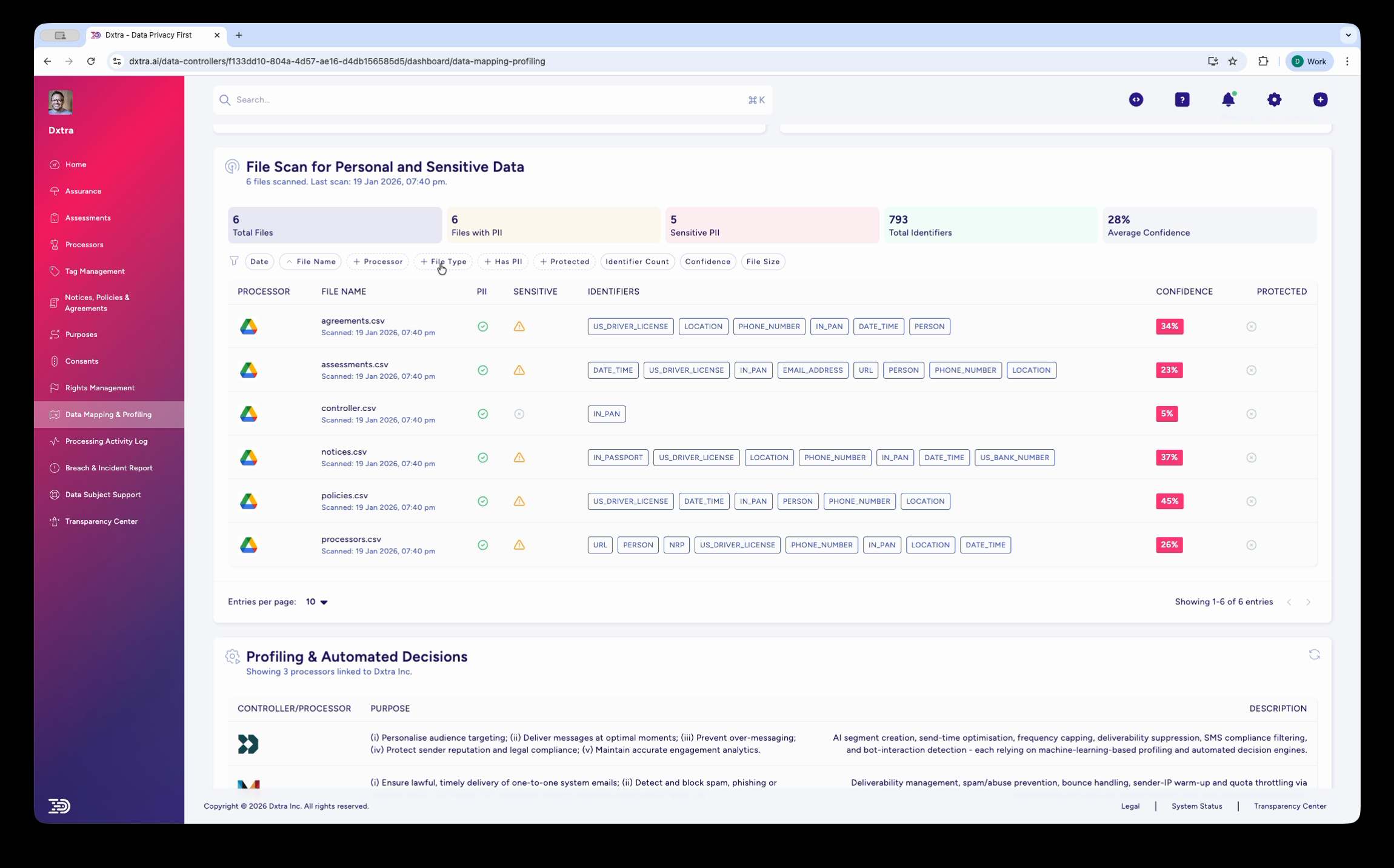
The Data Mapping & Profiling page showing the "File Scan for Personal and Sensitive Data" section. Summary stats display Total Files, Files with PII, Sensitive PII count, Total Identifiers, and Average Confidence percentage. Below, a table lists scanned files with columns for Processor icon, File Name, Identifiers (shown as colored category badges like PERSON, LOCATION, DATE, PHONE, EMAIL), Confidence score, and Protected status. Filter tabs include All, Processors, File Type, Protected, Identifier Type, Confidence, and File Size.
Navigate to Data Mapping & Profiling in the sidebar. The page shows results from your personal data scan, with summary statistics across all scanned files. Each file displays the PII identifiers detected (shown as colored badges), confidence scores, and protection status. Use the filter tabs to narrow results by processor, file type, or identifier category.
Data subject identifier table
In the Transparency Center, data subjects see a data mapping view that lists all personal data identifiers Dxtra has detected for them. The table displays:
| Column | Description |
|---|---|
| Identifier | The personal data element detected (e.g. Email Address, Full Name, Billing Address, Geographic Location, Cookie Identifiers) |
| Type | The identifier classification (e.g. Direct Identifier, Quasi-Identifier, Behavioral) |
| Category | Whether the identifier is Personal Data or Sensitive Personal Data |
| Status | Whether the identifier is Active, Archived, or Pending Deletion |
| Actions | View details, including which processors hold this identifier and the associated processing purposes |
The data mapping page is paginated — data subjects can browse through all detected identifiers across multiple pages. Colored processor icons next to each identifier show which connected processors (e.g. Shopify, Google Analytics, Mailchimp) hold that data element, providing full visibility into where their personal data is stored.
Step 2: Review profiling and automated decisions
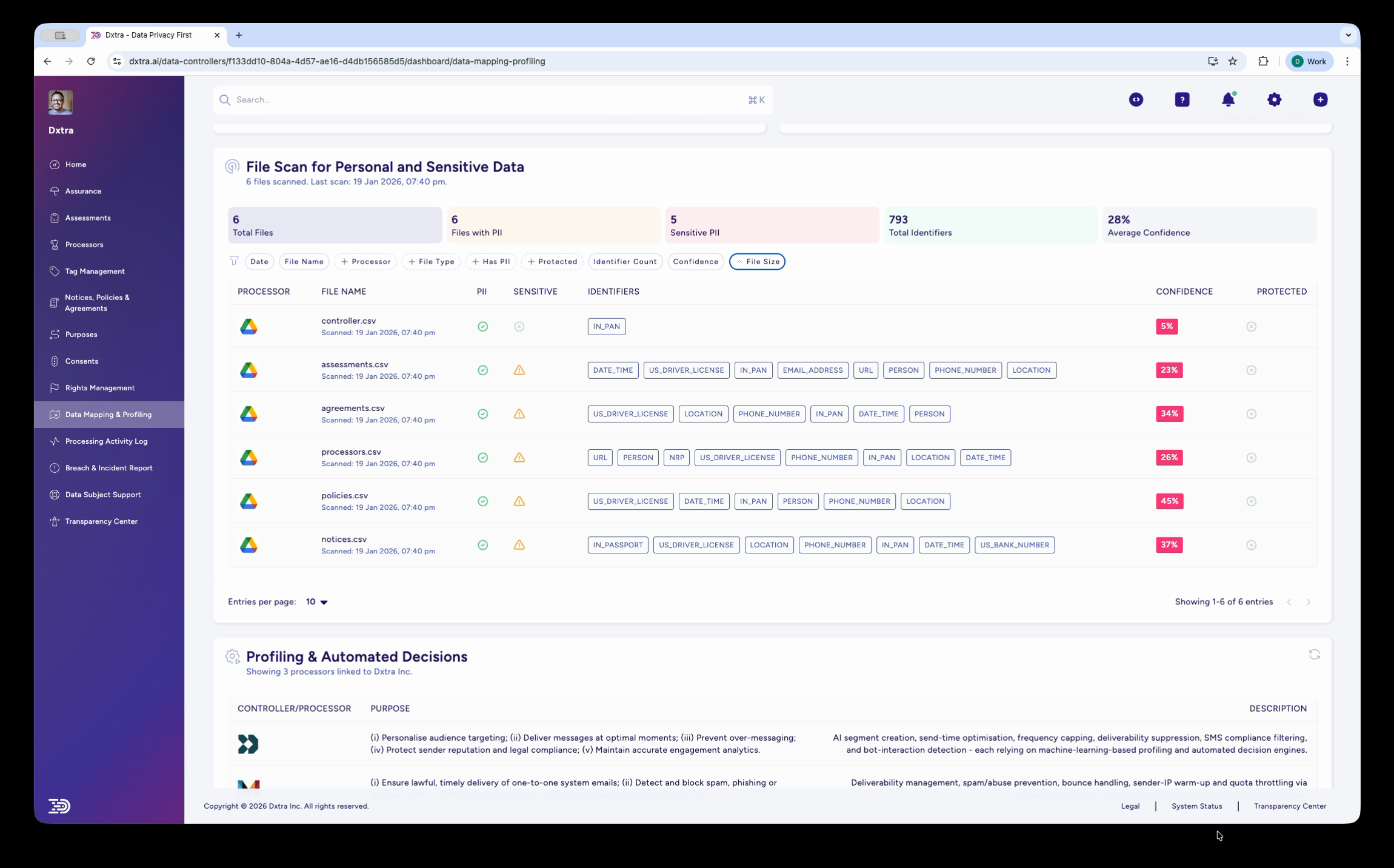
The same File Scan page with the "File Size" filter dropdown expanded, showing options for sorting and filtering results. Below the file scan table, the "Profiling & Automated Decisions" section lists data controllers/processors with their stated purposes and descriptions of automated processing activities.
Scroll down to review the "Profiling & Automated Decisions" section, which documents any algorithmic processing. This includes the controller/processor involved, the stated purpose, and a description of the automated decision-making activities. Use this information for impact assessments and regulatory compliance documentation.
Best practices
Start with High-Value Data: Prioritize mapping for sensitive data and high-volume processing before expanding to lower-risk activities.
Involve Cross-Functional Teams: Engage engineering, product, security, and business teams. Comprehensive mapping requires diverse perspectives.
Document Assumptions: Record decisions about data necessity, retention periods, and legal basis. Future reviewers need context.
Automate Discovery: Use data classification tools and automated scanning to identify personal data in your systems.
Regular Updates: Schedule quarterly or semi-annual reviews of your mapping. Business processes and data flows change frequently.
Test with Real Scenarios: Validate your mapping against actual use cases. Mock requests reveal gaps and inconsistencies.
Related pages
- Rights Management — Use mapping to efficiently fulfill access and erasure requests
- Security & Breach reporting — Report unauthorized access to sensitive data identified through mapping
- Transparency Center — Communicate your data practices based on mapping findings
Refer to GDPR Articles 13-14 (transparency), Article 35 (DPIA), and Chapter 3 (rights) for detailed regulatory requirements.