Consents
This page describes the Consents screen in the Dxtra dashboard. For workflow guides on consent configuration and form building, see Consent management.
Overview
The Consents module provides a comprehensive system for capturing and managing valid consent from individuals. This includes designing consent mechanisms, collecting consent, maintaining records, and enabling individuals to withdraw consent. Proper consent management is essential under GDPR Article 7, CCPA Section 1798.100, and similar regulations worldwide.
Who uses this feature
- Business Owner: Approves consent forms and marketing campaigns before deployment
- Data Protection Officer (DPO): Ensures consent mechanisms meet GDPR Article 7 requirements and oversees compliance
- Developer: Integrates consent banners and forms into websites and APIs via Tag Manager
The five elements of valid consent (GDPR)
1. Freely Given
Consent must not be coerced, pressured, or conditional on unrelated services. Pre-checked boxes are invalid. Service cannot be degraded if consent is withdrawn. "Reject All" buttons must be as prominent as "Accept All."
2. Specific
Consent applies to specific purpose(s), not blanket consent. Marketing, analytics, and cookies require separate consent requests. Individuals can accept some and reject others.
3. Informed
Individuals must understand what they're agreeing to. Use plain language, not legal jargon. Link to privacy notice before requesting consent. Explain what data is collected and how it's used.
4. Unambiguous Affirmative Action
Consent requires opt-in (affirmative action), not opt-out. Silence or inaction does not constitute consent. Clicking "Accept" or checking an unchecked box indicates agreement.
5. Easy Withdrawal
Right to withdraw consent must be as easy as giving it. One-click unsubscribe in every marketing email. Consent management dashboard for users to change preferences. Withdrawal is effective immediately.
Consent types in Dxtra
Direct Marketing Consent
Consent to send marketing communications about products, services, or promotions.
In Dxtra: Marketing Consent 1. Go to Consents > Create New > Marketing Email 2. Configure: - Consent Type: Opt-in (new contacts) or soft opt-in (existing customers) - Email Frequency: Weekly newsletter, promotional updates, product recommendations - Contact List: Import from CRM or email platform - Consent Capture: Web form, signup page, checkout, email form 3. Design consent request with plain language and link to privacy notice 4. Track acceptance rate in Dxtra dashboard
Cookie & Tracking Consent
Consent to place cookies, pixels, and tracking technologies on user devices.
Required Elements 1. Notice: Explain what cookies do and why 2. Granular Options: "Reject All," "Accept All," "Settings" buttons equally visible 3. Settings Interface: Essential (enabled, no choice), Analytics (toggle), Marketing (toggle), Advertising (toggle) 4. Consent Record: Store choice for future visits 5. Withdrawal: Link to manage preferences anytime
In Dxtra: Cookie Consent 1. Go to Consents > Create New > Cookie Consent 2. Configure Cookie Categories: - List all cookies/pixels used on your site - Assign to category (essential, analytics, marketing) - Document third-party sources and retention 3. Design Cookie Banner: - Upload company logo - Write clear banner text - Design buttons and set appearance 4. Configure Consent Script: - Essential cookies fire immediately - Analytics/marketing fire if consented 5. Deploy and monitor acceptance rates
Sensitive Data Processing Consent
Consent for processing special categories of personal data (health, race, religion, biometrics, genetic data).
In Dxtra: Sensitive Data Consent 1. Go to Consents > Create New > Sensitive Data Consent 2. Specify: - Data category: Health, biometric, genetic, religion, etc. - Processing purpose: Why this sensitive data is needed - Who accesses: Internal teams or external processors - Retention: How long sensitive data is stored 3. Design explicit consent request with clear disclosure 4. Document safeguards (encryption, access restrictions, deletion procedures) 5. Maintain audit trail (timestamp, user ID, IP address)
Children's Data Processing Consent
Consent for processing data of children (under 13-16 depending on jurisdiction).
In Dxtra: Children's Data Consent 1. Go to Consents > Create New > Children's Data Consent 2. Configure: - Age threshold: 13 or 16 (jurisdiction-dependent) - Service type: App, game, educational service - Data collected: Names, email, location, images 3. Design parental consent flow: - Child enters info - Parental consent request via email - Parent verifies with click or additional verification 4. Use child-friendly language and visual design 5. Implement safeguards (deletion when child reaches age of majority)
Valid consent mechanisms
Web Forms & Signup
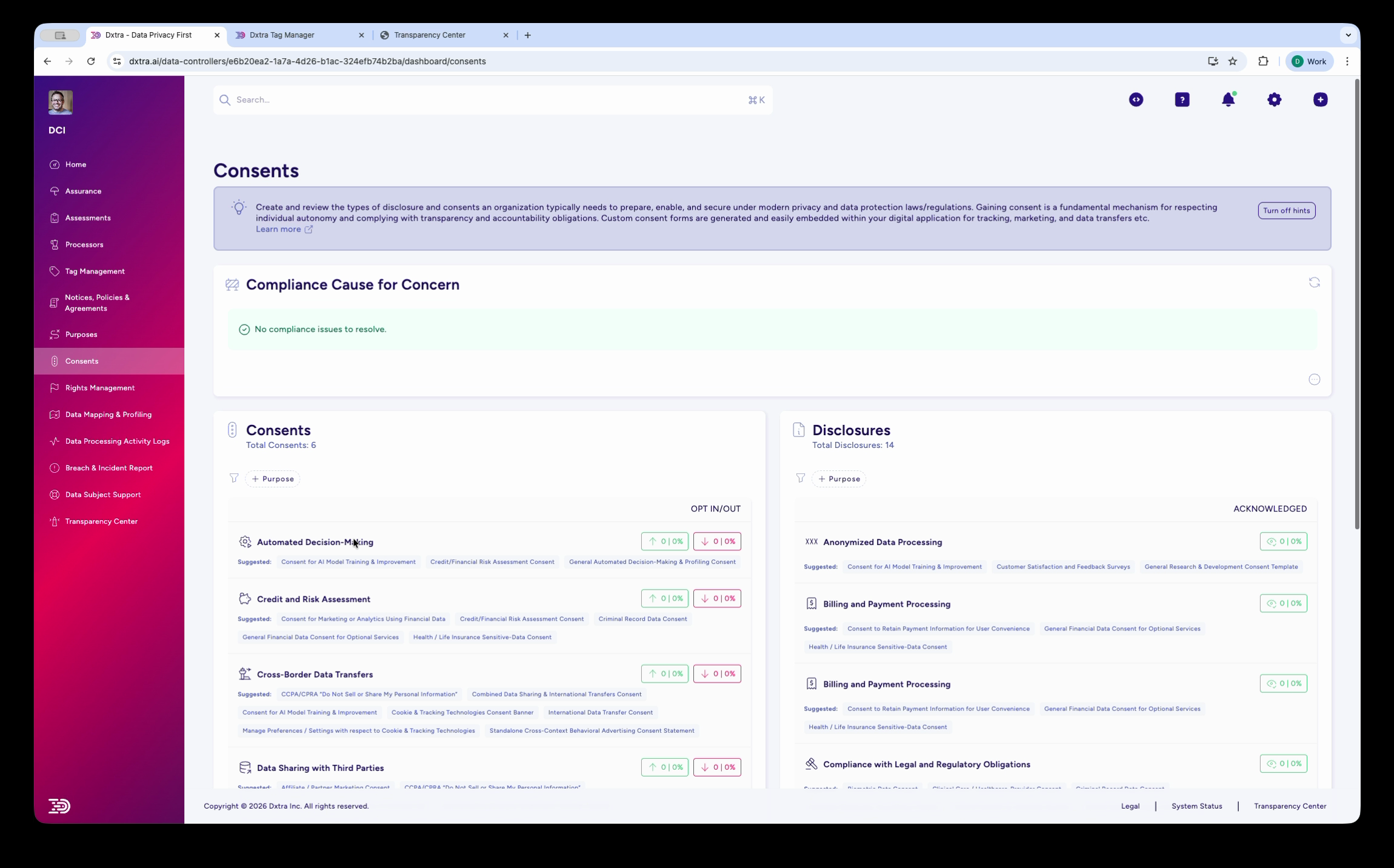
Initial consent form setup screen showing options for consent type selection, configuration of consent request text, and legal basis specification.
Best Practice Example
[Company Logo]

SUBSCRIBE TO OUR NEWSLETTER

We'll send you weekly updates about new products and special offers.
[Checkbox] ☐ Yes, subscribe me to the weekly newsletter

By subscribing, you agree to our Privacy Notice [link to full policy]

You can unsubscribe anytime by clicking the link in our emails.

[SUBSCRIBE BUTTON]
Design Principles - Pre-checked boxes are invalid - Checkbox must be clicked to consent - Privacy notice easily accessible - Frequency and purpose clear - Unsubscribe method disclosed
Cookie Banners
Best Practice Cookie Banner
🍪 COOKIE CONSENT

We use cookies to improve your experience and understand how you use our site.

[Settings]  [Reject All]  [Accept All]

COOKIE SETTINGS
☑ Essential Cookies (always enabled)
☐ Analytics (understand site usage)
☐ Marketing (show relevant ads)
☐ Social Media (share on social)

[SAVE PREFERENCES]
Design Principles - "Reject All" button equally prominent as "Accept All" - Granular options (not all-or-nothing) - Essential cookies cannot be rejected - Settings easily accessible - No countdown to auto-accept - No dark patterns
Preference Centers
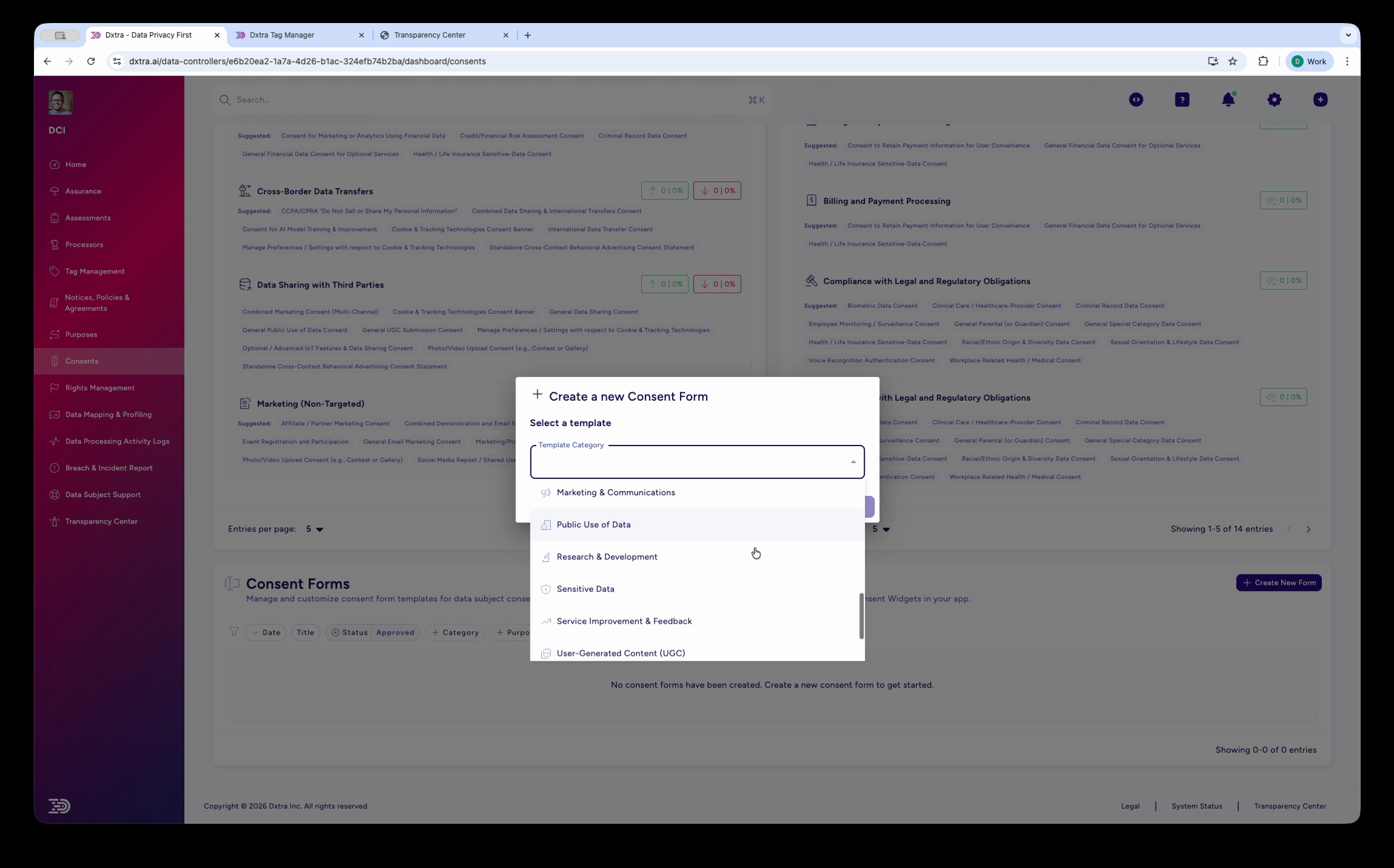
Consent form configuration panel showing settings for different consent types, cookie categories, granular options, and deployment configuration.
Purpose Allow individuals to change consent choices after initial consent.
In Dxtra 1. Create preference center link (send to all consenting individuals) 2. Users log in with email 3. View and modify marketing frequency, cookie preferences, data sharing 4. Changes apply immediately with confirmation
Consent records and documentation
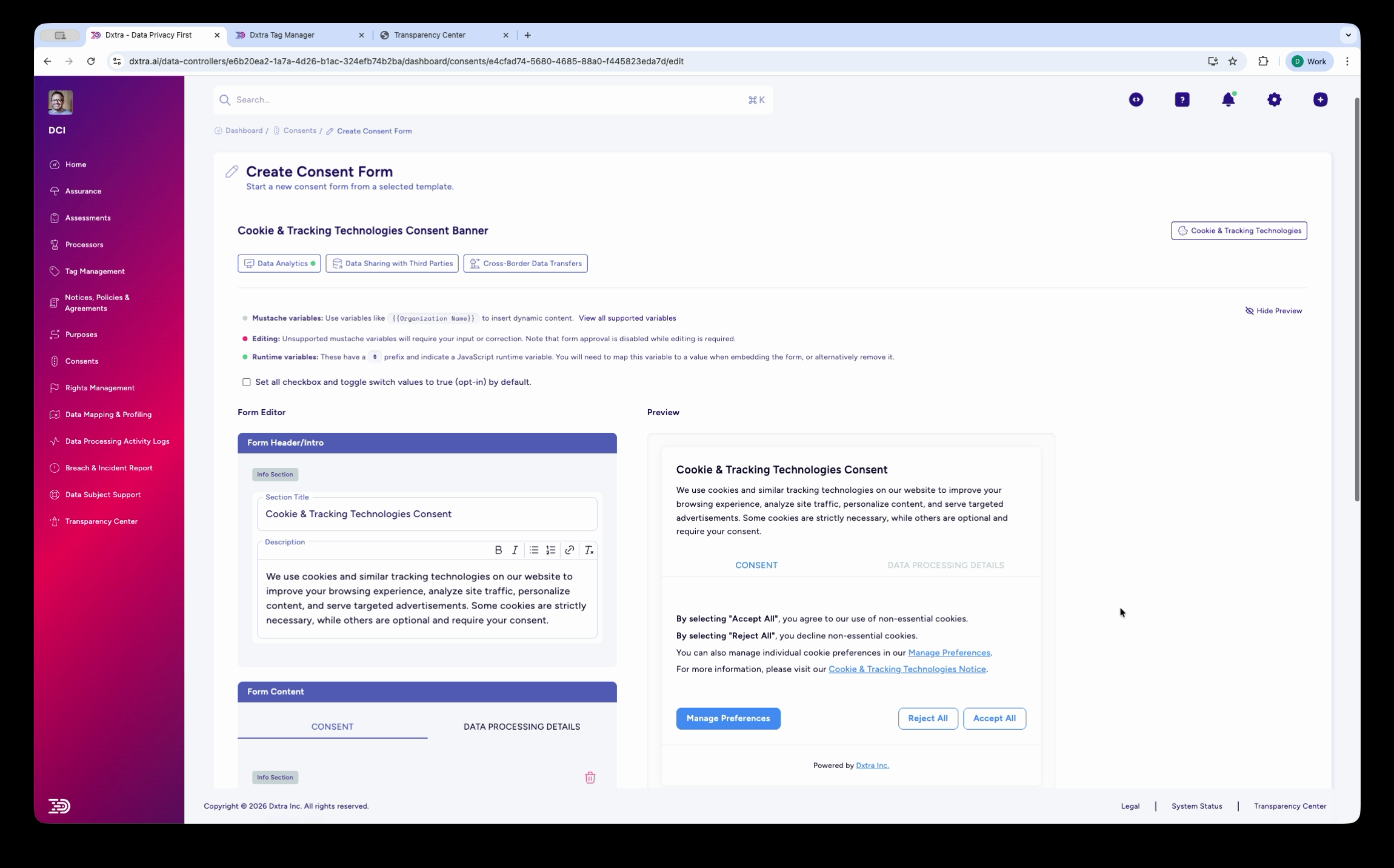
Consent records view showing stored consent data, timestamps, consent method, and audit trail for compliance verification and historical tracking.
What to Store For each consent, maintain: - Individual identifier (email, user ID, IP address) - Consent type (Marketing, cookies, sensitive data, etc.) - Timestamp (exact date and time given) - Method (Web form, app, email) - Version of notice shown - Withdrawal record with timestamp
Retention - Keep for duration of consent relationship plus statutory requirement - GDPR: At least as long as relationship lasts - CCPA: Minimum 24 months - Delete within one month after consent withdrawn
In Dxtra 1. Go to Consents > Records 2. View individual consent history with dates, method, withdrawals 3. Search and filter by email, type, date range, status 4. Export compliance reports and proof of consent 5. Audit trail shows who accessed records and when
Consent withdrawal and rights
Right to Withdraw Consent (GDPR)
Withdrawal must be as easy as granting consent. Withdrawal is effective immediately. Previous processing remains lawful.
Implementation - Email: Unsubscribe link in every email - Preference center: One-click toggle to off - Phone: Support line to request withdrawal - Website: Link to manage preferences
Example Withdrawal Flow 1. User clicks "Unsubscribe" in email 2. Preference center opens 3. User toggles marketing consent from ON to OFF 4. System shows: "You've unsubscribed. No more emails will be sent." 5. Next send skips this user
In Dxtra 1. Users can withdraw via email link, preference center, or support 2. Dxtra records withdrawal timestamp and method 3. Marketing system automatically removes user from future sends 4. Re-subscription requires new affirmative consent
Best practices
[!NOTE] Consent is most valuable when it represents genuine, informed agreement. Pre-checked boxes, dark patterns, and unclear notices are legally problematic and undermine trust.
1. Make Consent Granular - One consent per purpose - Individuals choose what to accept and reject - Use Dxtra's multi-consent templates
2. Ensure Affirmative Action - Checkboxes must be clicked (not pre-checked) - "Accept" and "Reject" buttons equally visible - Silence doesn't equal consent - Test with real users to verify understanding
3. Write Clear Consent Requests - Avoid legal language - Be specific ("We'll send you emails about sales every Friday") - Disclose who uses the data - Link to privacy notice - Explain how to withdraw
4. Track Consent Validity - Record timestamp, method, version of notice shown - Keep records for compliance proof - Use Dxtra's audit trail for regulatory response
5. Honor Withdrawal Immediately - Process within 24 hours - Remove user from future communications - Don't re-subscribe without new consent - Make unsubscribe as easy as subscribe
6. Test Regularly - Verify cookie banner functions correctly - Check email unsubscribe links work - Confirm "Reject All" works - Test on mobile and desktop
7. Integrate with Data Flows - Link consent to processing activities (RoPA) - Honor withdrawal by stopping related processing - Use consent status in decisions
Related documentation
- Purposes — Define why you collect data
- Notices, policies & agreements — Create privacy notices disclosing consent
- Rights Management — Manage withdrawal requests